

 shaneray
Visual studio 2022

I plan to add VS 2022 support very soon. It is more work to update from 2019 to 2022 than it was in the past so may be a week or two. I am open to PRs though!

I can make a PR, but it will drop support for 2019. Like here https://github.com/radiy/vs-graphql-textmate/pull/6

I have this branch that has support for both, but have not had a chance to perf test the new features. Support for this is also coming soon to 2022 natively, so not sure it’s worth it at this point.
https://github.com/shaneray/ShaneSpace.VisualStudio.InvisibleCharacterVisualizer/compare/master...vNext
Support for this is also coming soon to 2022 natively, so not sure it’s worth it at this point.
All i could find on this was Bidirectional text control character rendering, but not a list as extensive as this extension has.
That is interesting, I thought they was adding much more support than that. I will have to test my changes to see how well it plays with theirs. Assuming it goes well I will try to make a release soon.
Hi, after having lost an embarrassing long time finding out that a problem with the project was an invisible character, I came looking for something like this to prevent the problem from ever resurfacing, and found this extension. Apparently not working with VS 2022, but since there seem to be no alternatives and more people might end up looking for something like this, and you guys were discussing if this was ever going to be a native option, I wanted to confirm this.
I think what you guys are discussing above is an option in VS 2022 that can be currently found here, correct? Options > Text Editor > General > Display group > "View zero-width characters", correct? (I can't for the life of me understand why something like this wouldn't be enabled by default... 😅)
If this does what it seems, I think it effectively replaces this extension.

Thanks for the info @MegaMickPt
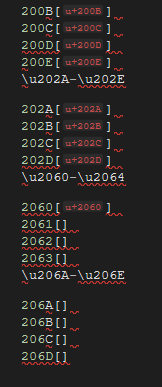
This works for some, but not all chars:
Without:

With:
I have put a version up that works well with VS 2022. Hope you don't mind :)
