

 sfu-db
`clean_email` cannot fix domains as expected
Describe the bug
Given a sets of email addresses with potential typos, clean_email cannot fix domains as expected.
To Reproduce The examples are given by this websites, or just see the demo below:
df = pd.DataFrame({'email': ["abc.def@mail#archive.com", "[email protected]"]})
clean_email(df, "email", fix_domain = True)
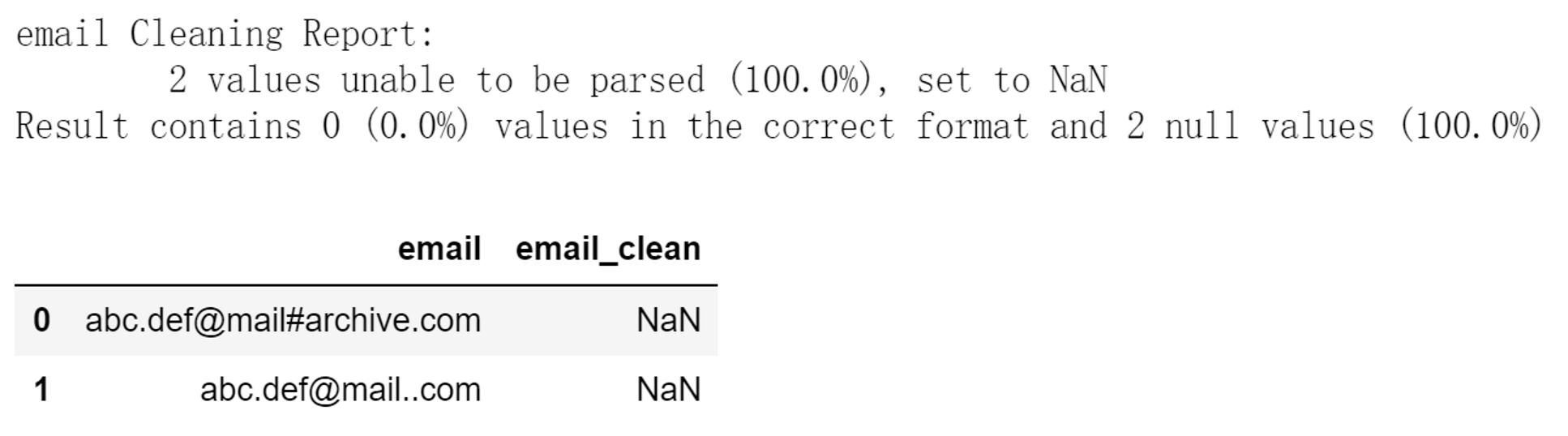
The expected outcomes should be "[email protected]" and "[email protected]", as shown in the website.
The major question I have is about the 4 strategies used by the parameter fix_domain. Does it follow certain principles or hypotheses? I did not find similar implementation in other places.

Hello NoirTree,
Thank you very much for creating this issue for Dataprep.
The 4 strategies in clean_email() are implemented to deal with most common typos appearing in real scearinos. They come from user cases on stackoverflow and some real datasets.
However it's not practical to fix every type of typo existing in email data based on current regex-based implementation. We're considering use more advanced techniques like learning-based ones as future work. At this point we are also interested in making the current regex solution covering more real user cases.
If you are interested, could you add some material to this issue, like the formal definition of the error which needs fixing, as well as its existence in real datasets? I also encourage you to make your PR following the guideline at https://github.com/sfu-db/dataprep/wiki/Steps-to-a-successful-PR.
Best Regards, Yi

Hi @yxie66, thanks for your reply!
I did not find a formal definition of the error either. At this point I only know the format of a valid email address, as shown in this link. It says:
Acceptable email prefix formats
- Allowed characters: letters (a-z), numbers, underscores, periods, and dashes.
- An underscore, period, or dash must be followed by one or more letter or number.
Acceptable email domain formats
- Allowed characters: letters, numbers, dashes.
- The last portion of the domain must be at least two characters, for example: .com, .org, .cc
So some typos can be fixed by detecting the invalid character and replacing it with a valid one.
But I'm a bit confused: how to judge whether an invalid value is a valid one with some typos, or it is a truly false one? (I think if there is a classifier, maybe we can know that from the possibility)
As for PR, I will try to do that after I'm prepared. Thanks for you suggestions!!