

 sfu-db
Connector: Generator with UI
Summary
With the generator being merged, we can now start implementing a GUI.
UI-level Explanation Actions
- [x] Change the current ipywidget based generator GUI to support new paginations and authorizations.
- [x] Discuss the usage pattern of the generator: e.g. can be used in jupyter, can become a standalone application on our website, can spin up by a single command on the user side...
- [x] Investigate the techniques used for implementing the GUI: ipywidget, raw HTML...
UI-level Explanation
How to start the generator
There will be two ways to do so.
- The user opens a Jupyter Notebook and run
GeneratorUI(). The UI will display in the output of the cell. - The user goes to dataprep website, e.g. https://dataprep.ai/generator. This will show the UI in the user's browser.
UI workflow
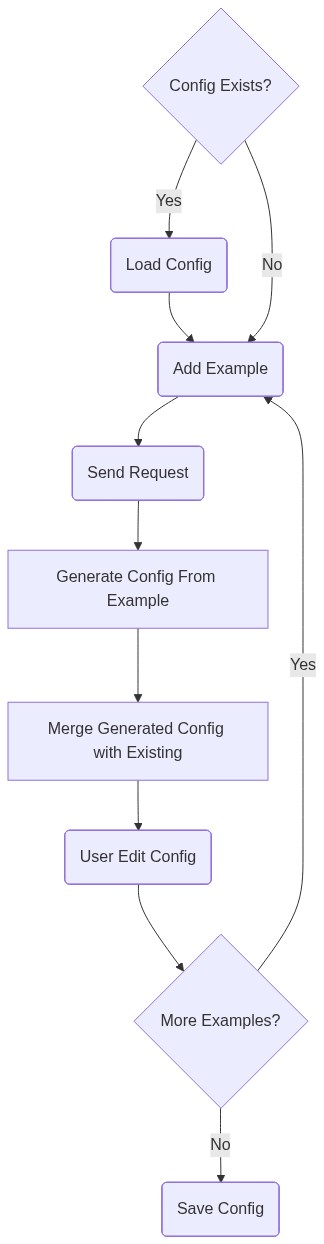
UI Interface
The UI design: https://docs.google.com/document/d/1rEpXcKALgH7prwDjyplcYufulXqpQnkYQ4Th8Dn1elA/edit?usp=sharing
Implementation-level Explanation 🔗
While it is easier to come up with a frontend tech choice, it is non-trivial to find a backend choice due to different backend choices affects the usage pattern.
Here listed two considered backend choices
| Backend Tech Choice | Use in Colab | Use in Kaggle | Use in Jupyter | Use as Standalone App | Additional Installation Step | Additional Dependencies | Implementation Difficulty |
|---|---|---|---|---|---|---|---|
| iPywidget | Y | ?1 | Y | N | Y | 1 | Frontend is harder (UI state management on ipywidget) |
| client side standalone backend | Y | ? | Y | Y | N | 1+ | Backend is harder (test compatibility on different systems, gracefully shutdown and restart, port conflict resolving, firewall detection) |
We need to choose one before proceed further.
- [ ] widget
- [ ] standalone
Rational and Alternatives
Since we only have two APIs, it is not worth to invest time on more complex backend frameworks.
Prior Art
QuickType uses React and Typescript Postman uses React.
Future Possibilities
NA.
Implementation-level Actions
- [ ] Design the frontend data flow, e.g. redux or flux or other data flow model.
- [ ] Implement the UI based on the dataflow
- [ ] Implement the backend
- [ ] Implement the functionality of displaying webpage in jupyter
Additional Tasks
-
[x] This task is put into a correct pipeline (Development Backlog or In Progress).
-
[x] The label of this task is setting correctly.
-
[x] The issue is assigned to the correct person.
-
[x] The issue is linked to related Epic.
-
[ ] The documentation is changed accordingly.
-
[ ] Tests are added accordingly.

@jnwang @peiwangdb What do you think of the second task? With the current implementation (ipywidget), you can only run the GUI in a jupyter notebook but no more. Also, it is hard to make the GUI dynamic (e.g. different input boxes for different pagination types).
However, if we use HTML, we can support scenarios like have a generator on our own website and make the GUI more dynamic. But certainly, it takes more time to implement.
I prefer the latter, what do you think?
