
Matthew Gray



Matthew Gray
`$null = Remove-Item -Path $_` is faster
```powershell Get-ChildItem * -include '*.png','*.jpg','*.gif' ```
This works `$names2.AddRange([string[]]( 'sue', 'bill'))` You have to use explicit type because you have a typed list
> @he852100 I guess it comes from .Net Core. That comes from PS5 and older. If website saying, i'm `utf8`, why does `iwr` return `ascii`?
I would expect to see this 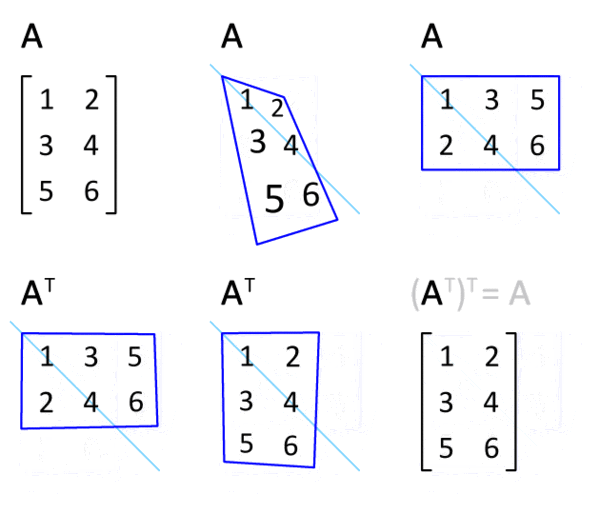 or in Powershell ```powershell [pscustomobject]@{'a'=0; 'b'=1; 'c'=2} a b c - - - 0 1 2 [pscustomobject]@{'a'=0; 'b'=1; 'c'=2} | Transpose-Object Property value...
Empty values will be converted to NULL after rendering by Excel app because `Export-Excel` generates just a declaration of `xlsx`.
A couple of quick work arounds: - remove excel file before calling `Export-Excel` - use `ClearSheet` parameter
does It imply that a table should be a table technically not just a visual table?
Xlsx/sheet can contain both tables as excel objects (technical table) and tables as just sets of cells (visual table). What kind of tables do you mean?
Prototype to start with: https://github.com/dfinke/ImportExcel/blob/master/GetExcelTable.ps1 ```powershell function Get-ExcelTableItem { [CmdLetBinding()] param ( [string]$Path, $ExcelPackage, [Parameter(ValueFromPipelineByPropertyName, ValueFromPipeline)] [string[]]$WorksheetName ) begin { $Excel = if ($ExcelPackage) {$ExcelPackage} elseif ($Path) { $Path =...