scripthookvdotnet
Allow the loading of assemblies from subfolders
Let's say that I have my script DLL and data on:
E:\Grand Theft Auto V\scripts\AnimeSpells
Now, the contents inside of that file are as follows:
E:\Grand Theft Auto V\scripts\AnimeSpells\AnimeSpells.dll E:\Grand Theft Auto V\scripts\AnimeSpells\Newtonsoft.Json.dll And others
Because the Script and Dependency are on the same folder, I expect that SHVDN picks up Newtonsoft.Json.dll and loads it up for AnimeSpells, but instead I get the following exception:
[05:40:49] [ERROR] Failed to instantiate script AnimeSpells.Manager because constructor threw an exception: System.TypeInitializationException: The type initializer for 'AnimeSpells.Manager' threw an exception. ---> System.IO.FileNotFoundException: Could not load file or assembly 'Newtonsoft.Json, Version=12.0.0.0, Culture=neutral, PublicKeyToken=30ad4fe6b2a6aeed' or one of its dependencies. The system cannot find the file specified.
   at AnimeSpells.Manager..cctor()
   --- End of inner exception stack trace ---
   at AnimeSpells.Manager..ctor()
If I copy the Newtonsoft.Json.dll file into the scripts folder, everything works as expected:
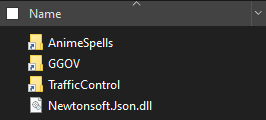
I feel that the dependencies in subdirectories should be loaded only if they are on the same folder as the mod.

Assemblies that are in subfolders are a bit of a problem in general. This applies to script assemblies too. The appdomain is configured to use the "scripts" directory to load and shadow assemblies, so anything not there won't work properly (since it messes up the appdomain load context).

I'm closing this because I feel that loading scripts only from the base directory is easier and safer.
Reopening because it looks like I was wrong and assemblies in subdirectories are shadowed too. Plus there are scripts in the wild that already require the script assembly to be in a subdirectory to work at all. So may as well support it all ....
Maybe possible with AssemblyResolve as this answer says for a question about loading assemblies with references from a different subfolder at runtime.