

 savaged
File Associations
Is your feature request related to a problem? Please describe. There is no option in the "Open With..." dialog of windows 10 to open a file in BlackNotepad, even a .txt file
Describe the solution you'd like BlackNotepad should register itself in the Apps available to open files, so that we can select it for any file
Describe alternatives you've considered
Opening the file with the EXE path of NotepadBlack - found from running the program as administrator from the start menu: C:\Program Files\WindowsApps\55809savaged.BlackNotepad_1.0.8.0_neutral__p2aarvyam9pfc\BlackNotepad\BlackNotepad.exe
This does not work however, windows gives an error when trying to open a file with this EXE:
Windows cannot access the specified device, path or file. You may not have the appropriate permissions to access the item.
Additional context Running Windows 10 Pro v1909 b18363.628
BlackNotepad installed from Microsoft Store

Given this is a Windows Store (WAP) application, the implementation is very challenging if possible at all. Will need help on this one.

VLC on the Windows Store supports opening files with it, perhaps you could figure out how they do it
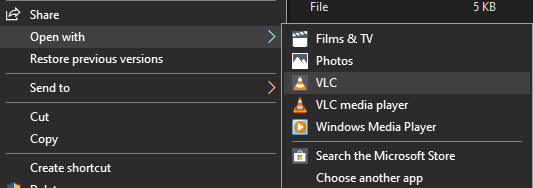 (I looked around a bit, couldn't find source for the Store version)
@savaged @Walkman100
I encountered the same issue, once I manged windows 10 to use this app as default for all .txt extension using essentialy Walkman100's described method, it always launches an untitled window and Im forced to manually open the path of the file I want to work on. Pain in the ass. I have no idea how to modify the app´s code but would be happy to try out some suggestions. Great work despite the inconvenience.

Having same issue described above. Kills all the sense in using it. There's no way to select it as default app for .txt files. I have to explicitly open it and then open existing files or create from the scratch. Pain in the neck. Uninstalled.

It's not ideal, but the workaround I'm using is to open BN first to a blank file, but then I can drop any file into the window and it opens instantly. And you can open multiple instances of the program. I'm looking into Registry hacks. I really love the program, though.
