

 sandytsang
ClientId value 3556cd23-09eb-42b3-a3b9-72cba5c7926e connect-planner issue
Hi,
Everytime I try to use connect-planner if fails with 'AADSTS700016: Application with identifier '3556cd23-09eb-42b3-a3b9-72cba5c7926e' was not found in the directory
I see that there is an Update-PlannerModuleEnvironment function alias, but I do not know what value I should set the clientid to in the function call. Any suggestions? Is there a particular set of steps I should be taking to determine what the client id should be? No matter what value I set it to (e.g. tenant id), running connect-planner afterwards always returns 'Authorization Token is null'.
Regards, Alan.

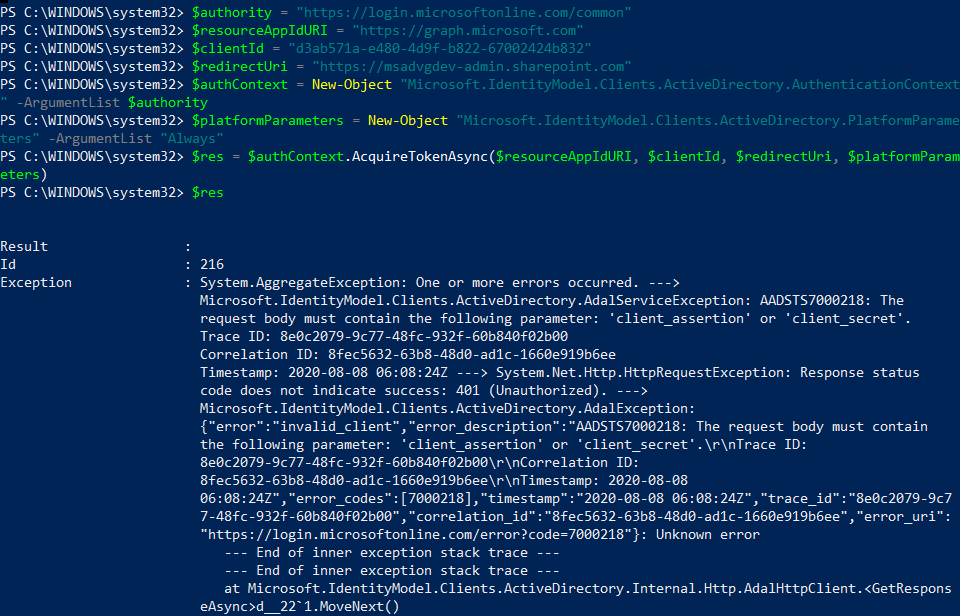
Looking into the module code further and running the auth commands line by line, I can see that the $authContext.AcquireTokenAsync is getting the exception 'The request body must contain the following parameter: client_assertion or client_secret'. In my case I have a app registration with a client id and secret, but the code doesn't cater for this.
I've seen stackoverflow.com/questions/51080514/body-must-contain-client-secret-or-client-assertion

My only work around was to not use the module at all. The weird thing about Planner is that you have to be a member of a group in order to create a plan. PnP functions like New-PnPUnifiedGroup will allow you to include yourself as both a member and an owner (whereas several UI components within O365 will not allow you to do this). Once you are a member you can create a Plan against your group as follows:
Write-Host "Creating a Plan"
$groupId = $group.GroupId
connect-pnponline -Scopes "User.Read.All","Group.Read.All","Group.ReadWrite.All"
$accessToken = Get-PnPGraphAccessToken
$bearer = "Bearer " + $accessToken
$plannerName = "Tasks"
$json = @{
    owner="$groupId"
    title="$plannerName"
}
$requestJson = $json | ConvertTo-Json
$uri = "https://graph.microsoft.com/beta/planner/plans"
$plan = Invoke-RestMethod $uri -Headers @{Authorization = "$bearer" } -Method POST -Body $requestJson -ContentType "application/json"
Write-Host "Creating To-Do bucket"
$planId = $plan.id
    $bucketToDo =@{
    name= "To-Do"
    planId="$planId"
}
$bucketToDoJson = $bucketToDo | ConvertTo-Json
$bucketURI = "https://graph.microsoft.com/beta/planner/buckets"
$todoResponse = Invoke-RestMethod -Method Post -Uri $BucketUri -Headers @{"Authorization"="$bearer"} -Body $bucketToDoJson -ContentType "application/json"
$todoBucketID = $todoResponse.id
Note that I couldn't get an App Registration to create a plan, as it is not a user who can be a member of the group.
Regards, Alan.