

 sameersbn
Lossing the plugins after update to 4.2.5
Hi,
I have moved my Redmine site from 4.2 to 4.2.5 Everything seems to work fine when I do docker-compose up, but none my plugins are workeing, they are stored in my image under /home/redmine/redmine/plugins and are deleted during the process of bringing the project up.
I can see in the redmine container log that that happens at this point:
Migrating plugins. Please be patient, this could take a while...
/home/redmine/redmine/plugins/redmine_contacts/init.rb:29: warning: already initialized constant FCSV
/home/redmine/redmine/plugins/redmine_agile/init.rb:29: warning: previous definition of FCSV was here
/home/redmine/data/tmp/bundle/ruby/2.7.0/gems/aws-sdk-v1-1.67.0/lib/aws/core/signers/s3.rb:60: warning: URI.escape is obsolete
Database 'redmine' already exists
/home/redmine/redmine/plugins/redmine_contacts/init.rb:29: warning: already initialized constant FCSV
/home/redmine/redmine/plugins/redmine_agile/init.rb:29: warning: previous definition of FCSV was here
/home/redmine/data/tmp/bundle/ruby/2.7.0/gems/aws-sdk-v1-1.67.0/lib/aws/core/signers/s3.rb:60: warning: URI.escape is obsolete
Installing plugins...
Installing gems required by plugins...
You are replacing the current local value of without, which is currently "development:test"
Running bundle install --jobs 4 --quiet with bundler 2.3.10
Migrating plugins. Please be patient, this could take a while...
DEPRECATION: :dalli_store will be removed in Dalli 3.0.
Please use Rails' official :mem_cache_store instead.
https://guides.rubyonrails.org/caching_with_rails.html
Installing themes...
Executing entrypoint.custom.sh...
2022-04-04 18:36:22,074 INFO Included extra file "/etc/supervisor/conf.d/cron.conf" during parsing
2022-04-04 18:36:22,074 INFO Included extra file "/etc/supervisor/conf.d/nginx.conf" during parsing
2022-04-04 18:36:22,075 INFO Included extra file "/etc/supervisor/conf.d/unicorn.conf" during parsing
2022-04-04 18:36:22,075 INFO Set uid to user 0 succeeded
2022-04-04 18:36:22,088 INFO RPC interface 'supervisor' initialized
2022-04-04 18:36:22,089 INFO supervisord started with pid 12
2022-04-04 18:36:23,092 INFO spawned: 'unicorn' with pid 323
Please, can you help me with this?

Stop, ⚠️. Please read https://github.com/sameersbn/docker-redmine#data-store and https://github.com/sameersbn/docker-redmine#plugins
You shouldn't be copying anything into the docker container manually. Anything that should be kept persistent should be part of the data or logs volume mount. Otherwise it wont survive a down/up. See https://github.com/sameersbn/docker-redmine/blob/master/docker-compose.yml for reference.
If you need further help please provide your docker-compose.yml file.

Thanks for your reply.
We do manage the persistence and volumes, in fact we have been using our redmine using this image from some years now with no issues.
Only when we change the image issue from our Dockerfile from 4.2.0 to 4.2.5 we have this issue
The thing is, the plugins are deleted from the folder without doing any down / up. When the container is up there are the plugins, an some seconds later (during the container process executions) all the plugin folder content is removed:
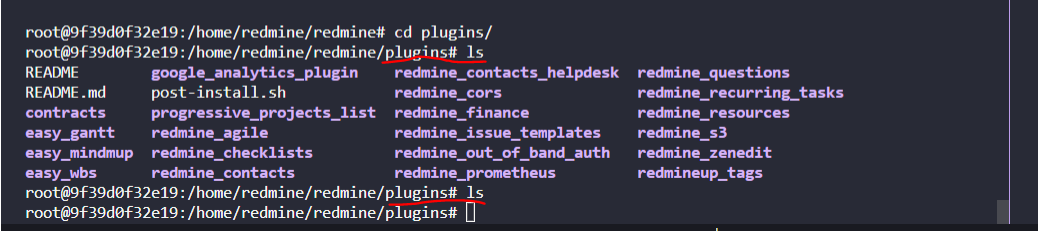
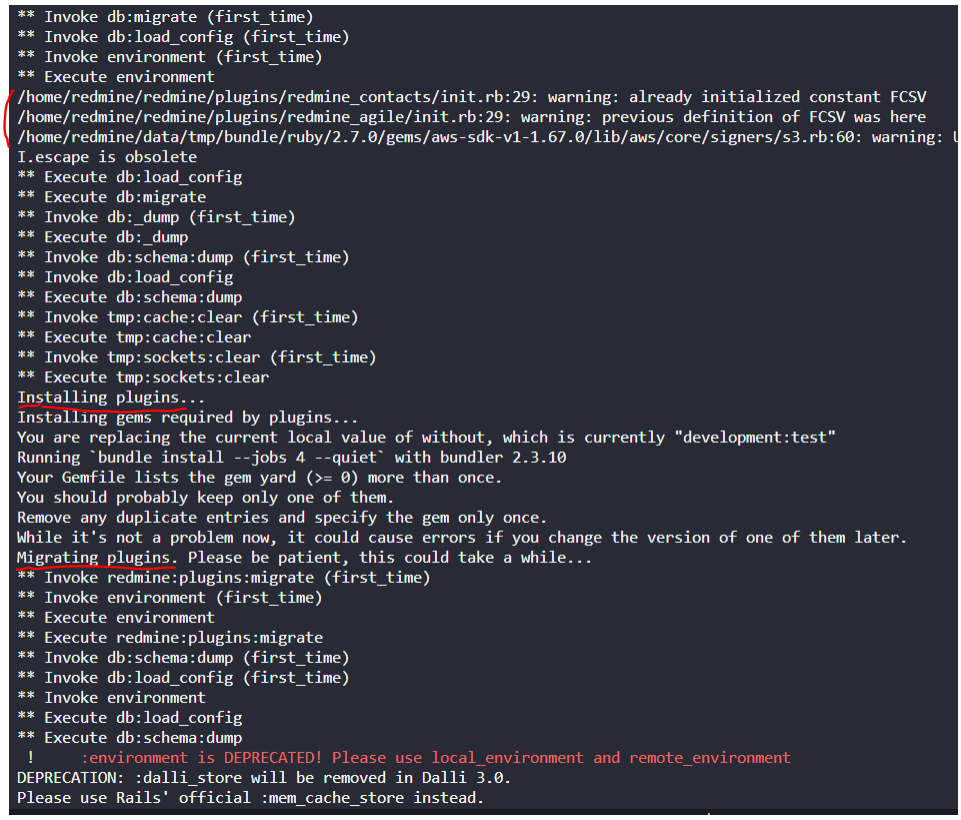
This is our docker file, we move the plugins like the documentation says:
`
FROM sameersbn/redmine:4.2.5
LABEL repository "https://github.com/sameersbn/docker-redmine"
ENV DEBIAN_FRONTEND='noninteractive' ENV TZ='Europe/Amsterdam' ENV TERM='xterm' ENV GEM_PATH="/home/redmine/redmine/vendor/bundle/ruby/2.4.0"
EXPOSE 80
RUN apt-get -qq update
&& apt-get -qq -y install
ssmtp
libmysqlclient-dev
libssl-dev
libmagickwand-dev
&& rm -rf /var/lib/apt/lists/* /tmp/* /var/tmp/* /usr/share/doc/* /var/cache/apt/* /var/cache/debconf/* /var/log/*
COPY .artifacts/plugins ${REDMINE_INSTALL_DIR}/plugins/
RUN rm -r ${REDMINE_INSTALL_DIR}/db/migrate/20120115143100_add_repositories_is_default.rb
&& rm -r ${REDMINE_INSTALL_DIR}/db/migrate/20120127174243_add_custom_fields_multiple.rb
RUN echo "Fix bug: LoadError: No such file to load -- contract_category..."
&& mv ${REDMINE_INSTALL_DIR}/plugins/redmine-contracts-with-time-tracking-plugin ${REDMINE_INSTALL_DIR}/plugins/contracts
&& echo "Fix bug: Progressive Project List plugin directory should be 'progressive_projects_list' instead of 'redmine-progressive-projects-list'..."
&& mv ${REDMINE_INSTALL_DIR}/plugins/redmine-progressive-projects-list ${REDMINE_INSTALL_DIR}/plugins/progressive_projects_list
&& echo "Fix bug: The directory for plugin google_analytics_plugin should be /home/redmine/redmine/plugins/google_analytics_plugin..."
&& mv ${REDMINE_INSTALL_DIR}/plugins/redmine-google-analytics-plugin ${REDMINE_INSTALL_DIR}/plugins/google_analytics_plugin
&& echo "...make sure the plugins.sha1 is not present..."
&& rm -rf ${REDMINE_DATA_DIR}/tmp/plugins.sha1
&& mkdir -p /var/log/supervisor
COPY .artifacts/themes ${REDMINE_INSTALL_DIR}/public/themes/ COPY .artifacts/config/s3.yml ${REDMINE_INSTALL_DIR}/config/s3.yml COPY .artifacts/config/Gemfile ${REDMINE_INSTALL_DIR}/Gemfile COPY .artifacts/cloudsql-certs ${REDMINE_INSTALL_DIR}
COPY assets/runtime/ ${REDMINE_RUNTIME_DIR}/ COPY .artifacts/entrypoint.custom.sh ${REDMINE_DATA_DIR}/entrypoint.custom.sh COPY .artifacts/set-ssmtp-config.sh /sbin/set-ssmtp-config.sh RUN chmod +x /sbin/set-ssmtp-config.sh
RUN bundle update --all --quiet
RUN bundle install --without development test --quiet --path ${REDMINE_INSTALL_DIR}/vendor/bundle
RUN for adapter in mysql2 postgresql sqlite3; do cp Gemfile.lock "Gemfile.lock.${adapter}"; done
&& chmod +X ${REDMINE_DATA_DIR}/entrypoint.custom.sh
ENTRYPOINT []
CMD /sbin/set-ssmtp-config.sh
&& /sbin/entrypoint.sh app:start
`
We use this from our docker-compose.yml file (partially shown):
`
version: "3.4"
services: web: build: context: ./ dockerfile: Dockerfile image: toomba/redmine ports: - 80:8080
`
Many thanks for your support
This also happens when I tried to install a plugin manually following the documentation with image 4.2.5:

As you can see after running the redmine-install-plugins command, the plugins are deleted from the folder
This process works fine with image 4.2.0
Finally it seems my issue it is related to some changes in the install_plugins() script, I managed to solve that by overwriting the file with the one in 4.2.0:
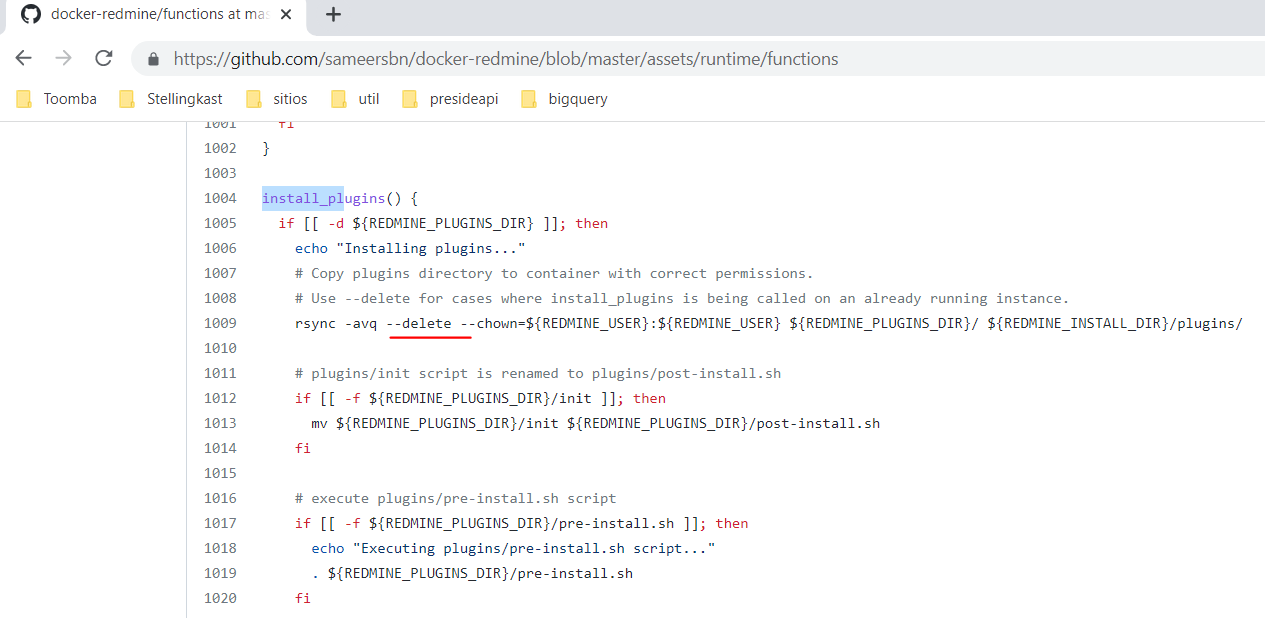
Thanks
This is our docker file, we move the plugins like the documentation says:
So this is definitely not the expected way to use this docker container. By manually installing the plugins into the "${REDMINE_INSTALL_DIR}/plugins" folder you are fighting the automation that this image brings, such as the installing plugins step you highlighted above.
There really shouldn't be any need to create your own Dockerfile, most common things are supposed to be configurable via environment variables.
If your trying to work around the entrypoint script and a lot of the automation you might be better off basing your Dockerfile on the official docker redmine image. https://hub.docker.com/_/redmine
I can't really help you with how you are doing things. Your of course welcome to keep doing it if it works for you but it's not supported.