
block-xray-attributes
 block-xray-attributes copied to clipboard
 salcode
WordPress Gutenberg plugin to display the attributes for the currently selected block in the Document sidebar.
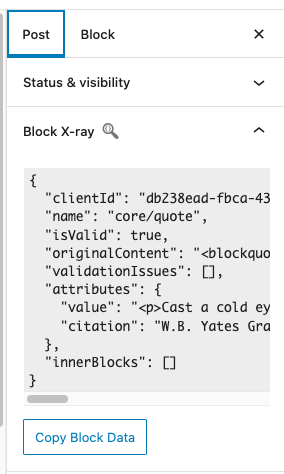

I think we could use the [Gutenberg Popover component](https://github.com/WordPress/gutenberg/tree/57da3c91a166d917a2a9de98177be9c3dfe07ee5/packages/components/src/popover) ([Popover Demo](https://wordpress.github.io/gutenberg/?path=/story/components-popover--default)) to offer an optional large window with the attributes displayed. Perhaps this would be triggered by a button.
Along with displaying the attributes in the browser console on click (see #5), the click could set the attributes to a global variable. Similar to this built in browser functionality,...
Sometimes it is helpful to have the attributes available in the console for expanding and collapsing sections. Perhaps, we want to add a button that sends the attributes to and...

This PR works for WordPress 6.6 but is not backwards compatible with older versions of WordPress core (e.g. WordPress 6.5) See #31
I'm seeing the following in the browser console. > wp.editPost.PluginDocumentSettingPanel is deprecated since version 6.6. Please use wp.editor.PluginDocumentSettingPanel instead.  Reminder, we'll need to do this in a backwards compatible...
We're seeing the following warning in the browser console > PluginDocumentSettingPanel requires a name property. Error Component Stack  ## Proposed Solution Update https://github.com/salcode/block-xray-attributes/blob/516c3f71a4f48a8f75295150dd0df6355cc31551/src/components/BlockXrayPanel/index.js#L13-L18 to ``` ``` i.e. add `name="block-xray-attributes"`...
It would save a click to have the `Block X-ray` details rendered in the `Block` sidebar (rather than the `Post`/`Page` sidebar where it is currently rendered). In addition to my...
See - https://developer.wordpress.org/plugins/wordpress-org/previews-and-blueprints/ - https://www.tannerrecord.com/using-the-wordpress-playground-for-plugin-demos/