

 saguiitay
Fault @ c.List() - Please assist
I have the following code with the correct UN and PW, yet the code continues to error out (NOTE: There is no trouble connecting via WebDAV using SCP or other clients): IClient c = new Client(new NetworkCredential { UserName = USERNAME, Password = PASSWORD }); c.Server = "https://app.latista.com"; c.BasePath="/webdav/messer/project_133/Test"" var files = await c.List(); //await c.List();
error CS4033: The 'await' operator can only be used within an async method. Consider marking this method with the 'async' modifier and changing its return type to 'Task'. c.List() Id = 12, Status = Faulted, Method = "{null}", Result = "{Not yet computed}" AsyncState: null CancellationPending: false CreationOptions: None Exception: Count = 1 Id: 12 Result: null Status: Faulted
Any thoughts? Thanks - Mike

This is not about c.List(), but about using of TPL syntax itself. You can both change type of function you are making await call from (as compiler recommends in this message), but it solve problem for this call and force to use await to call the function. Or, you can call .Result, not await.

Thank you for your reply - It appears the C# god's are out to get me. . . the code with your suggestion incorporated is listed below:
- Error A is generated when calling the "List().Result" method and 'Just My Code' is enabled.
-
Error B is generated when calling the "List().Result" or "await c.List()" methods and 'Just My Code' is disabled
- When running the List() line I receive a dialog box "Find Source" with a location of "f:\dd\ndp\clr\src\BCL\system\nullable.cs".
- See the attached screen shot -Interesting Issues-
public void Main() { IClient c = new Client(new NetworkCredential { UserName = "UN", Password = "PW" }); c.Server = "https://app.latista.com"; c.BasePath = "/webdav/messer/project_133/Test/"; var files = c.List().Result; }
-
Error A Exception thrown: 'System.AggregateException' in mscorlib.dll 'DtsDebugHost.exe' (CLR v4.0.30319: DefaultDomain): Loaded 'C:\WINDOWS\assembly\GAC_MSIL\Microsoft.VisualStudio.Debugger.Runtime\14.0.0.0__b03f5f7f11d50a3a\Microsoft.VisualStudio.Debugger.Runtime.dll'. Skipped loading symbols. Module is optimized and the debugger option 'Just My Code' is enabled
-
Error B A dialog box pops up titled "Find Source nullable.cs". Canceling the dialog displays a source not found screen and the final error dialog: at System.RuntimeMethodHandle.InvokeMethod(Object target, Object[] arguments, Signature sig, Boolean constructor) at System.Reflection.RuntimeMethodInfo.UnsafeInvokeInternal(Object obj, Object[] parameters, Object[] arguments) at System.Reflection.RuntimeMethodInfo.Invoke(Object obj, BindingFlags invokeAttr, Binder binder, Object[] parameters, CultureInfo culture) at System.RuntimeType.InvokeMember(String name, BindingFlags bindingFlags, Binder binder, Object target, Object[] providedArgs, ParameterModifier[] modifiers, CultureInfo culture, String[] namedParams) at Microsoft.SqlServer.Dts.Tasks.ScriptTask.VSTATaskScriptingEngine.ExecuteScript()
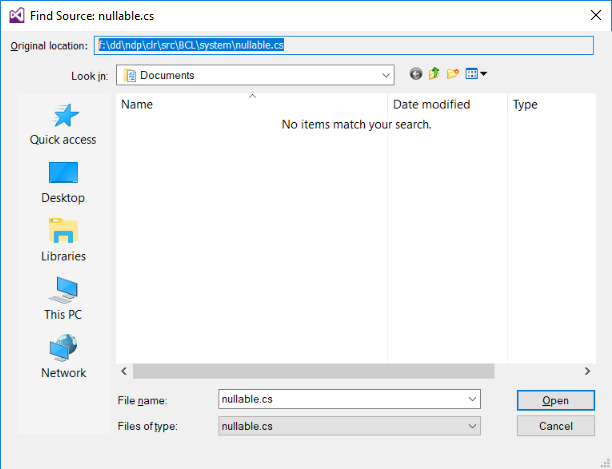
I've tried this with v1.1.3 as well and every time I get to the .List method, I receive the error.
Just to make sure there was no funny business I did the following:
- Downloaded the WebDAVClient 1.1.3 code into its own project folder.
- Added a console project to the WebDAVClient codeset and set it as default.
- Pasted your code into the Console portion of the project.
- Added a reference to the WebDavClient code
- Set the URL and Password.
- Ran the code and received the nullable.cs error message.
Modified Code:
using System;
using System.Collections.Generic;
using System.IO;
using System.Linq;
using System.Net;
using System.Text;
using System.Threading.Tasks;
using WebDAVClient;


namespace ConsoleApplication1
{
    class Program
    {
        static void Main(string[] args)
        {
            Task.Run(async () =>
            {

                // Basic authentication required
                IClient c = new Client(new NetworkCredential { UserName = "xxxxxx", Password = "yyyyy" });
                // OR without authentication
                var client = new WebDAVClient.Client(new NetworkCredential());

                // Set basic information for WebDAV provider
                c.Server = "https://app.latista.com/webdav/";
                c.BasePath = "messer/project_133/";

                // List items in the root folder
                var files = await c.List(); //****************************************** Errors on this line every time *******************************

                // Find folder named 'Test'
                var folder = files.FirstOrDefault(f => f.Href.EndsWith("/Test/"));
                // Reload folder 'Test'
                var folderReloaded = await c.GetFolder(folder.Href);

                // Retrieve list of items in 'Test' folder
                var folderFiles = await c.List(folderReloaded.Href);
                // Find first file in 'Test' folder
                var folderFile = folderFiles.FirstOrDefault(f => f.IsCollection == false);

                var tempFileName = Path.GetTempFileName();

                // Download item into a temporary file
                using (var tempFile = File.OpenWrite(tempFileName))
                using (var stream = await c.Download(folderFile.Href))
                    await stream.CopyToAsync(tempFile);

                // Update file back to webdav
                var tempName = Path.GetRandomFileName();
                using (var fileStream = File.OpenRead(tempFileName))
                {
                    var fileUploaded = await c.Upload(folder.Href, fileStream, tempName);
                }

                // Create a folder
                var tempFolderName = Path.GetRandomFileName();
                var isfolderCreated = await c.CreateDir("/", tempFolderName);

                // Delete created folder
                var folderCreated = await c.GetFolder("/" + tempFolderName);
                await c.DeleteFolder(folderCreated.Href);

                // Do any async anything you need here without worry
            }).GetAwaiter().GetResult();
        }
    }
}
I use NuGet package, and with other IIE Webdav server its works fine for me. And, for version 1.1.4 I have catch nullable exception. but for 1.1.3 not. My project is working on 1.1.1, so, you can try this one. If you reference source code, you can step into List and check where null in nullable is unexpected.
1.1.4 broke use 1.1.3 1.1.4 gives nullable exception all the time or just set the port
