

 rytilahti
Add support for Dreame D9 Robot Vacuum (dreame.vacuum.p2009)
The Dreame D9 Robot Vacuum is launched in Europe and has some interesting specs and feature.
Device information:
-
Name(s) of the device: Dreame D9 Robot Vacuum
-
Link: https://www.dreame-technology.com/products/dreame-d9
-
Model: dreame.vacuum.p2009
-
Hardware version: -
-
Firmware version: -
Additional context As there is already the miot-spec out there (http://miot-spec.org/miot-spec-v2/instance?type=urn:miot-spec-v2:device:vacuum:0000A006:dreame-p2009:1) it should be possible to add support?! As I am new to this, I have no Idea where to start, but would like to contribute (when my robot arrives ^^)

I wouldn't be surprised if this shares similarities with p2008 (WIP PR #683) or some other dreame vacuums (#812).

I wouldn't be surprised if this shares similarities with p2008 (WIP PR #683) or some other dreame vacuums (#812).
That would be great! And if I havent missed some critical point, it seems not THAT hard to get this done. By getting the commands from miot-spec you can write py-functions to controll the bot ... and hide that behind a nice UI ;-)
Slightly off-topic, but does the bot have to be conected to the internet to receive those "locale" commands?
That would be great! And if I havent missed some critical point, it seems not THAT hard to get this done. By getting the commands from miot-spec you can write py-functions to controll the bot ... and hide that behind a nice UI ;-)
Yes, there is a script in devtools directory for that purpose. It takes a miot-spec json as input and generates a template that can be used to add support for new devices. It is still heavily work in progress, as is the whole architecture to support miot devices in a future-proofed way.
Slightly off-topic, but does the bot have to be conected to the internet to receive those "locale" commands?
No idea, sorry. It really depends on the device, but at the moment I cannot recall issues regarding to blocking the internet access, outside https://python-miio.readthedocs.io/en/latest/troubleshooting.html#intermittent-connection-issues-timeouts-xiaomi-vacuum .
Hi guys,
is there already something new regarding this robot? I got this model last week and would like to implement it into home assistant.

Hi guys,
is there already something new regarding this robot? I got this model last week and would like to implement it into home assistant.
Caused by (the pandemic- and the holiday-caused ^^) lockdown I had not much time yet. I tried to capture the commands of the App with wireshark, but had no luck. I guess a stupid little issue but my brain was just to lazy from all the eating to see it ;-) Would be nice if someone could try that too.
Yes, there is a script in
devtoolsdirectory for that purpose. It takes a miot-spec json as input and generates a template that can be used to add support for new devices. It is still heavily work in progress, as is the whole architecture to support miot devices in a future-proofed way.
As soon as possible i'll try that.
No idea, sorry. It really depends on the device, but at the moment I cannot recall issues regarding to blocking the internet access, outside https://python-miio.readthedocs.io/en/latest/troubleshooting.html#intermittent-connection-issues-timeouts-xiaomi-vacuum .
Sounds promising. Strange, I searched like crazy for such informations but no luck. Thats why I like to "ask" stuff, humans are much better search-engines ;-)
Any news at this issue? I have a d9 too and it would be very nice if I could control it with oh and Alexa :)

I have a Dreame D9 and it does work with Home Assistant. Just follow a post from Hyyd1e here for support for F9, apparently this works for D9 too - https://community.home-assistant.io/t/support-for-xiaomi-dream-f9-mop-vacuum/220858/14


Hello, I managed to add my D9 vacuum cleaner in HA, but I cannot recover the card to order the vacuum cleaner by zone or by room. have you succeeded? thank you

Hi. Unfortuanely, no, i haven't. It seems kinda tricky to set up, it involves extracting the coordinates for rooms or zones, and making the scripts to incorporate them in the card. I was trying to read up on the procedure for Xiaomi Mijia 1C which is similar to Dreame D9, but i didn't have the time to actually do it. You can find the discussion here https://community.home-assistant.io/t/xiaomi-mijia-1c-sweeping-vacuum-cleaner-white-stytj01zhm/185089/95 , let me know if you succeed.
If the format is similar to the roborock models you can use this tool to extract coordinates from the map
https://community.openhab.org/t/xiaomi-vacuum-map-viewer-to-find-coordinates-for-zone-cleaning/103500

Thank you, I use for my Roborock S5, and it works very well. https://github.com/PiotrMachowski/Home-Assistant-custom-components-Xiaomi-Cloud-Map-Extractor but it does not work with my Dreame D9. How can I use Marcel Verpaalen's software with Home Assistant? How to get the rrmap? from Xiaomi Home?
To extract coordinates, you need to download that customized xiaomi .apk, it will create a log file on android with the coordinates, from there you can use them in your scripts... It's discussed on the community forums

There was link posted on the forums, let me know if you can't find it, I have it also local...
Difficult to find without knowing the exact name of the file! If you have a link, thank you.
MiHome_6.1.700_63410_vevs.apk or google „kapiba mihome“.
The file will surely infringe some copyright and so I didn't want to post the direct link.

It's not possible to extract map , only coordinates that are in a log file
Look here, you need to manually create the folder first, then start a normal clean, it will create a file then... Then stop the clean, and then just start with your coordinate cleaning...
https://community.home-assistant.io/t/xiaomi-mijia-1c-sweeping-vacuum-cleaner-white-stytj01zhm/185089/118?u=pergola.fabio
Thank you pergolafabio, I had to create the 3 directories as indicated, I got a file, but I don't really see any coordinates.
Same for me, i cannot find them with the log file method. Nothing in there resembles to the coordinates as for the other Xiaomi vacuums, so i guess Dreame D9 shows them in a like a different value or something. Also, even if i found and extracted them, i cannot use them anyway, since the vacuum.send_command is giving me "failed to call service". So using it with the F9 method i linked only gets you so far. Someone with the higher knowledge and D9 needs to work on this, if we want to make zone cleaning and live maps available.
search for something like this
"siid":4,"aiid":1,"in":[{"piid":1,"value":19},{"piid":10,"value":X}]
X contains json with areas. i'm pretty sure d9 uses same cmd for room/zone clean as f9.

Thank you for your help. An extract of my file compared to your indication, but I do not see what to recover! 2021-02-06 13:51:53 -> {"id":4531,"method":"action","params":{"did":"382836526","siid":6,"aiid":1,"in":[{"piid":2,"value":"{"req_type":1,"frame_type":"I"}"}]}} 2021-02-06 13:52:06 -> {"id":4534,"method":"action","params":{"did":"382836526","siid":4,"aiid":1,"in":[{"piid":1,"value":18},{"piid":10,"value":"{"selects":[[5,1,0,2,1]]}"}]}}
Are you starting a room cleaning? Or are you drawing an rectangle? Room cleaning commands are not supported yet i think
1/18 is room clean which uses array of selects (rooms) in this format
var selectInfo = [];

for (var areaId in selectAreas) {
  var _item = selectAreas[areaId];

  if (_item) {
    var newData = [parseInt(_item), _this.state.selectNum, _this.state.cleaningMode, _this.state.mopMode, Number(areaId) + 1];
    selectInfo.push(newData);
  }
}

var selectData = {
  "selects": selectInfo
};
1/19 is zone/area clean.
pergolafabio I do a room cleaning. Thank rezmus I did not understand everything, I am a beginner. In the example I set, the part number is 18, is that it?
Same for me, i cannot find them with the log file method. Nothing in there resembles to the coordinates as for the other Xiaomi vacuums, so i guess Dreame D9 shows them in a like a different value or something. Also, even if i found and extracted them, i cannot use them anyway, since the vacuum.send_command is giving me "failed to call service". So using it with the F9 method i linked only gets you so far. Someone with the higher knowledge and D9 needs to work on this, if we want to make zone cleaning and live maps available.
same experience. It seems vacuum.send_command does not work correctly Dreame D9.

are you using f9 integration? zone cleaning in f9/d9 has different command than 1c.
In my case, I tried it both, with xiaomi_vacuum.vacuum_clean_zone and vacuum.send_command. First one says: Failed to call service xiaomi_vacuum/vacuum_clean_zone. 'DreameVacuum' object has no attribute 'zone_cleanup'. So i guess the dreamevacuum.py (the one we replaced with one suited for F9) inside config\custom_components\xiaomi_vacuum needs to be updated with the proper code or something, i really have no experience in this area.
9are you guys actually using the custom component for zone cleaning? because there is one specific for D9 and F9
i believe this one for D9 : https://github.com/Concentricc/xiaomi_vacuum and this one for F9 (using myself) : https://github.com/microfrost1/xiaomi_vacuum
i am using this command for F9, works perfect
dreame_clean:
  alias: Boven stofzuigen
  sequence:
  - service: xiaomi_vacuum.vacuum_clean_zone
    data:
      entity_id: vacuum.dreame
      zone: -1951,-6352,10160,2788
      repeats: 1
don't use 1c integration. d9/f9 has same command for zone/room cleanup. use f9 if you can't find d9.
Thanks pergolafabio. Your suggestion works like a champ. Now i am working to get the coordinates maps out.
Yaaay, success. Thanks pergolafabio, you are the champ. The problem was indeed that i was using the wrong custom component, the one by Concentricc is actually not suitable for D9, but the microfrost1 works (i was using Concentricc), so no more issues with xiaomi_vacuum.vacuum_clean_zone.
I also managed to dig out the coordinates, they are tough to find. In the log, search for the word areas . My entry in the log looked like this after i drew a zoned clean rectangle for my kitchen in the cracked Mi Home app:
2021-02-10 05:53:00 -> {"id":5960,"method":"action","params":{"did":"382834556","siid":4,"aiid":1,"in":[{"piid":1,"value":19},{"piid":10,"value":"{"areas":[[-1117,3105,1235,8338,1,0,2]]}"}]}}
So, you take only that four points that i bolded, i have no clue what the next three ones are. Worked like a charm, cleaned the kitchen going all the way near the walls, like it would do from the regular Mi Home app, so i am happy.
Next thing to do, we need to find out how to make multiple zoned cleans work. For example, what i do from the Mi Home app is that i pick Room, select Kitchen first, and Living Room second, so the vacuum goes in that order of cleaning, before returing to the dock.
I would also like the map functionality to work, like the people use xiaomi_vacuum_map_card for the other models, that is very nice option to have, having a map in HA, so you can see where the robot is. Maybe too much to ask, but at least we made progress for zone cleaning to work :) Thanks again.
@GizmoLibre indeed room cleaning + map extracting is a nice plus, maybe for later
what i do if i want to clean multiple zones, i make a script to clean 2 zones, with a delay between it... the delay is the amount of time that should be suffecient for zone 1
allthough fot the official vacuum you can define a lists of zones... i dont know if that works too for this custom, i never tried it...
https://www.home-assistant.io/integrations/xiaomi_miio/#service-xiaomi_miiovacuum_clean_zone
let us know :)
d9/f9 support multiple zones.
{"areas":[[zone1],[zone2],[zone3]]}
each zone record is [x1,y1,x2,y2,zone_number,clean_mode,mop_mode]
perfect
btw, did anyone already recieved a firmware for this daughter brand of xiaomi? seems 1C is getting updates, and dreame f9/d9 not?
ah ok, i already have indeed 3.5.8 1039 , but that was from 2 months ago? i dont know the history since i have it like 2 months but now seems 1C is getting again new firmwares , are they not the same?
last update for f9 was in november. don't expect updates every month. 1c got new fw 1096 (backporting room clean from f9) after 9 months since previous 1059.
I will try to play with multiple zones, gonna report back. Yea, we had one firmware update 3.5.8_1072 on December 28th for the D9, the next one that brings multiple floor maps is coming this month, according to a representative on Ozbargain website.
ok, good to know
i am not that happy with F9, probaly since there is no camera, sometimes its just not able to find a zone, if i want to clean another room, while the path is quite easy my S50 works way better probably the D9 too
Couple of services do not work when I tried to use them
- service: xiaomi_vacuum.vacuum_clean_zone data: entity_id: vacuum.dreame zone: -1951,-6352,10160,2788 repeats: 1 >>> this seems not working...the clean times remain 1 regardless of what number we used
service: vacuum.start_pause >>>> not working so we can't resume the zone clean service: vacuum.start >>>> will abort the current zone clean and start a full clean service: vacuum.send_command >>> does not work
Many more, but I see these should be working so we could use this integration more effectively.
Couple of services do not work when I tried to use them
- service: xiaomi_vacuum.vacuum_clean_zone data: entity_id: vacuum.dreame zone: -1951,-6352,10160,2788 repeats: 1 >>> this seems not working...the clean times remain 1 regardless of what number we used
service: vacuum.start_pause >>>> not working so we can't resume the zone clean service: vacuum.start >>>> will abort the current zone clean and start a full clean service: vacuum.send_command >>> does not work
Many more, but I see these should be working so we could use this integration more effectively.
Has anyone tried looking at the mutiple cleans and the resume function?
GizmoLibre, I use the cracked app from the vevs&rez_mus as well, but not able to get the logs. Perhaps, i can try digging into the action id and other params in the logs to find out more.
Thanks
Update:
After fixing the permission on the app, the log shows up
The payload for zone clean is now showed up {"piid":10,"value":"{"areas":[[-2356,434,-657,2045,2,3,3]]}"}]}}
it seems the structure from zone clean is [[-x,-y,x,y],[ cleaning times],[clean_mode][mop_mode]]
current code for xiaomi_vacuum.vacuum_clean_zone accept str and ignores trailing values after the 4 given coords.
@command(click.argument("coords", type=str))
def zone_cleanup(self, coords) -> None:
    """Start zone cleaning."""
    payload = [{"piid": 1, "value": 19},{"piid": 10, "value": coords}]
    return self.call_action(4, 1, payload)
Is there a way, we can at least hard-code the cleaning times, clean_mode, and mop_mode into this service?
Thanks for the helps
Spend another day to tinker around this bot and found a way to do repeat clean properly (in a ghetto way ofc). Hopefully, my finding will benefit others.
The trick is to use the entire string provided in the log. The zone argument should be constructed as below:
zone: "{"areas":[[-x,-y,x,y,
dreame_clean: alias: Boven stofzuigen sequence:
- service: xiaomi_vacuum.vacuum_clean_zone data: entity_id: vacuum.dreame_d9 zone: "{"areas":[[-2356,434,-657,2045,2,3,3]]}" repeats: 1 >>>not in use
It appears the D9 does NOT support multiple zones clean. The robot only takes the first zone. Perhaps more can be tested
But it does support multiple rooms clean in order. Using the existing repo from microfrost1, I modified the dreamevacuum.py and vacuum.py to add service xiaomi_vacuum.vacuum_room_clean into hass
add the following in the vacuum.py to enable service room clean
SERVICE_CLEAN_ROOM = "vacuum_clean_room"
......
async def async_setup_platform(hass, config, async_add_entities, discovery_info=None):
......
platform.async_register_entity_service(
SERVICE_CLEAN_ROOM,
{
vol.Required(ATTR_ZONE_ARRAY): cv.string,
vol.Required(ATTR_ZONE_REPEATER): vol.All(
vol.Coerce(int), vol.Clamp(min=1, max=3)
),
},
MiroboVacuum.async_clean_room.name,
)
.......
async def async_clean_room(self, zone, repeats=1):
"""Clean selected area."""
try:
await self.hass.async_add_executor_job(self._vacuum.room_cleanup, zone)
except (OSError, DeviceException) as exc:
_LOGGER.error("Unable to send zoned_clean command to the vacuum: %s", exc)
###the same args being used here....not a python expert but it does not hurt using the same args for this service###
Then add the dreamevacuum.py file with the following
class DreameVacuum(MiotDevice): .... @command(click.argument("coords", type=str)) def room_cleanup(self, coords) -> None: """Start room cleaning.""" payload = [{"piid": 1, "value": 18},{"piid": 10, "value": coords}] return self.call_action(4, 1, payload)
In the script, the following can be called to execute multiple room clean
zone:"{"selects":[[<room_number>,<clean_time>,<fan_speed>,<mop_water>,<order_to_clean>]]}"}]}"
sample script can be used as below with multiple rooms
dreame_clean: alias: Boven stofzuigen sequence:
- service: xiaomi_vacuum.vacuum_clean_zone data: entity_id: vacuum.dreame_d9 zone: "{"selects":[[5,1,0,3,1],[3,1,0,3,2],[2,1,0,3,3],[1,1,0,3,4],[4,1,0,3,5],[6,1,0,3,6]]}"}]}" repeats: 1
Room number can be achieved using the modify apk app.
Also, using this method, you can specify different number of cleans per room, which I found pretty handy and practical. However, it seems fan_speed does not change per room when using this method.
The remaining item
- fix the coding (which I am bad at) the above method in a nicer way...
- fix the resume function. It may have to do with handling the feedback from the robot on vaccum.start service. When vacuum.start executes, a new cleaning task begins instead of resuming the current task ( assuming it was stopped/paused previously)
Thanks rezmus and pergolafabio a bunch for helping out on this.
Cheer!
Thanks for the effort need2buy. How do we get the room numbers? We do a regular room select from the app and instead of coordinates we get the room number in the log?
On the note of pausing the robot while zone cleaning, i just tried it, and thought it works just fine, it continued to clean the kitchen. But when i thought it would finish the kitchen and go back to the dock, it continued cleaning the living room intead, so yea, pausing the robot and continuing, messes up the zone clean command.
In the modified apk Mi app log, look for select after perform a "selective room cleanup". The log should look like this
2021-02-18 12:45:33 -> {"id":2347,"method":"action","params":{"did":"xxxxxxx","siid":4,"aiid":1,"in":[{"piid":1,"value":18},{"piid":10,"value":"{"selects":[[5,2,3,3,1],[3,2,3,3,2]]}"}]}}
To get all room numger, I would suggest select all the rooms and take a screen shot of the order assigned to each room. After getting the log, look for the "select" entry in the log and find the room number for each room following the screenshot.
RESUME function. Look like the official integration Xiaomi vacuum have a fix for this issue. But this is a new bot with different commands so their fix would not be applicable for this bot.
https://github.com/home-assistant/core/issues/31906
I looked at the dreamevacuum.py, the start function definitely has more to be explored. We'll see if I can dig more or someone else can help out on digging on this.
Update:
RESUME function work.
All you have to do is edit the "start" command in the dreamevacuum.py as followed
@command()
def start(self) -> None:
    """aiid 1 Start Sweep: in: [] -> out: []"""
    return self.call_action(2, 1)
I guess the integration commands are 99% satisfied
When i try to edit the vacuum.py file to enable room, after i save the file, my vacuum becomes unavailable. I am adding it to the end of the vacuum.py file, dunno what i am doing wrong.
need2buy, can you share your edited vacuum.py and dreamevacuum.py files with us? Would help out a lot. Thanks.
Thanks, that works, replaced both files and vacuum is available as normal. But, i cannot get the multiple room script to work, i can't save it, saying - Message malformed: Integration '' not found.
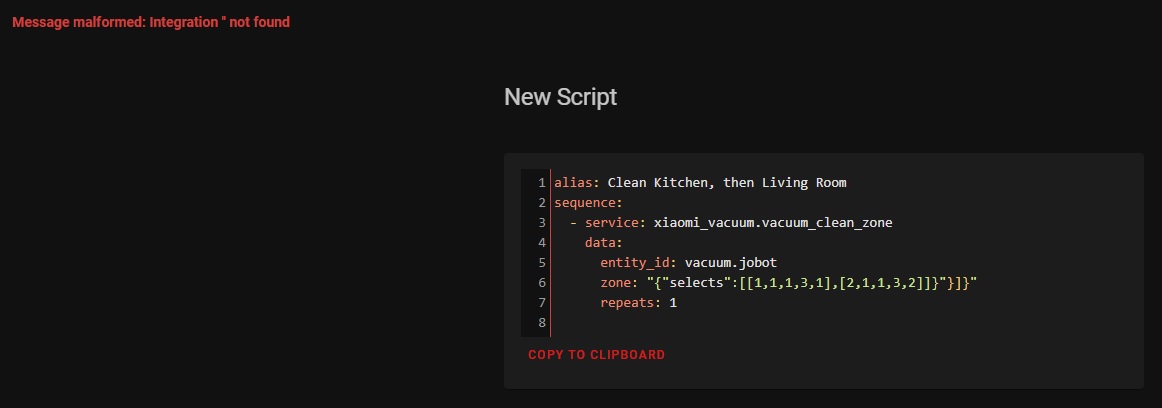
Are you sure that zone part is written in that form, with the double quotation marks? If i put single quotation marks, it saves the script, but does nothing when i execute it. Dunno what to do.
Gizmo,
You should use the below syntax. Note single quote wrap around the string including the curly braces {} and put double quotes around the selects
- service: xiaomi_vacuum.vacuum_clean_room data: entity_id: vacuum.dreame_d9 zone: '{"selects":[[1,1,1,3,1],[2,1,1,3,2]]}' repeats: 2
Ahh, yes, i completely missed it. I was using the service clean zone instead of service clean room because i just copied and edited your suggested sample script, and of course nothing happened when i executed it, haha. So yea, i figured as much there is something wrong with the quotes, but i was using the wrong service too :D Great, now it works.
Just a suggestion - you could edit your long post with the correct syntax, not to cause confusion for people that did not read all the way down. Again, thanks for your work, you helped out a lot.
All i want now is live view map support, after that i would be completely satisfied with this integration into HA.
Sorry I'm late here. Great progress from everyone working together.
@need2buy, I've incorporated you changes into my repo. I took a slightly different approach keeping start, stop, start_sweep, stop_sweeping as seperate functions in dreamvacuum.py so it's closer to the MIOT spec. I've called start_sweep from vacuum.py as it supports basic start and resume. I've used stop_sweeping for pause but kept stop for stop as it then reports in the Xiaomi app as complete. I quite like not being able to resume after a stop is issued.
I've also added a waterbox attribute which I'm hoping will allow me to automate enabling restricted zones over carpet when the waterbox is installed.
@GizmoLibre, I've tried to find local commands to support mapping but it appears reliant on the Xiaomi cloud. I was hoping at least I could find a way to get real time coordinate to somehow plot over a static map. Sadly, that doesn't look possible to me.
@need2buy, I'm not sure how far you got with the restricted zone support. My sniffing shows that the zone array is over written every time rather than appended. I was looking into bringing a status back as an attribute with the zones which looks possible.

@microfrost1
I used the modified app to find the command sent from the app. It seems the app does overwrite instead of appending the info. And yeah, this service comes in handy to automate restricted zone base on other changes in my house ( like murphy bed up and down type of situation like the below script)
- service: xiaomi_vacuum.vacuum_restricted_zone data: entity_id: vacuum.dreame_d9 zone: > {% if is_state('cover.murphy_bed', 'open') %} {"vw":{"line":[],"rect":[[5294,1781,5794,2303]],"mop":[[-712,4245,1857,4745],[-173,-2766,989,-1521],[-5821,-7023,-3007,15],[613,-7085,4861,-2753],[-1836,-7247,660,-3844]]}} {% elif is_state('cover.murphy_bed', 'closed') %} {"vw":{"line":[],"rect":[],"mop":[[-712,4245,1857,4745],[-173,-2766,989,-1521],[-5821,-7023,-3007,15],[613,-7085,4861,-2753],[-1836,-7247,660,-3844]]}} {% endif %} repeats: 1
All theses coords from the modded app. I just don't like long cords values...it's easy to make typo mistake. I like to make a certain part of the script to be predefined variables so I can keep reuse it instead typing it out...but not sure hassio allows this for scripting.
The current firmware does detects water box, so the mop zone become active so there's not much I touch on this.
I also tried sniffing the packets but unable to decode JSON embeded in UDP or encrypted TLS packets using wireshark. Not sure if there is any other packets decoder library I should use for decoding the UDP messages.
I don't mind about the discussion here, but just wanted to point out that PR #952 (which was merged today) added support for one dreame model (mc1808). Without any knowledge on the subject and whether these devices shared common features, if someone wants to extend that to add support for p2009, I'm happy to help with code reviews.
Hi @rytilahti,
I think we'd love to get support directly. The p2008 and p2009 appear to have identical miot spec however the commands don't match up with the mc1808. I'm not sure how you would want to handle the conflict with DreameVacuumMiot?
@need2buy
You can decode the hex of the payload for sniffing. Only for local UDP packets but in Wireshark you right click on data, copy, as Hex Stream. You can then use this command to convert to json. miio protocol --token ***** packet *****
Hi @microfrost1, is it just the service/action ids that do not match? If yes, I think getting #905 merged will be helpful to have the same API with separate siid/aiid mappings like done in other (miio) integrations.
Hi @rytilahti,
I'll need to double check but I'm 99% it's just mappings. #905 looks like an ideal route.
Hello guys, that's a very interesting topic. I have a question, do you know how could be controlled the side brush motor ? Mine on D9 completely stopped working...I took it out, and tested with cables, it is working, so somehow is not being powered by the robot. Robot always tell to clean the side brush, no matter even if the motor is not inserted !

Hello guys, that's a very interesting topic. I have a question, do you know how could be controlled the side brush motor ? Mine on D9 completely stopped working...I took it out, and tested with cables, it is working, so somehow is not being powered by the robot. Robot always tell to clean the side brush, no matter even if the motor is not inserted !
Sorry not sure. Only thing that comes to mind is maybe the brush life needs resetting. I'm still on my first one so only guessing it might be related.
@GizmoLibre, I've tried to find local commands to support mapping but it appears reliant on the Xiaomi cloud. I was hoping at least I could find a way to get real time coordinate to somehow plot over a static map. Sadly, that doesn't look possible to me.
Hey microfrost1, how's it going? Dreame released a firmware update 3.5.2_1082 today, adding multi-map feature finally. Can you check if they also changed anything that could give us possibility to integrate realtime map tracking in Home Assistant? Seems like a longshot, but hope dies last. Thanks.
@GizmoLibre, I've tried to find local commands to support mapping but it appears reliant on the Xiaomi cloud. I was hoping at least I could find a way to get real time coordinate to somehow plot over a static map. Sadly, that doesn't look possible to me.
Hey microfrost1, how's it going? Dreame released a firmware update 3.5.2_1082 today, adding multi-map feature finally. Can you check if they also changed anything that could give us possibility to integrate realtime map tracking in Home Assistant? Seems like a longshot, but hope dies last. Thanks.
Hey, I actually have the F9 which uses the same protocol. I don't have a firmware update but when and if I do, I'll have a look but yeah does feel like a longshot.
@microfrost1 , since you also have the F9, do you also notice a verry bad wifi on this robot? i tred everything, setting explicit 20 or 40 mhz, different channels, differen authentication as soon its further away, it looses its wifi verry fast, while the wifi signal is verry strong in that room, other ESP boards or smart stuff on same floor, i dont have issues with them
i can also see on my accesspoint that wifi is poor, only 1-2 bars n that room, while it should be 5
Hey microfrost1, how's it going? Dreame released a firmware update 3.5.2_1082 today, adding multi-map feature finally. Can you check if they also changed anything that could give us possibility to integrate realtime map tracking in Home Assistant? Seems like a longshot, but hope dies last. Thanks.
Hi Gizmolibre, I updated firmware to 1082 last night, deleted my old map and remapped this morning, but I still can't find any evidence of multi-map. Could you point me in the right direction? Thank you!

Hey microfrost1, how's it going? Dreame released a firmware update 3.5.2_1082 today, adding multi-map feature finally. Can you check if they also changed anything that could give us possibility to integrate realtime map tracking in Home Assistant? Seems like a longshot, but hope dies last. Thanks.
Hi Gizmolibre, I updated firmware to 1082 last night, deleted my old map and remapped this morning, but I still can't find any evidence of multi-map. Could you point me in the right direction? Thank you!
Nevermind - 20 minutes after my remapping, the app updated itself (without a software update??) and has the feature now. For anyone else trying, remap and then be patient! Ha. Thanks anyway.
@microfrost1 , since you also have the F9, do you also notice a verry bad wifi on this robot? i tred everything, setting explicit 20 or 40 mhz, different channels, differen authentication as soon its further away, it looses its wifi verry fast, while the wifi signal is verry strong in that room, other ESP boards or smart stuff on same floor, i dont have issues with them
i can also see on my accesspoint that wifi is poor, only 1-2 bars n that room, while it should be 5
Hey, mine is brilliant on wifi. I do have a few unifi AP's but my 2.4ghz iot network is configured with legacy options like 20 mhz, no roaming etc. Maybe having multiple AP's is masking the problem for me but it's always showing as strong.
Hmm, in my case it's not roaming, i have an aimesh, i have bound the device to the nearest ap
Op di 13 apr. 2021 10:37 schreef microfrost1 @.***>:
@microfrost1 https://github.com/microfrost1 , since you also have the F9, do you also notice a verry bad wifi on this robot? i tred everything, setting explicit 20 or 40 mhz, different channels, differen authentication as soon its further away, it looses its wifi verry fast, while the wifi signal is verry strong in that room, other ESP boards or smart stuff on same floor, i dont have issues with them
i can also see on my accesspoint that wifi is poor, only 1-2 bars n that room, while it should be 5
Hey, mine is brilliant on wifi. I do have a few unifi AP's but my 2.4ghz iot network is configured with legacy options like 20 mhz, no roaming etc. Maybe having multiple AP's is masking the problem for me but it's always showing as strong.
— You are receiving this because you are subscribed to this thread. Reply to this email directly, view it on GitHub https://github.com/rytilahti/python-miio/issues/870#issuecomment-818558211, or unsubscribe https://github.com/notifications/unsubscribe-auth/AKJ7LQAJH2ZUIUPNNHNDHTDTIP7F7ANCNFSM4UC3TCCA .

I can confirm that new Dreame bot L10 Pro (dreame.vacuum.p2029) works with @microfrost1 repo.
I just bought and manage to integrate with HA during two days. Thanks to people from this thread.
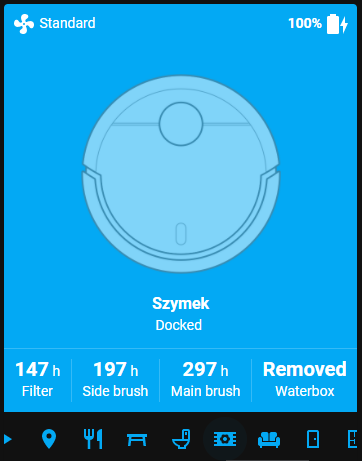 Also thanks Smartnora I can send vacuum to his job by voice :)

For those using D9 running 3.5.8_1082 firmware with multiple maps support (possibly, MOVA L600 or dreame L10), you could replace vacuum.py and dreamevacuum.py with attached files to get the following added features.
@microfrost1 : could add these features in his repo later.
fixed some small error causing vacuum not loaded<<<<<<
-
Extract room ID / map ID from schedule created from Mi Home app. Useful for multi-floor maps. Possibly more convenient to setup script in H.A
-
Introduce new service:
- set-map
- fast-map
- room_clean_id with custom clean count per room.
- Adding additional attributes
- Work_mode
- Task_Status
Go to Developer tab > State > type robot name > then you should see the list of rooms and map-id associated with the map-id
fan_speed_list:
- Silent
- Standard
- Strong
- Turbo
battery_level: 86
battery_icon: 'mdi:battery-90'
fan_speed: Turbo
status: idle
waterbox: Removed
task_status: Completed >>>>>>>>
work_mode: SleepMode >>>>>>>>>
error: NoError
main_brush_time_left: 300
side_brush_time_left: 200
filter_left_time: 149
cleaning_area: 0
cleaning_time: 0
total_cleaning_count: 605
map_id_list: >>>>>>>>>
map_id_0: 192
room_list:
map_id_0: >>>>>>>>>>
- E
- H
- K
- D
- G
- F
- B
- C
- I
- J friendly_name: dreame-D9 supported_features: 12924
To access these room id/map id for scripting, you could use template in your hass script. Example below
set-map
  - service: xiaomi_vacuum.vacuum_set_map
    data:
      entity_id: vacuum.dreame_d9
      map_id: "{{ state_attr('vacuum.dreame_d9','map_id_list').get('map_id_0') }} "
room_clean_id for the first room in the map_id_0
  - service: xiaomi_vacuum.vacuum_clean_room_id
    data:
      entity_id: vacuum.dreame_d9
      rooms: "{{ state_attr('vacuum.dreame_d9','room_list').get('map_id_0')[0] }}"
      repeats: 2
      clean_mode: 2
      mop_mode: 2
or
  - service: xiaomi_vacuum.vacuum_clean_room_id
    data:
      entity_id: vacuum.dreame_d9
      rooms: [ 'E', 'H' ]
      repeats: 2
      clean_mode: 2
      mop_mode: 2
or
  - service: xiaomi_vacuum.vacuum_clean_room_id
    data:
      entity_id: vacuum.dreame_d9
      rooms: [[ 'E', 2, 3, 3] ,['A', 2, 3, 3 ]]
      repeats: 2  >>>this will get override with this syntax
      clean_mode: 2. >>>this will get override with this syntax
      mop_mode: 2 >>>this will get override with this syntax
Or better yet, you could setup a template sensor to statically mapping room_id to room name of your choice and create different custom clean profile for each mapping entry. This is how it looks on my setup.
sensor:
- platform: template sensors: vacuum_room_id: value_template: "{{ state_attr('vacuum.dreame_d9','room_list').get('map_id_0') }}" attribute_templates: hallway: "{{ state_attr('vacuum.dreame_d9','room_list').get('map_id_0')[2] }}" living_room: "{{ state_attr('vacuum.dreame_d9','room_list').get('map_id_0')[3] }}" kitchen_room: "{{ state_attr('vacuum.dreame_d9','room_list').get('map_id_0')[4:6] }}" full_house: "{{ [ [ state_attr('vacuum.dreame_d9','room_list').get('map_id_0')[0], 2, 2, 3 ], [ state_attr('vacuum.dreame_d9','room_list').get('map_id_0')[1], 2, 2, 3 ], [ state_attr('vacuum.dreame_d9','room_list').get('map_id_0')[2], 2, 2, 3 ], [ state_attr('vacuum.dreame_d9','room_list').get('map_id_0')[3], 1, 2, 3 ], [ state_attr('vacuum.dreame_d9','room_list').get('map_id_0')[4], 1, 2, 3 ], [ state_attr('vacuum.dreame_d9','room_list').get('map_id_0')[5], 1, 2, 3 ] ] }}"
script:
  - service: xiaomi_vacuum.vacuum_clean_room_id
    data:
      entity_id: vacuum.dreame_d9
      rooms: '{{ state_attr(''sensor.vacuum_room_id'',''full_house'') }}'
      repeats: 2
      clean_mode: 2
      mop_mode: 2
I have L10 and replaced vacuum.py in homeassistant\custom_components\xiaomi_vacuum directory and also replaced dreamevacuum.py in homeassistant\custom_components\xiaomi_vacuum\miio directory and after my vaccum card become unavailable. My log from HA: `Ten błąd pochodzi z niestandardowej integracji.
Logger: homeassistant.bootstrap Source: custom_components/xiaomi_vacuum/miio/init.py:3 Integration: xiaomi_vacuum (documentation) First occurred: 15:22:59 (1 occurrences) Last logged: 15:22:59
Error setting up integration vacuum - received exception
Traceback (most recent call last):
File "/usr/src/homeassistant/homeassistant/setup.py", line 98, in async_setup_component
return await task # type: ignore
File "/usr/src/homeassistant/homeassistant/setup.py", line 208, in _async_setup_component
processed_config = await conf_util.async_process_component_config(
File "/usr/src/homeassistant/homeassistant/config.py", line 853, in async_process_component_config
platform = p_integration.get_platform(domain)
File "/usr/src/homeassistant/homeassistant/loader.py", line 493, in get_platform
cache[full_name] = self._import_platform(platform_name)
File "/usr/src/homeassistant/homeassistant/loader.py", line 498, in _import_platform
return importlib.import_module(f"{self.pkg_path}.{platform_name}")
File "/usr/local/lib/python3.8/importlib/init.py", line 127, in import_module
return _bootstrap._gcd_import(name[level:], package, level)
File "
@xury77 you could try download the new files. I fixed some of the loading error.
Hi @need2buy did you also changed data structure in "vacuum_clean_zone"?
I have a nodered inject { "data": { "zone": "-3383,1251,-972,2984", "repeats": "1" } }
This is a rug in the center of the room so a zone must be used to clean only that rug. But with modified files I get API error when I send command to call service.
@xury77 don't use repeats param as it does not pass to the zone clean service.
map_id_list: >>>>>>>>> map_id_0: 192 room_list: map_id_0: >>>>>>>>>>
- E
- H
- K
- D
- G
- F
- B
- C
- I
- J friendly_name: dreame-D9 supported_features: 12924
@need2buy how do you have values in map_id and map_id_list?
if I understand correctly they should be populated by reading "siid": 8, "piid": 2 right?
I get empty lists when i do that.
[{'siid': 8, 'did': '', 'piid': 2, 'value': '', 'code': 0}]
Am I missing something?
And another question is what does set-map do? I see that it sends a "siid": 6, "piid": 2 with a value of
{"sm":{},"mapid": ???"}
I appreciate any help in this matter

@pooyashahidi you would need to create a clean schedule in Mi Home app to see the map id and room assigned in the schedule
set_map service to switch map if you have more than 1 map stored
@need2buy after playing with your code, do you know why spot cleaning is not working?
    def clean_spot(self) -> None:
        """Spot Cleaning."""
        payload = [{"piid": 1, "value": 20}]
        return self.call_action(4, 1, payload)
=> Does nothing (but with value '21' in the payload, it's launching fast mapping, and value '19' is cleaning a zone)

you would need to create a clean schedule in Mi Home app to see the map id and room assigned in the schedule
set_map service to switch map if you have more than 1 map stored
@need2buy Your solution to room cleaning is one nice example of outside the box thinking! I forked xiaomi_vacuum to support Dreame D9 with what I thought would be improvements over the currently existing information scattered around the web. Also used your work. If you like me to mention your name there please let me know.
@pooyashahidi I am glad that my solution to room cleaning helps others. You could add me as a contributor if you find it appropriate. I am not so savvy at coding so I do not create my own repository publicly.
After using D9 for a few months, the main issue with this bot is no persistent map control. Map constantly get updated and overwrite the previous save map after each successful clean. Any change in the environment would cause the map to to shift from a few inches to a few feet from the original map in random direction. This could render zone cleaning to fail and its a hassle to fix each and every script built for automation. Thus room clean id service helps since map could be reset, but with static room mapping following the order created in the schedule in Mi Home app would avoid recreate the existing automation script.
Hopefully, the next firmware update could address the persistent map issue with few other minor issues. Until then, we'll see if any way to improve the usability of this bot.
Note: Do you know that we could the bot run more than 2 passes per room? I have set mine to run 4 to 6 times per room for complete deep clean :))
@need2buy I'm also not really a python developer myself (I learn as I go). I just got this thing a couple of days ago and was frustrated by the amount of info, some correct some not so much, scattered around the net but not really any single working integration or even a resource to learn how to do it.
So I thought maybe I can make something relatively well documented so that others don't have to go through the same thing. Just made the install voice pack service accessible from HA.
I have not tried it with more than two cleaning passes, will test tomorrow. I don't think that would make a huge difference. But I used the thingy only a couple of times.
okay it in fact does do more than 2 cleaning passes (yaay).
@pooyashahidi Hi I have installed the custom component from your repository and I can confirm that it also works with the dreame l10 pro. So it will be nice if you could update the docs to make other people know that it also works with this device.

Hello, I'am new here. Can you tell me, where i have to introduce new services and include the script. THX

@pooyashahidi thank you for you work! Can you share you custom lovelace card? Looks amazing!

@pooyashahidi thank you for you work! Can you share you custom lovelace card? Looks amazing!
unfortunately I do not have it anymore. I moved on from using that widget and made one in HA using this fantastic work as inspiration.
I rooted my D9 and currently use my repo in conjunction with Valetudo Map Card to get this result:

@pooyashahidi Wow, that looks really nice. I had no idea that rooting the D9 is even doable, let alone getting jt to work with Valetudo. Mind sharing a bit more detailed (i mean the rooting part step by step) procedure how to achieve that? :) Thanks in advance, would love to implement it on my dashboard ASAP :)
Indeed, that's new either, i have a F9 model, should work too... Are there improvements with newer firmware?
@pooyashahidi Wow, that looks really nice. I had no idea that rooting the D9 is even doable, let alone getting jt to work with Valetudo. Mind sharing a bit more detailed (i mean the rooting part step by step) procedure how to achieve that? :) Thanks in advance, would love to implement it on my dashboard ASAP :)
I really don't want to hijack this issue as it is mainly about adding D9 support to Python-miio. I am fine discussing my fork since it uses python miio and could have as well been done here (probably will not) but Valetudo is definitely outside of that area. So i keep it short.
You can find almost all the info required for rooting and installing valetudo in their last github release. There you will also find a link to the telegram group where stuff is discussed and some* help is given. But it is mostly from people who are starters like myself. The admins are mostly ignoring messages regarding problems that they don't want to answer. Using search in the group is probably a good thing to do.
Indeed, that's new either, i have a F9 model, should work too... Are there improvements with newer firmware?
I am using firmware 1093 which is apparently a leaked beta or something (which i found out after installing it) not really the most stable thing but it works. I would probably stick to the older stable firmwares, that being said I think (probably placebo) there are some improvements in how the bot moves. I think it hits less stuff when cleaning. But still dumb af when it comes to getting out of tight spaces.
ok, seems we need to buy some hardware to root it :-)
https://valetudo.cloud/pages/general/rooting-instructions.html
To do this, you’ll only need a pry tool, and a 3.3V USB UART Adapter (Like CP2102 or Pl2303) as well as basic linux knowledge.
Indeed we do. @pooyashahidi Thanks for the write-up. I have read the messages in Telegram group, and have mixed feelings about the rooting process. On one hand, sounds simple enough if you read all the steps in the guides, but on the other hand i am not thrilled about the risk of rooting process failing. They do mention it is eventually fixable, but dunno, chance of soft bricking the robot does not sound great.
About the hardware needed, I have asked if it is doable with ESP32 boards since i have a couple laying around, but no response. I also have a CH341A mini programmer i bought ages ago on AliExpress, but i have found out it is actually 5V instead of 3.3V, and i would need to solder some wires to make it 3.3V - all that sounds like a hassle :) In any case, i would still need to order those F2M jumper wires for the connection between uart and the robot...
I surely am tempted to go with the rooting process, but it does involve some risks. Rewards are cool though, you just need to be willing to get the needed tools and crack open the robot :) If someone else decides to go through it, let us know how it went. Also, sorry for hijacking the topic with rooting stuff, but this is a convenient place to write about it.