
Rectangle

Rectangle copied to clipboard
 rxhanson
keyboard shortcuts are disabled after adding a second user account
Symptom: keyboard shortcuts stopped working. They're displayed as disabled in the menu (see the screenshot). If I choose items from the menu using the trackpad the commands correctly resize the window (these are shown in the log below).
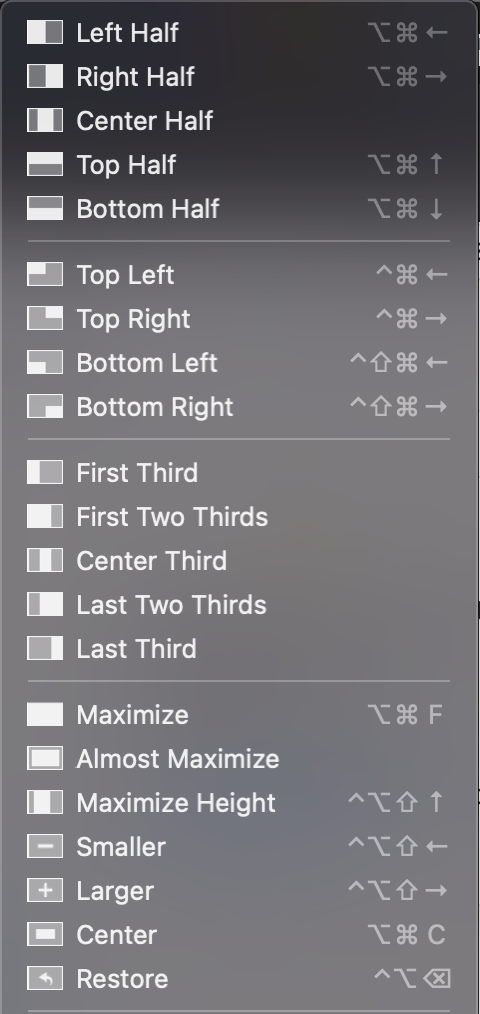
Rectangle was working fine before I added a second account to my laptop.
- [x] This is a new bug that hasn't been documented in a closed issue or in the Readme.
macOS version: macOS 11.1 (20C69) Rectangle version: Version 0.42 (47) Logs if applicable (In Rectangle menu, hold option, "View Logging..."):
2021-01-22T08:07:06-07:00: AX sizing proposed: (480.0, 875.0), result: (480.0, 536.0)
2021-01-22T08:07:06-07:00: AX position proposed: (0.0, 25.0), result: (0.0, 25.0)
2021-01-22T08:07:06-07:00: AX sizing proposed: (480.0, 875.0), result: (480.0, 875.0)
2021-01-22T08:07:06-07:00: firstThird | display: (0.0, 0.0, 1440.0, 875.0), calculatedRect: (0.0, 25.0, 480.0, 875.0), resultRect: (-0.0, 25.0, 480.0, 875.0), srcScreen: Built-in Retina Display, destScreen: Built-in Retina Display, resultScreen: Built-in Retina Display
2021-01-22T08:07:19-07:00: AX sizing proposed: (1440.0, 875.0), result: (1440.0, 875.0)
2021-01-22T08:07:19-07:00: AX position proposed: (0.0, 25.0), result: (-0.0, 25.0)
2021-01-22T08:07:19-07:00: AX sizing proposed: (1440.0, 875.0), result: (1440.0, 875.0)
2021-01-22T08:07:19-07:00: maximize | display: (0.0, 0.0, 1440.0, 875.0), calculatedRect: (0.0, 25.0, 1440.0, 875.0), resultRect: (-0.0, 25.0, 1440.0, 875.0), srcScreen: Built-in Retina Display, destScreen: Built-in Retina Display, resultScreen: Built-in Retina Display
