
paastor
 paastor copied to clipboard
 ruffrey
open source deployment platform for node.js, mongo and redis formerly paastor.com
paastor
A hostable gui for deployment management of Node.js, MongoDB, and Redis apps on Ubuntu servers.
Formerly paastor.com, this project was open sourced and the website was shutdown because I do not have time to maintain it. Apologies to the users.
sheep
A proxy and api for running node apps on a slave VPS.
How it works

Managing servers via gui
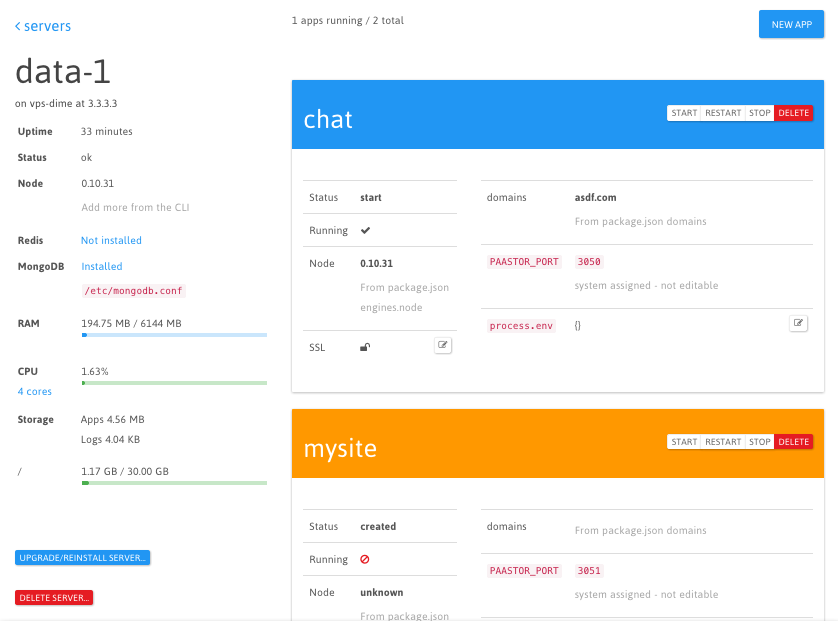
Deploy with the command line tool
pstr push my-server myapp
Development and Running Locally
requirements:
- node.js
- mongodb
- gulp
installing:
git clone https://github.com/ruffrey/paastor
cd paastor && npm install
cd sheep && npm install
sheep is an express app inside the paastor directory, hence the double npm install.
running:
npm start
or
npm run debug-start
Also
gulp
will watch and perform tasks like recompiling jade and client JS.
Default Server Locations
- paastor is at
localhost:2999 - sheep proxy is at
localhost:3001in development andlocalhost:80in production - sheep api is at
localhost:3000
Default Services
Install mongodb and redis via gui.
Security
- header
Paastor-Secretis sent during paastor --> sheep api communications.- secret is stored hashed and salted on sheep, by sheep, inside
system.json. - secret is stored in paastor database under the
Vps.secretproperty - YOU set the secret when creating a Vps
- To tell sheep to reset and hash the secret, start the instance with an environment variable
HASH_RESET=and your new secret.cd /path/to/sheep && HASH_RESET=asdfpassword npm start
- secret is stored hashed and salted on sheep, by sheep, inside
System Settings
emailLogin email address.nameSystem informational name.passwordHashed login password.sshkeyGenerated from the paastor gui. System public ssh key - add this to your git repos.
Tests
First add a vps for testing at spec/vps-credentials.json and set up paastor (http://localhost:2999/), then add paastor credentials at spec/paastor-credentials.json.
An example file is at spec/vps-credentials.json.example.
Running the Tests
npm test
If you have problems, try
npm run debug-test
for more verbose output.
If tests fail, you might end up with node processes that have gone rogue. Find them and stop them:
ps -l | grep node

kill [pid goes here]

Deploying sheep to the static site
From the root directory of paastor:
./pack
will do it.
License
MIT - see LICENSE file in this repository
Copyright 2015 Jeff H. Parrish
 ruffrey