

 rtcTo
rtcTo
Found No Changes to Accept
Hello,
I am trying to move a RTC project to Github using rtc2git and after following the directions, I get a
22:04:52 - Start collecting changes since baseline creation

22:05:03 - Found no changes to accept

Successfully logged out of [JAZZ URI]

22:05:08 -
All changes accepted - Migration of stream '[STREAM UUID]' is completed.
You can distribute the git-repo 'myProjectName.git'.
When I go to the directory I set in conifg.ini where migration is to take place, I see two folders, one called myProjectName and another called myProjectName.git. The folder without the git extension has a lot the stuff from my RTC project, but in the folder with the git extension, I only see a couple of files. What is meant by You can distribute the git-repo 'myProjectName.git'.
After this, how can I push this to the Github Repo that were are trying to use?

Hi Henry
According to your log, no changes get accepted. The cause is, that rtc2git was unable to reset your workspace to an older previous state.
You can do that manually by follow this wiki https://github.com/rtcTo/rtc2git/wiki/Resetting-your-workspace-to-an-older-state and configure useExistingWorkspace=True (see config.ini.example). I hope that helps.

Hello,
Thank you for the reply. I tried using useExistingWorkspace=True however that gave me another error about
Problem running 'compare':
Unmatched workspace "MyWorkSpace"
If I set that to true, what I am I suppose to name WorkspaceName=ToBeCreatedWorkspaceName
It says in the config.ini that this WorkspaceName will be loaded if I have useExistingWorkspace set to true. However as mentioned when I put the workspace name we use locally, I get a compare error. Is this workspace related to the Eclipse workspace we create or the Repository workspace?
Sorry, but the config.ini seems a little vague to me and I am having trouble understanding some of the settings. I also left the same comments on the Slack channel.
Hi Henry,
I am not really sure, if I understood you correctly. The WorkspaceName needs to be the name of the RTC workspace (not your eclipse workspace).
For example in this screenshot the name would be "old"
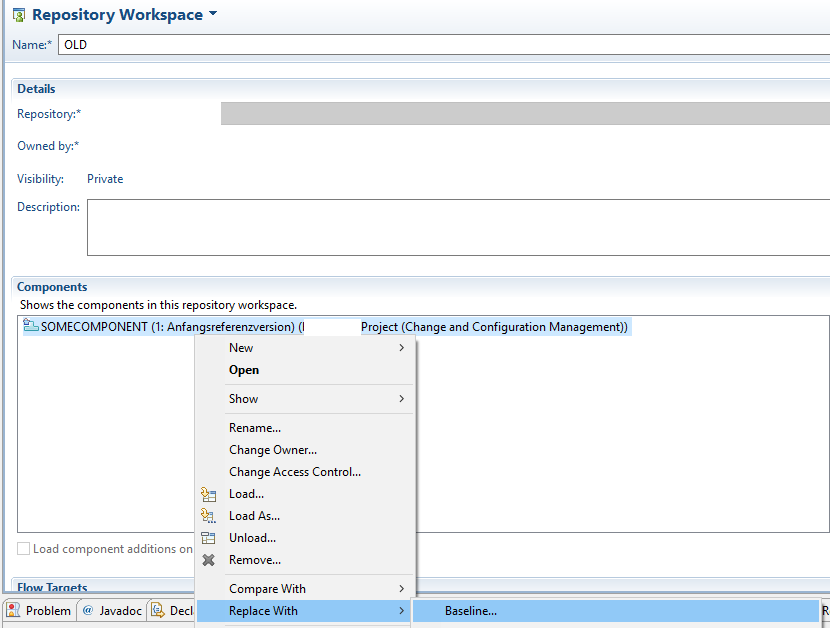
Thank you, I am looking into rewinding my Repository Baseline to the very beginning, but my oldest baseline is only a week old. The application I work with is probably more than 10 years old. I can get a complete list of the history files, but not reset my workspace to an older baseline.
I think this is why I keep getting the message Found no changes to accept. If I push to github with just all the history files but not reset my workspace to the beginning baseline, will the change set not show on github?
This kind of confuses, what will the history files show on github vs the change sets?
Sorry for the late response, I have forgotten to answer 🙈
If I push to github with just all the history files but not reset my workspace to the beginning baseline, will the change set not show on github?
No they wont show on github. The history files are just a help for rtc2git to keep (a more correct) order of the changesets applied during the migration.
Found no changes to accept is the error you get when no changesets are found, therefore no migration can take place