

 rsms
rsms
Rendering issues with variable font on macOS 10.13 (overlaps)

As shown lines are present in the font across my localhost site.
Fonts are coming from @import url("https://rsms.me/inter/inter.css"); but same issue with google font
Using: nextjs on: Mac os high sierra 10.13
Anyway to fix?


Which browser are you using (and version)?
Chrome Version 96.0.4664.110 (Official Build) (x86_64)
Very odd. I can't reproduce this with any browser, VF or not. @TheBoringBOT If you visit this https://rsms.me/inter/lab/?feat-case=1&sample=reth%20Ri&size=128&varfont=1, do you see the issue in your web browser?
This is what I see in latest stable Chrome on macOS 12:
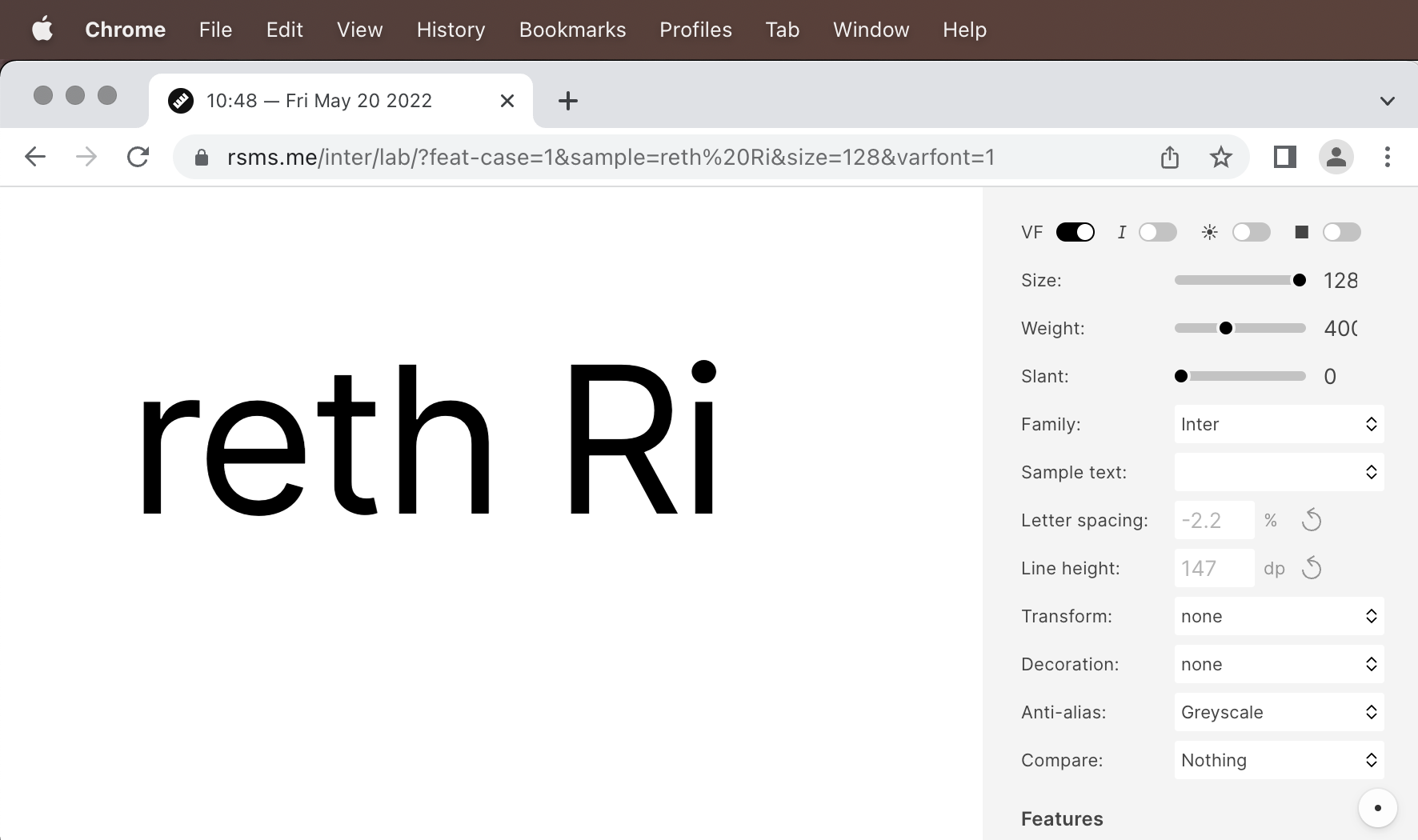
Note: 99 times out of 100, this is a bug with the software and not the font, so please do test with other variable fonts to make sure this is specific to Inter.

@rsms It looks the same as the picture.
I noticed tho the lines show intermittently with Inter. The place I noticed it ( a development project) also stopped showing the lines.
There really is no thread to figure out the possible bug. Perhaps its just my Mac as its from 2012. Other then that I have no idea
@rsms
Safari was fine. I can't test on firefox. I did find a website using Inter and saw this right now. Using Chrome and it looked the same on Safari

@TheBoringBOT That's a known bug with Google's version of Inter. If you can, please use the official releases from this GitHub project.
@rsms I see! I do use the official releases this was just another example of an issue I found. (sorry to confuse matters). The original issue was indeed with official release
I think I found the issue. I had the same issue with the official and Google's version of Inter but everything looks fine at https://rsms.me/inter/lab/var.html so I ended up digging differences in CSS. The issue was caused on other site than Inter var test lab because there was a line -webkit-text-stroke: 0.01em #000; in CSS body.
If you open https://rsms.me/inter/lab/var.html and add following CSS
.sample { -webkit-text-stroke: 0.01em #000; background: #000; color: white; }
you can reproduce the issue. It should outline a text but for some reason, it doesn't work with the Inter variable font. Other Inter fonts works just fine.
Update 1/21/2023: I opened Inter variable font file by using FontForge (GlyphApp is only for mac) and compared two letters A and B to see if there is something that explains the issue. The root cause of the problem is apparently that the incorrectly rendered letters consist of more than one part. Especially with the letter A, this seems obvious. I would fix the problem myself, but I've never edited fonts before and it's hard to make a letter symmetrical with that FontForge.
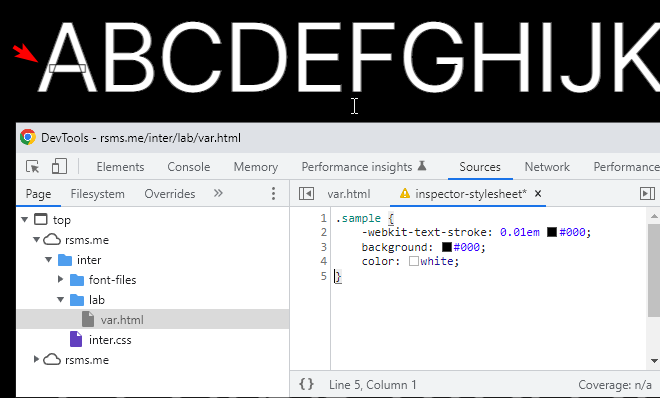
Inter variable font test site with the CSS mentioned above
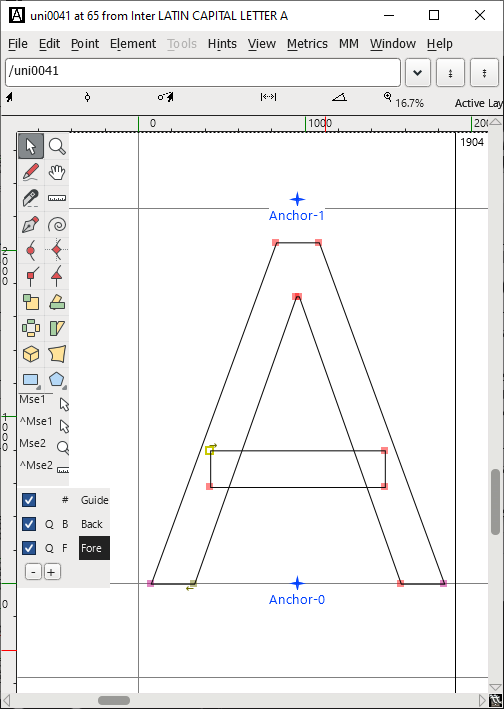 Letter A
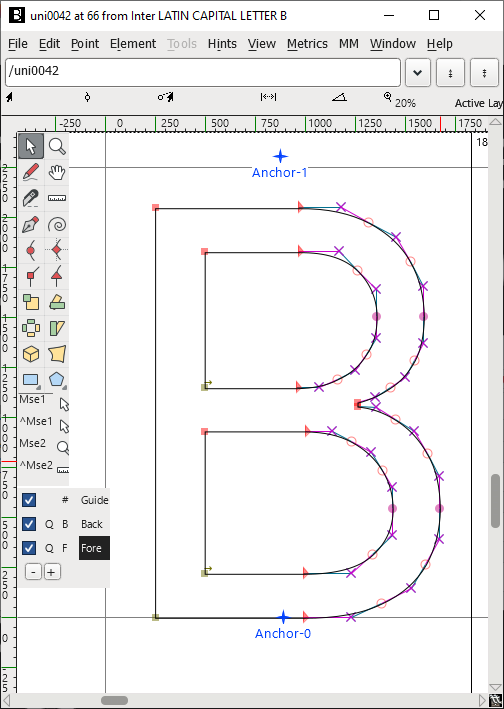 Letter B

First i love this font! Ther
During a web project i have the same issues as describe below.
On windows systems and anroid devices it still look fine. But the nasty thing is, on some Mac IOS and Os systems (macOS Monterey Ver. 12.6) the issues are still there. For me i have solve the issue with the inter font.
Solution:
-
Don´t use the inter font from google.
-
Download the font form the original source.
https://github.com/rsms/inter/releases/tag/v3.19
-
convert the font otf to WOFF, WOFF2 ... etc (i don`t check if the WOFF, WOFF2 format form the original source is working. May be it is too long ago to remember ;-) )
Web tool to convert https://transfonter.org/
Before you are going to use the Font, use this CSS property in your Developer tools
-webkit-text-stroke: 1.52px #75ff25; -webkit-text-fill-color: #0000;
to check If there some overlapping issues*.
The font have to be look like this with no overlapping Lines:

also have a look at my web presence
www.vier-raum.de (here i am using the the inter)
- If there some overlapping.
Don´t use the font If there overlapping issues
Example of overlapping issues:
https://fonts.google.com/specimen/Inter?preview.text=A4&preview.text_type=custom&query=inter

https://rsms.me/inter/lab/?antialias=default&size=148&wght=779

Hopefully i could help you so far.

Overlapping will never be "resolved" for variable fonts. Shape overlap is simply expected with variable fonts.
Software which intend to stroke text should stroke the silhouette of glyphs, not the paths. There are different ways of doing this, for example by applying a boolean union operation to all shapes before computing stroke.
Users who want stroked text in web browsers need to use the static font files which does not have overlapping paths.
Regarding regular filled glyphs rendered incorrectly, with overlaps contributing to anti-aliasing side-effects causing odd edges, the software doing that is simply broken. Use the static font files in that case. There's nothing I can do with Inter to fix broken rasterizers :–P