

 rsiebert
SDTV playback does not work
Hi, playback of SDTV channels fails.
Playback of SDTV video fails with both the internal and external (Google Photos) players. Only program subtitles are displayed, despite User interface -> Show program subtitle being disabled. Audio does play. The playback profiles (pass), server port and the TVHeadend server itself are correctly configured, Playback of HDTV works from the same server with both the internal and external players. Pasting the SDTV playback URL from TVHClient into an external player (VLC) works. The SDTV channels play back correctly on "TVH Client".
Versions: TVHClient 2.0.5 tvheadend/stable,now 4.2.4-dmo1~bpo9+1~rpt1 armhf Raspbian GNU/Linux 9 (stretch)
Let me know if you need any more information.
Thanks, François

Google photo player is not suitable to play these streams. VLC or MXPlayer are fine. VLC should be in the list of selectable players when a channel or recording shall be player. If not reinstalling VLC can help.

Hi, thanks for the suggestion.
Although external playback with MX Player works, it does not support casting like VLC. TVHClient's internal player does, but doesn't work for SDTV and with HDTV displays subtitles when it shouldn't.
Here's a full consolidation of all playback results after reinstalling both TVHClient and VLC, and installing MX Player.
SDTV:
- Internal player only displays subtitles, even though they are disabled
- VLC isn't offered as external player and Photos does not work
- Pasting the playback URL into VLC works
- TVH Client offers VLC as external player and it works
- MX Player is offered as external player and works (without casting support)
HDTV:
- Internal player displays video and subtitles, even though subtitles are disabled
- VLC isn't offered as external player and Photos does not work
- Pasting the playback URL into VLC works
- TVH Client offers VLC as external player and it works
- MX Player is offered as external player and works (without casting support)
In case it matters, the device is a Nexus 5x with Android 8.1 Dec. 2018 patch level.
Thanks for adding to the milestone.
On the current version 2.2.14 SD playback no longer works via MX Player - no SD playback is possible. I'm unable to investigate the playback URL because Copy playback Url to clipboard no longer works.
I'd be happy to provide further information you may need.
VLC is now offered as an external player. SD video playback now works with both VLC and MX Player :-). SD video playback with internal player still fails (audio still plays). Copy playback URL to clipboard still doesn't work.
Here is an intermediate version 2.3.5 of the app. Please enable debug logging and start to play a stream. The used video and audio format should then be logged. Please send the log to me afterwards. This could help to see why SD channels can't be played.
Attached the log you asked for. tvhclient_2.3.5_197_15.01.2020.log
I notice that SDTV now no longer works while the channel is being recorded. Also, SDTV audio no longer plays on the internal player, only subtitles show as before.
According to the logs the SD channel uses the mpeg2 video format which is not supported by the Exoplayer library. Is it possible to change the profile settings on the server so that the video stream gets transcoded into mkv or something else?
Yes, SD digital TV in Europe does use an MPEG-2 transport stream.
Are you suggesting changing only the container from MPEG-2 to mkv, and/or transcoding the actual video frames from the MPEG-2 codec to another one?
Changing only the container might work, but real-time transcoding of video frames is not feasible on my server, a Raspberry Pi 3B. It doesn't even manage very light-weight low-quality transcoding.
Can you try to just change the container? But I would assume that the video frames need to be transcoded to something different.
As expected that does not work because video encoding remains MPEG-1 (as reported by the external MX Player).
I ran into a problem with accessing available TVH profiles. Playback profiles (Internal player) do not include the pass profile, some available profiles are included twice and custom profiles are excluded (e.g. the matroska-* profiles) I created. Playback profiles (External players) do not include the htsp profile and some available profiles are included twice. All profiles were available to all users on TVH. I attach some screenshots.
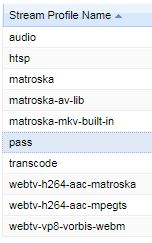

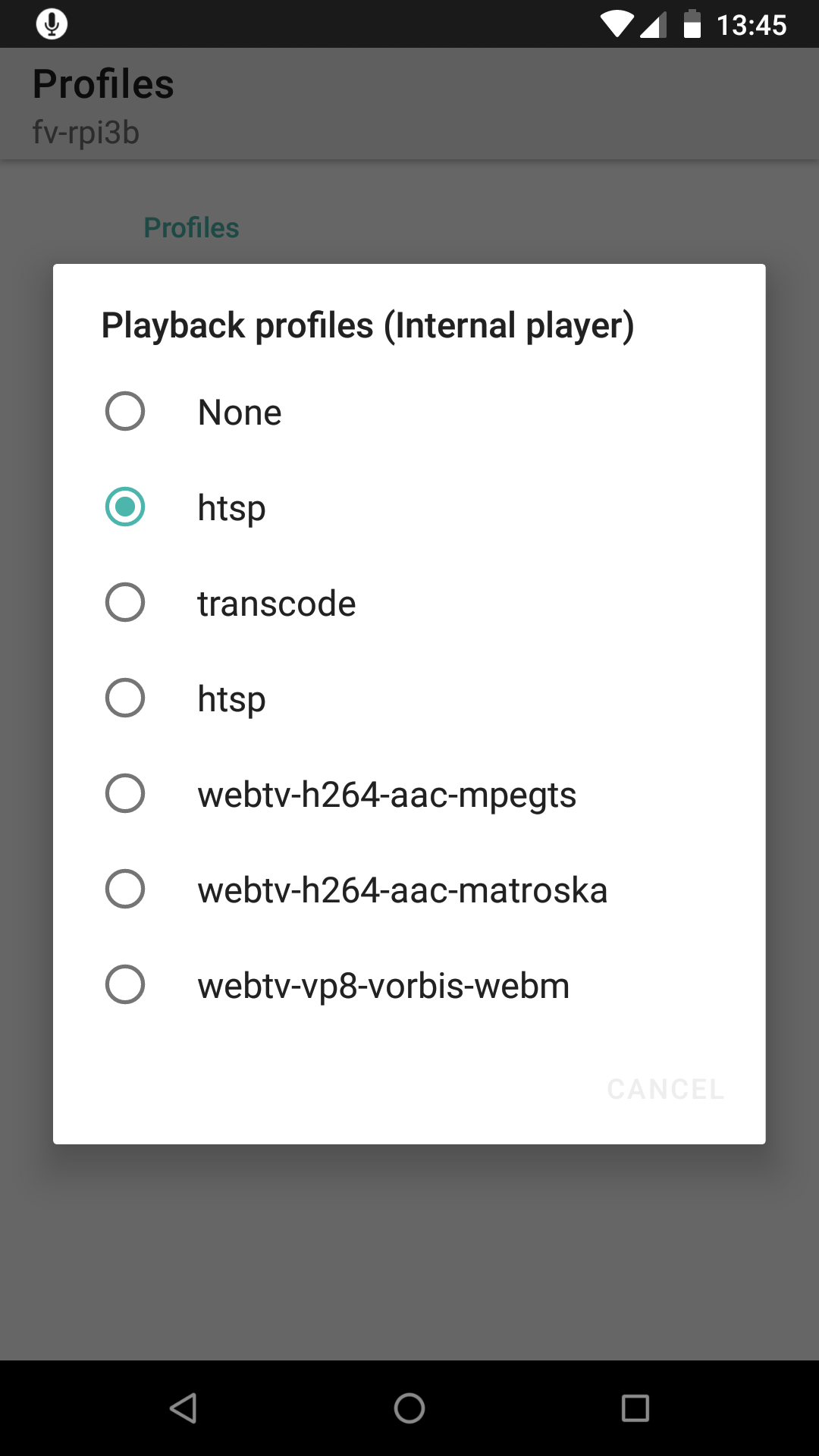
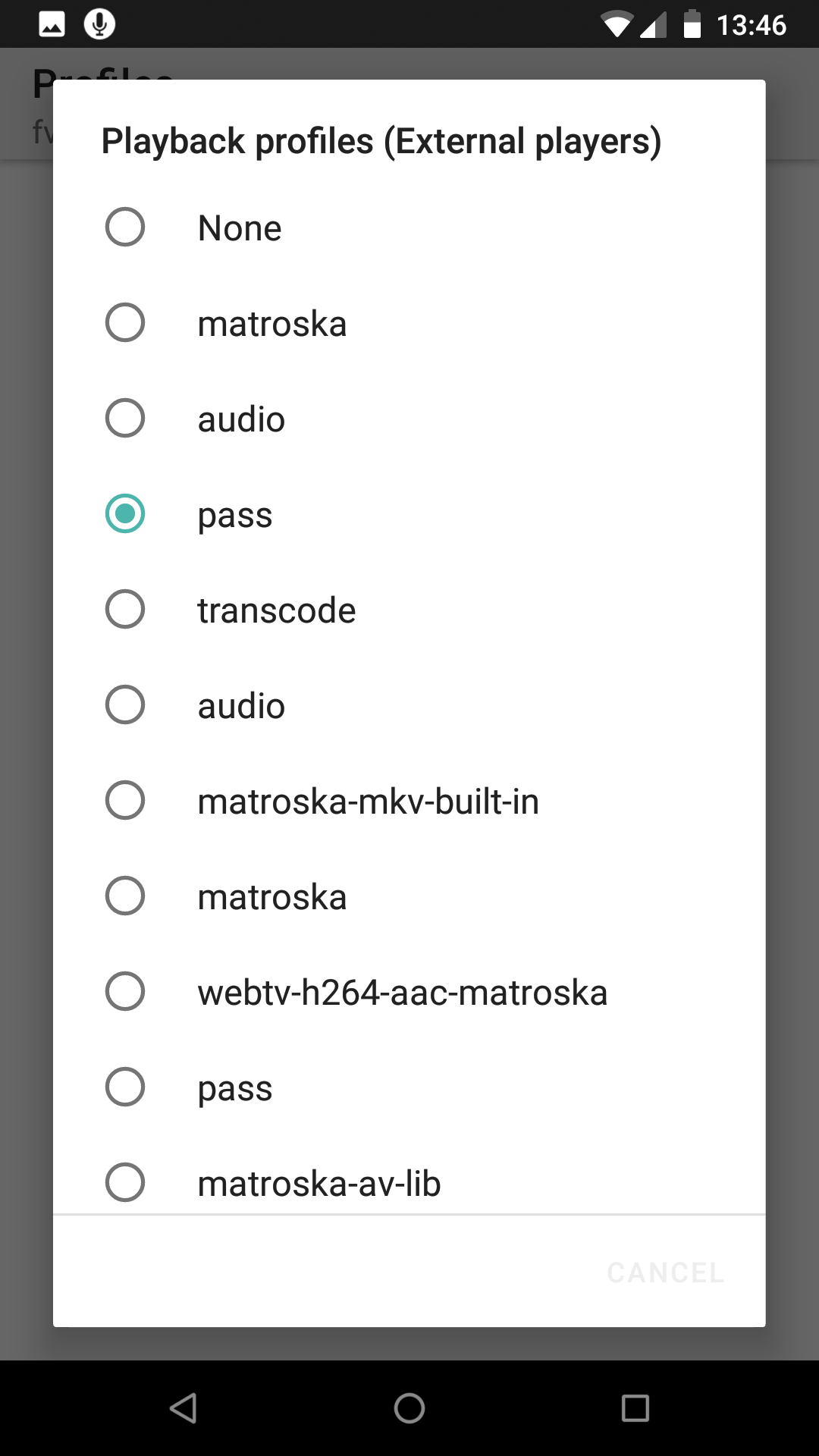
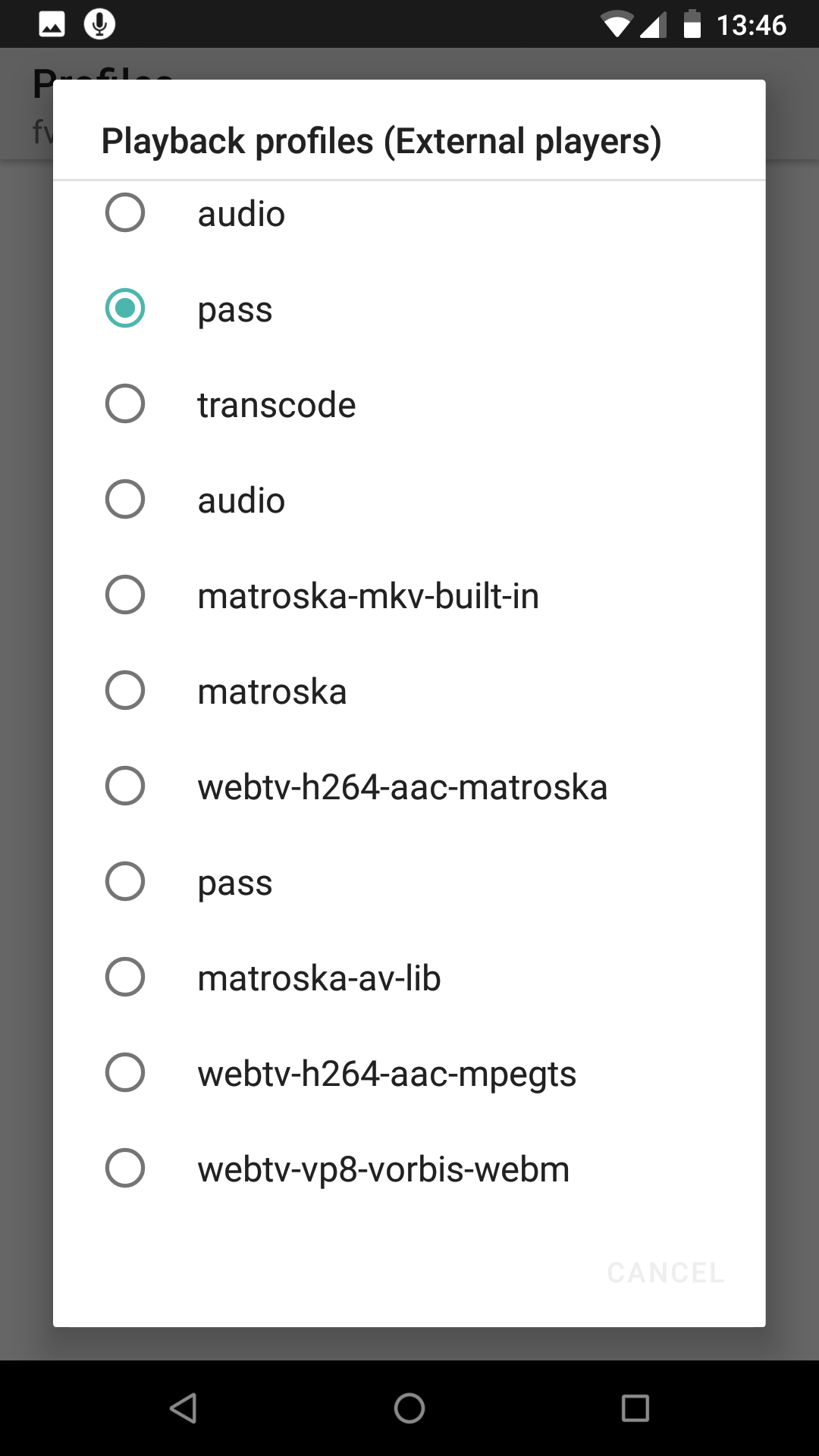
Because of these problems I was not able to use a custom stream profile with the internal player to test remuxing to Matroska. Instead I temporarily modified the transcode profile to only remux the container.
Testing the modified profile with the external player confirmed it correctly provides H.264-encoded video with HD and MPEG-1-encoded video with SD. The internal player was still only able to play HD channels with that profile.
Just wondering, is anything preventing you from doing this testing? I'm not doing anything special here, but the amount of time you and I spend describing and understanding what I do is surely more than if you just checked yourself?
I am not on my computer, so just a short comment. Since dvb-t1 was switched off in berlin I do not have my own server anymore. I rely on a test account from someone else. There only HD channels are provided. I also have no access to the Webinterface. So I can't test anything related to custom profiles and SD playback.
I'll answer here because #463 was closed.
I don't know how but with Kodi I can watch HD and SD (installed tvheadend pvr addon) - maybe you can have a look how they do it.

Kodi (and your Kodi platform) support SD MPEG-2 video playback, but according to rsiebert above:
the mpeg2 video format which is not supported by the [TVHClient] Exoplayer library
@AlBundy33 KODi does not use the exoplayer library. They probably have their own implementation of a player. Other than that, the pvr add-on is written in C. No way to compare or check in a reasonable amount of time what they are doing differently. If I can get a testaccount to a server with SD channels I could try to fix the issue.
Hi, that would help. Then I can load it locally and test it.
AlBundy33 [email protected] schrieb am Do., 4. Juni 2020, 20:57:
@rsiebert https://github.com/rsiebert would it help if i upload a sd recording somewhere?
— You are receiving this because you were mentioned. Reply to this email directly, view it on GitHub https://github.com/rsiebert/TVHClient/issues/411#issuecomment-639054410, or unsubscribe https://github.com/notifications/unsubscribe-auth/AAKXP4CVYFDS64O6S2ML6X3RU7VDHANCNFSM4GTRJ4IQ .
Here is beta version 2.4.0-215. I was able to play the provided video with video and audio (I added a new menu to play the file locally from the download folder).
Great, the internal player also works with live SDTV, thanks. However, it doesn't play either HDTV or SDTV TVH recordings. There are 2 other niggles you may want to know about:
- Aspect ratio always defaults to 5:4 with live SDTV. The stream does seem to provide aspect ratio because e.g. MX Player correctly displays 16:9 for the same service.
- As with HDTV playback on the internal player, subtitles are always on by default regardless of the app setting.
unfortunately in my setup still no video in live tv for sd channels and with the latest I cannot play existing recordings with internal player.