

 ropensci
Entity sentiment shows but document sentiment shows NA
Hello,
I'm not sure if this is an issue or it's just me but here goes. Thanks for creating this package.
I'm trying to run Entity sentiment analysis on a column. Here's my API call for it.
nlp <- gl_nlp( cleanData$translatedText, nlp_type = "analyzeEntitySentiment", type="PLAIN_TEXT", language="en" )
When I run nlp$entities, I can see entity level sentiment
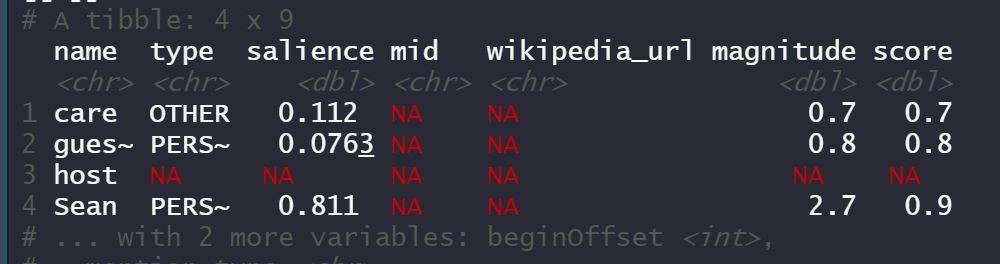
However, when I try nlp$documentSentiment, I see NA's across all my 5 rows of text data
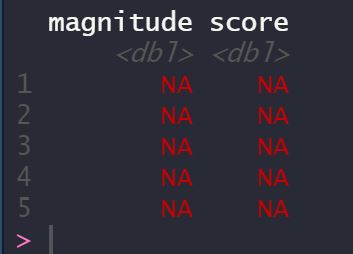
Can you pls help me understand why would this be the case? and what can I do to improve my code here? Thanks.

What if you send it in as one string? The code looks like it will send in each element in your column individually. Try paste(x, collapse = " ")

Hi Mark, Here's how the output looks when I try paste command. How can I save these as two dataframes?
- with sentiment score per entity
- document level sentiment
Thanks

Ah I meant in the text you send in - what does
nlp <- gl_nlp(paste(cleanData$translatedText, collapse = " "),
                        nlp_type = "analyzeEntitySentiment", type="PLAIN_TEXT", language="en" )
...look like? It may be that the document sentiment needs a minimum number of letters to work.
As per this link [for Classification function], at least 20 tokens are required https://cloud.google.com/natural-language/docs/classifying-text
2 out 5 rows in my sample data are fairly long. Also when I try the paste command within gl_nlp, I'm getting NA

