

 root676
QgsTinInterpolator produces incorrect results for isochrone interpolation
Hi! First of all: Thank you very much for this interesting set of algorithms! Unfortunately, being a n00b, I can't really get it to work. As a first try, I wanted to make isochrone polygons from data in the official Vienna OGD repository as provided in your examples. First, I downloaded the street grid: https://www.data.gv.at/katalog/dataset/1039ed7e-97fb-435f-b6cc-f6a105ba5e09 Then I took the Vienna subway station file to obtain the points for the stations: https://www.data.gv.at/katalog/dataset/stadt-wien_ubahnnetzbestandwien/resource/7ecc106b-fdfd-456f-b8cc-752a21496b8a I downloaded both items as SHP.
Next, I converted both files from WGS84 to the projected coordinate system ETRS89 / Austro Lambert EPSG:3416 in QGIS 3.0.2 (and 3.2 for that matter) and set the corresponding QGIS project CRS to EPSG:3416. File format: SHP. I added a new column with unique IDs in the point layer's attibute table.
In your plug-in, I select Iso-area as polygons, I take the street grid as network and the subway stations as starting points, I select "fastest" for the time-based approach, type in "360" seconds for the outer polygon and "60" for the inner polygons and set walking speed to 3 km/h and let the system calculate. No matter what input, I never get neat isochrones but something like this:
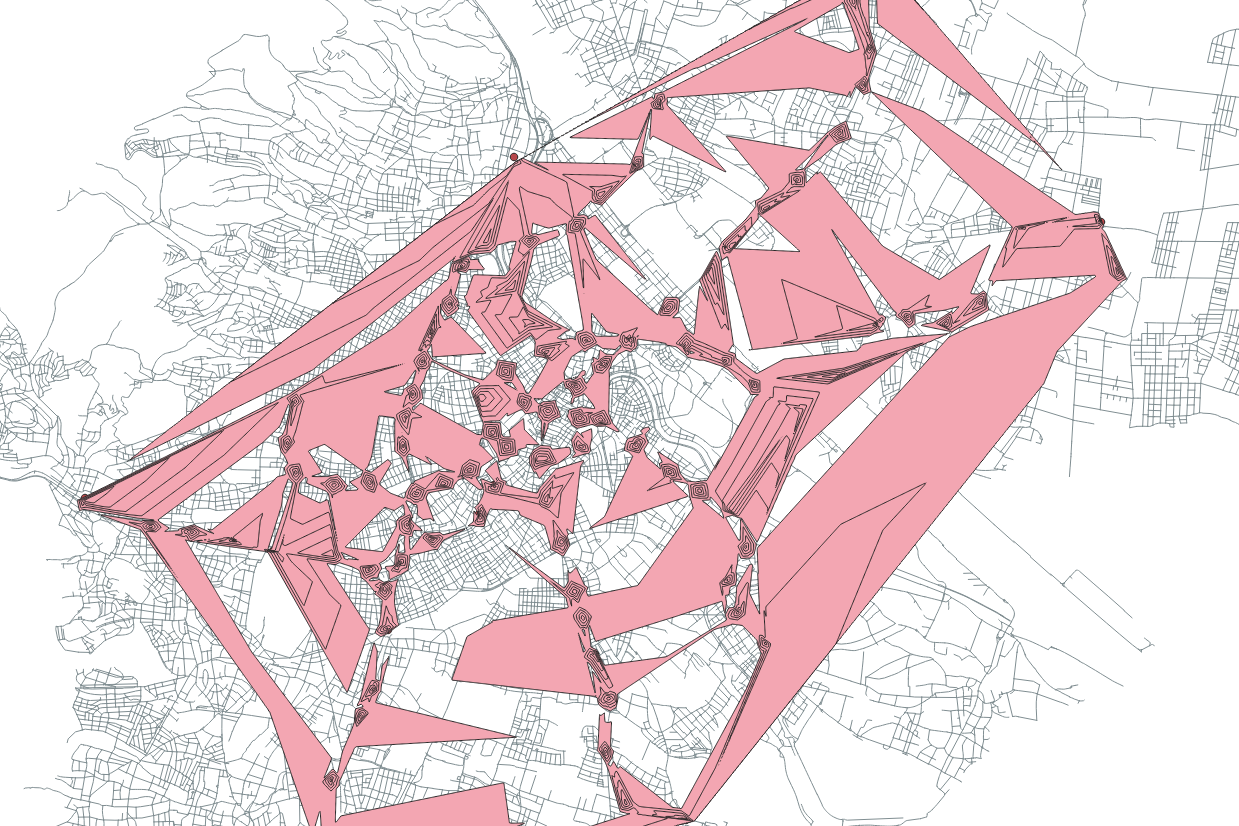
The Vienna city grid is made up of multilines, so I even tried to reduce it to simple lines, but it made no difference. I also tried resizing the point layer's dimensions, but to no avail. Being a newbie, I must be making some trivial mistake. Perhaps you could give me a hint, it would be greatly appreciated.

Hi @guenterhack, Thank you very much for testing QNEAT3! I tested the parameters you used in your analysis and confirm this bug. It is related to the interpolation classes that ship with QGIS (QgsTinInterpolator) which seems to be not as suitable for calculating Iso-Areas as it is stated in multiple tutorials. I plan to rewrite the Iso-Area as Polygons (from Layer) algorithms based on a handmade interpolation method that will be implemented purely in python. On the one hand, the new interpolation technique should fix this bug, on the other hand, the implementation in pure python will slow the plugin down.
I will start working on this bug soon, but I can't promise a quick fix for this due to the fact that I have to implement a new interpolation function and redraft the functions. I am also working full time and code this plugin in my spare time. I will update this issue when I have looked into the problem in more detail.
Cheers, Clemens

Dear @root676, thank you very much for the swift reply! For me, it was just an experiment, don't worry. I'm just excited that somebody's working on an isochrone solution for QGIS. Keep up the great work and keep us posted! All the best Guenter
Hey Clemens, thanks for the good work at the plugin. I am a Bachelors Student and want to focus my Bachelors-Work on Network-Analytics. Your Plugin comes in very handy!
Allthough I think I have the same issue as Guenther had. I'm not familiar with any programming or python and stuff but I thought I might add my view off the Bug in hope, it might help a little.
So, I think the problem occurs, when you define a ceratin range, but there is no road, to cover that range in a certain direction. I put two examples as png's attached. In the first one, I did the analysis only with one single point with a range of 300m. So towards south there is no road, which goes 300m away from the point. Logically, there also no Interpolation for that area. But in the second try, I did the analysis of the point with other points in the surrounding area included in the analysis. That leads to the effect, that the south part of the iso of our point is making some strange values leaning towards the points, which are in the southern, area even if there is no road or anything.
I don't know if that is a new point of view for you of the issue or anything but I thought I'll just leave this here :)
Thanks again and best wishes!
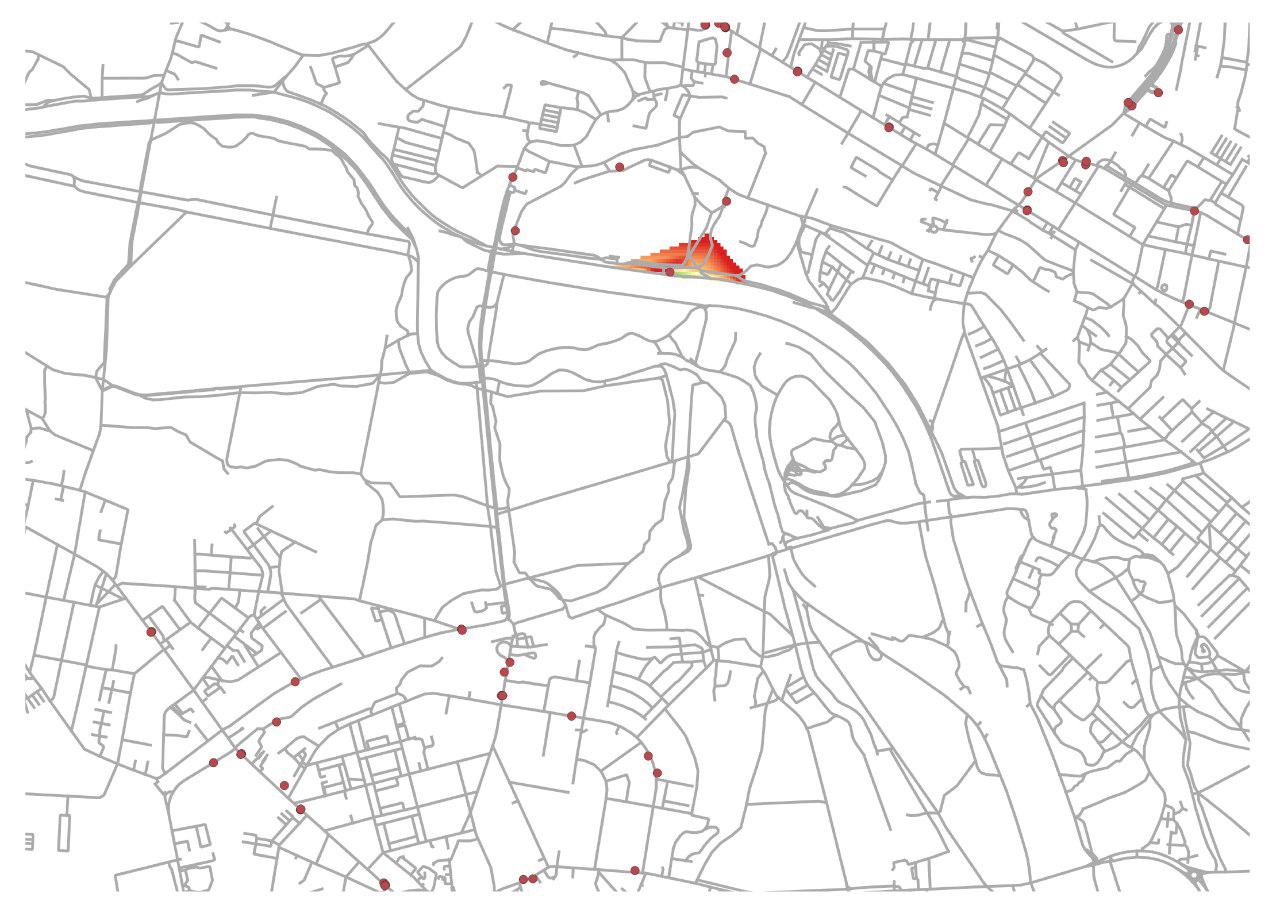
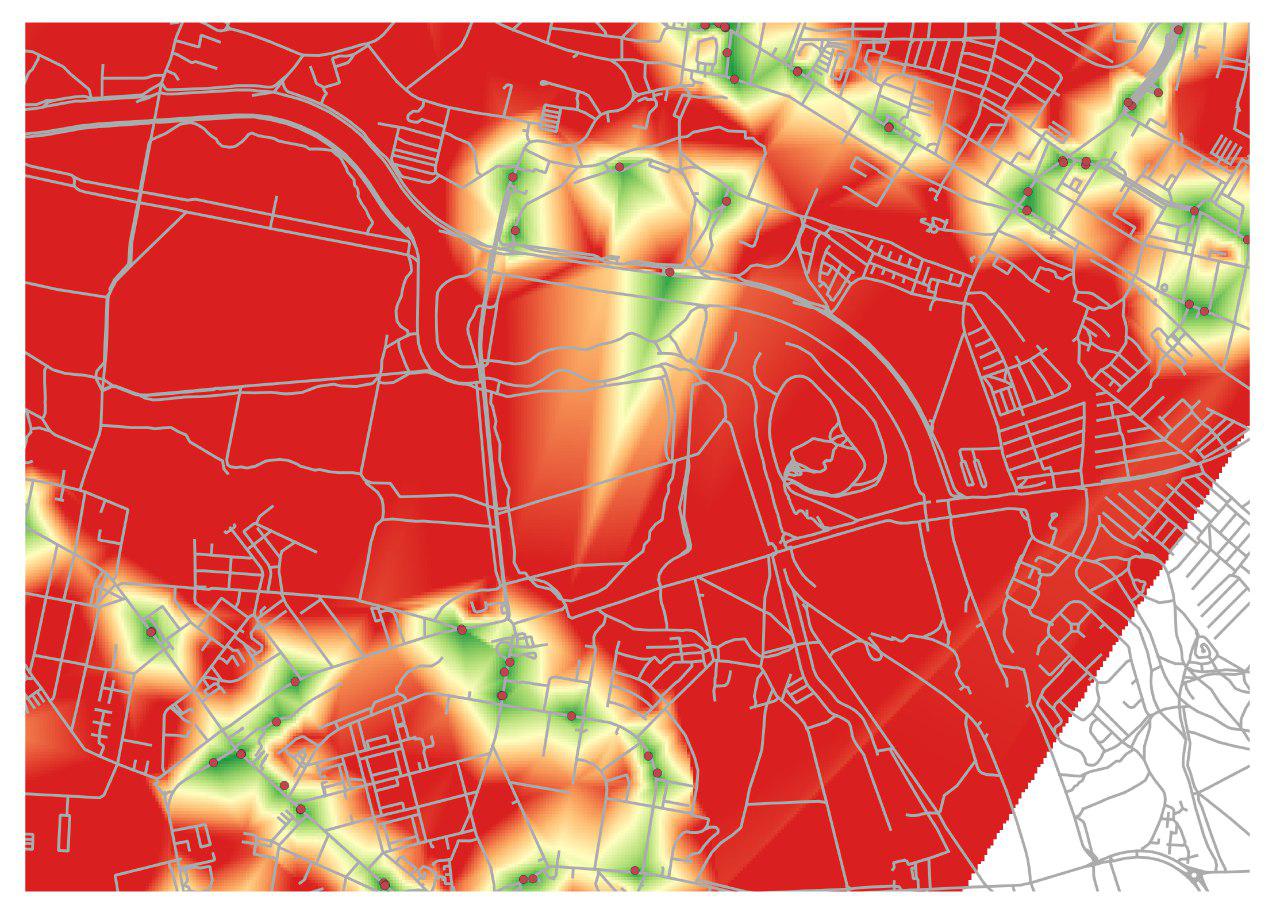

Hi @FitzeFatze580, thanks for your post and the update on your viewpoint on this bug. From your second screenshot I can see the problem - and yes - I have also been encountering it. I have been thinking about how to solve this issue: A possible solution could be to apply the interpolation algorithm for each point seperately, create isochrones and union the different vectors together... But this would slow down the algorithm considerably... I will keep you posted on this issue.
Hey, I saw you updated the plugin in the last week with saying, that your changes might adress the interpolation problem. So i ran the same test again but unfortunately it didn't change at all. I just wanted to leave this here, thought it might help :) Best, Fritz
I've been looking at this same issue. The problem is that the TIN will create very long edges at the boundaries of your network and in any place where the routes are sparse (e.g. I noticed the issues doing network analysis for Malawi, where the contours and bays of Lake Malawi cause the same problems).
One strategy to significantly improve results without adding much processing time is to calculate a greater distance than necessary and then select out only the isochrones you're interested in. E.g. if you want isochrones of 5, 10, and 15 minutes, then calculate out to 30 minutes at 5 minute intervals, and select the necessary isochrones. This works reasonably well unless you have a very disjoint and circuitous network such that your longest isochrone (30 mins in this case) is still not reaching locations that are proximate in euclidean distance but farther than the longest isochrone in network distance. The other case in which this does not work is geographic features / regions that are completely inaccessible to the network, but which the TIN interpolation visualizes as accessible. In this case, I'd suggest using a raster MASK or vector overlay CLIP or DIFFERENCE to remove inaccessible regions (e.g. Lake Malawi) / keep only the accessible regions.
I think the algorithm could easily calculate and select the requested isochrones with extra distance included, and maybe accept this as an optional parameter. Worst case scenario, users would need to calculate cost for all points in the network. Clipping / masking out inaccessible regions should probably be done separately by the user.

Can the title of the issue be changed to reflect the problem? The problem isn't Vienna, it's TIN interpolation of network vertices into a cost surface
I have experienced that to have "good looking" 600 m isochrones I could ask for something like 600, 1200 and 1800 m. Often the last (1800 m) will look bad, but since I actually did not need it I just delete that.
But this also means that a 600 m isochrone looks different if you just ask for 600 m or if you ask for 600 and 1200 m. This is not so good....
