romanz
Config: db starts sync and stops
./target/release/electrs --conf="config.toml"Starting electrs 0.9.7 on x86_64 linux with Config { network: Bitcoin, db_path: "/home/dimitris/electrs/db/bitcoin", daemon_dir: "/home/dimitris/.bitcoin", daemon_auth: CookieFile("/home/dimitris/electrs/cookie"), daemon_rpc_addr: 127.0.0.1:8332, daemon_p2p_addr: 127.0.0.1:8333, electrum_rpc_addr: 127.0.0.1:50001, monitoring_addr: 127.0.0.1:4224, wait_duration: 10s, jsonrpc_timeout: 15s, index_batch_size: 10, index_lookup_limit: None, reindex_last_blocks: 0, auto_reindex: true, ignore_mempool: false, sync_once: false, disable_electrum_rpc: false, server_banner: "Welcome to electrs 0.9.7 (Electrum Rust Server)!", args: [] } [2022-05-22T19:33:32.702Z INFO electrs::metrics::metrics_impl] serving Prometheus metrics on 127.0.0.1:4224 [2022-05-22T19:33:32.702Z INFO electrs::server] serving Electrum RPC on 127.0.0.1:50001 [2022-05-22T19:33:32.789Z INFO electrs::db] "/home/dimitris/electrs/db/bitcoin": 7 SST files, 0.000005635 GB, 0.000000007 Grows [2022-05-22T19:34:03.472Z INFO electrs::db] closing DB at /home/dimitris/electrs/db/bitcoin Error: electrs failed
Caused by: 0: bitcoind RPC polling failed 1: daemon not available 2: JSON-RPC error: transport error: Didn't receive response data in time, timed out.
I can't find anything regarding a solution to this.

Is Electrs running on docker, Ubuntu for Windows (with WSL2), or a virtual machine different than the one running Bitcoin Core ? If so the Bitcoin Core ip will not be 127.0.0.1. Keep in mind that you config for authorization to access bitcoind RPC calls is pointing to CookieFile("/home/dimitris/electrs/cookie"), this needs to point to the bitcoind folder where the .cookie file exists (ex: daemon_auth: CookieFile("/home/myUser/Bitcoin/.cookie")). To configure this you need to create a electrs.toml file at the eletrs root folder, use the doc/config_example.toml as a model. See https://github.com/romanz/electrs/blob/master/doc/config.md for more info.
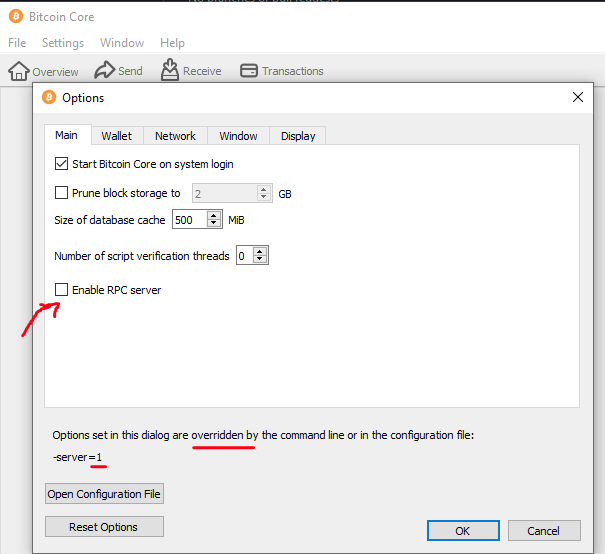
Also check the Bitcoin Core bitcoin.conf file has:
# [rpc]
# Accept command line and JSON-RPC commands.
server=1
You can also config this at the GUI:
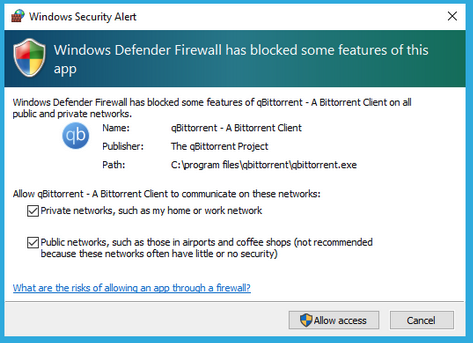
Windows firewall will ask for the first time if you allow the application to access the network, if you clicked no, then the firewall will block electrs.
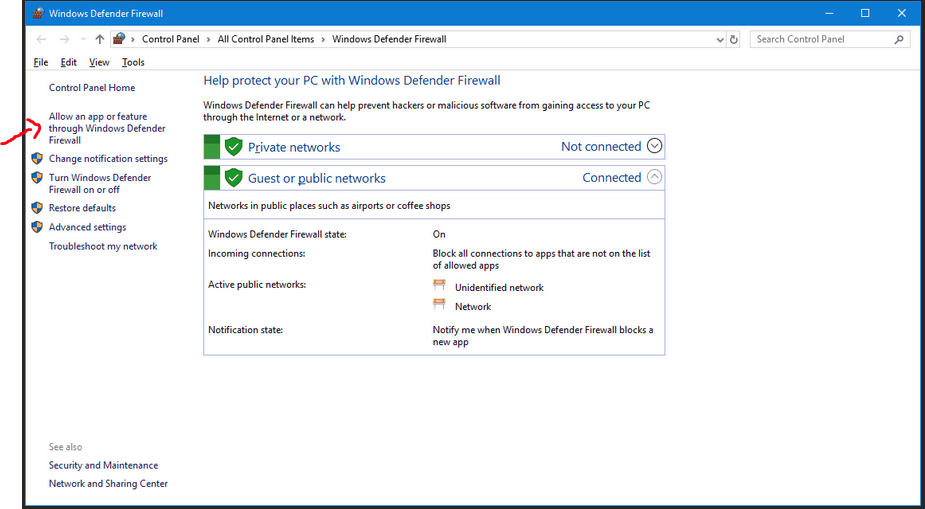
To check for that type at Windows start menu Windows Defender Firewall, click on the link Allow an app or feature through Windows Defender Firewall, then check if electrs is allowed.