

 rogalmic
typeset: -A: invalid option
In addition to the details for issue, please provide us Executables information and Debug output unless you have confidence that they don't help us.
cd . ; bash -c "cd "/Users/xxx/Sync/VSCode"; while [[ ! -p "/tmp/vscode-bash-debug-fifo-17631" ]]; do sleep 0.25; done; "/Users/xxx/.vscode-insiders/extensions/rogalmic.bash-debug-0.3.0/bashdb_dir/bashdb" --quiet --tty "/tmp/vscode-bash-debug-fifo-17631" --tty_in "/tmp/vscode-bash-debug-fifo-17631_in" --library "/Users/xxx/.vscode-insiders/extensions/rogalmic.bash-debug-0.3.0/bashdb_dir" -- "/Users/xxx/Sync/VSCode/bash/network.sh" " /Users/xxx/.vscode-insiders/extensions/rogalmic.bash-debug-0.3.0/bashdb_dir/init/require.sh: line 49: typeset: -A: invalid option typeset: usage: typeset [-afFirtx] [-p] name[=value] ... /Users/xxx/.vscode-insiders/extensions/rogalmic.bash-debug-0.3.0/bashdb_dir/lib/action.sh: line 42: typeset: -A: invalid option typeset: usage: typeset [-afFirtx] [-p] name[=value] ... /Users/xxx/.vscode-insiders/extensions/rogalmic.bash-debug-0.3.0/bashdb_dir/lib/action.sh: line 45: typeset: -A: invalid option typeset: usage: typeset [-afFirtx] [-p] name[=value] ... /Users/xxx/.vscode-insiders/extensions/rogalmic.bash-debug-0.3.0/bashdb_dir/lib/alias.sh: line 19: typeset: -A: invalid option typeset: usage: typeset [-afFirtx] [-p] name[=value] ... /Users/xxx/.vscode-insiders/extensions/rogalmic.bash-debug-0.3.0/bashdb_dir/lib/break.sh: line 59: typeset: -A: invalid option typeset: usage: typeset [-afFirtx] [-p] name[=value] ... /Users/xxx/.vscode-insiders/extensions/rogalmic.bash-debug-0.3.0/bashdb_dir/lib/break.sh: line 62: typeset: -A: invalid option typeset: usage: typeset [-afFirtx] [-p] name[=value] ... /Users/xxx/.vscode-insiders/extensions/rogalmic.bash-debug-0.3.0/bashdb_dir/lib/cmd-hooks.sh: line 1: typeset: -A: invalid option typeset: usage: typeset [-afFirtx] [-p] name[=value] ... /Users/xxx/.vscode-insiders/extensions/rogalmic.bash-debug-0.3.0/bashdb_dir/lib/filecache.sh: line 24: typeset: -A: invalid option typeset: usage: typeset [-afFirtx] [-p] name[=value] ... /Users/xxx/.vscode-insiders/extensions/rogalmic.bash-debug-0.3.0/bashdb_dir/lib/filecache.sh: line 28: typeset: -A: invalid option typeset: usage: typeset [-afFirtx] [-p] name[=value] ... /Users/xxx/.vscode-insiders/extensions/rogalmic.bash-debug-0.3.0/bashdb_dir/lib/filecache.sh: line 32: typeset: -A: invalid option typeset: usage: typeset [-afFirtx] [-p] name[=value] ... /Users/xxx/.vscode-insiders/extensions/rogalmic.bash-debug-0.3.0/bashdb_dir/lib/help.sh: line 23: typeset: -A: invalid option typeset: usage: typeset [-afFirtx] [-p] name[=value] ... /Users/xxx/.vscode-insiders/extensions/rogalmic.bash-debug-0.3.0/bashdb_dir/lib/help.sh: line 31: typeset: -A: invalid option typeset: usage: typeset [-afFirtx] [-p] name[=value] ... /Users/xxx/.vscode-insiders/extensions/rogalmic.bash-debug-0.3.0/bashdb_dir/lib/processor.sh: line 26: typeset: -A: invalid option typeset: usage: typeset [-afFirtx] [-p] name[=value] ... /Users/xxx/.vscode-insiders/extensions/rogalmic.bash-debug-0.3.0/bashdb_dir/lib/processor.sh: line 62: exec: {_Dbg_fdi}: not found
Executables
Version of bash-debug: (can be checked in: ctrl+shift+X or command+shift+X -> INSTALLED: Bash Debug)
0.3.0
Output of following commands (on windows, execute them in Command Prompt or PowerShell):
where bash
# if `code` not found on macOS, follow the instructions in:
# https://code.visualstudio.com/docs/setup/mac
code --version
bash -c 'uname -a; for P in bash bashdb cat mkfifo pkill; do echo ---; which -a $P; command $P --version; done'
Darwin EW-MB-0115.local 17.7.0 Darwin Kernel Version 17.7.0: Thu Jun 21 22:53:14 PDT 2018; root:xnu-4570.71.2~1/RELEASE_X86_64 x86_64
EW-MB-0115:svenvogel root# bash --version GNU bash, version 4.4.19(1)-release (x86_64-apple-darwin17.3.0)
Debug output
Paste here outputs in DEBUG CONSOLE (ctrl+shift+D or command+shift+D) with "showDebugOutput": true and "trace": true in launch.json.
Your launch.json may looks like:
{ // Use IntelliSense to learn about possible attributes. // Hover to view descriptions of existing attributes. // For more information, visit: https://go.microsoft.com/fwlink/?linkid=830387 "version": "0.2.0", "configurations": [ { "type": "bashdb", "request": "launch", "name": "Bash-Debug (type in script name)", "cwd": "${workspaceFolder}", "program": "${command:AskForScriptName}", "args": [] }, { "type": "bashdb", "request": "launch", "name": "Bash-Debug (select script from list of sh files)", "cwd": "${workspaceFolder}", "program": "${command:SelectScriptName}", "args": [] }, { "type": "bashdb", "request": "launch", "name": "Bash-Debug (hardcoded script name)", "cwd": "${workspaceFolder}", "program": "${workspaceFolder}/path/to/script.sh", "args": [] }, { "type": "bashdb", "request": "launch", "name": "Bash-Debug (simplest configuration)", "program": "${file}" } ] }
Details
Details goes here.

Please try following:
- use newly released extension from marketplace (v. 3.1) - wont fix your problem but still..
- add/modify "pathBash" in launch config to point to bash version 4.x (https://unix.stackexchange.com/questions/150015/typeset-a-is-giving-error-in-script)

Hi -
Managed to get around it. Apparently it was BASHDB causing the problem Here is my launcher.json file. A sym link to Bashdb is ideal. But just thought to make it work. Hope it works.
{
"configurations": [
{
"pathBashdb": "/usr/local/Cellar/bashdb/4.4-0.94/bin/bashdb",
"type": "bashdb",
"request": "launch",
"name": "Bash-Debug (simplest configuration)",
"program": "${file}"
}
]
}

@macosbasher : Could you paste here contents of "/usr/local/Cellar/bashdb/4.4-0.94/bin/bashdb" script?
I am interested in shebang value (first line)...
The newest extension uses internal bashdb with "#!/bin/bash" (if it was not specified explicitly like in your case).
BTW - if you have not set the "pathBashdbLib", then internal libraries are used (from extension folder). So the only difference should be in bashdb script file.
Small fix to test under macOS:
bash-debug-0.3.1.vsix.zip - requires proper pathBash in launch.json, pointing to bash 4.*
@macosbasher : Could you paste here contents of "/usr/local/Cellar/bashdb/4.4-0.94/bin/bashdb" script?
I am interested in shebang value (first line)...
The newest extension uses internal bashdb with "#!/bin/bash" (if it was not specified explicitly like in your case).
BTW - if you have not set the "pathBashdbLib", then internal libraries are used (from extension folder). So the only difference should be in bashdb script file.
Hi @rogalmic - Here are the 10lines of Bashdb. It seems bashdb broke it? :). This was installed via HomeBrew. No mods whatsoever.
'#!/usr/local/bin/bash '# -- shell-script -- '# Top-level debugger program. This program may be initially invoked. '# '# Copyright (C) 2002, 2003, 2004, 2005, 2006, 2007, 2008, '# 2009, 2010, 2011 Rocky Bernstein [email protected] '# '# This program is free software; you can redistribute it and/or '# modify it under the terms of the GNU General Public License as '# published by the Free Software Foundation; either version 2, or
I just released version 0.3.2 of extension with fix for launching from terminal (basically using defined bash rather than relying on shebang).
In launch.json, please remove the "pathBashDb", then set "pathBash" to /usr/local/bin/bash (assuming it is 4.*).
Not sure about the breaking of bashdb, but extension should not need bashdb installed anymore. From 3.0 it uses internal copy of bashdb.
Thanks. It seems to be working but what i dont unterstand is when i go forward or backwards always the bashdb file opens when i run the debugger.
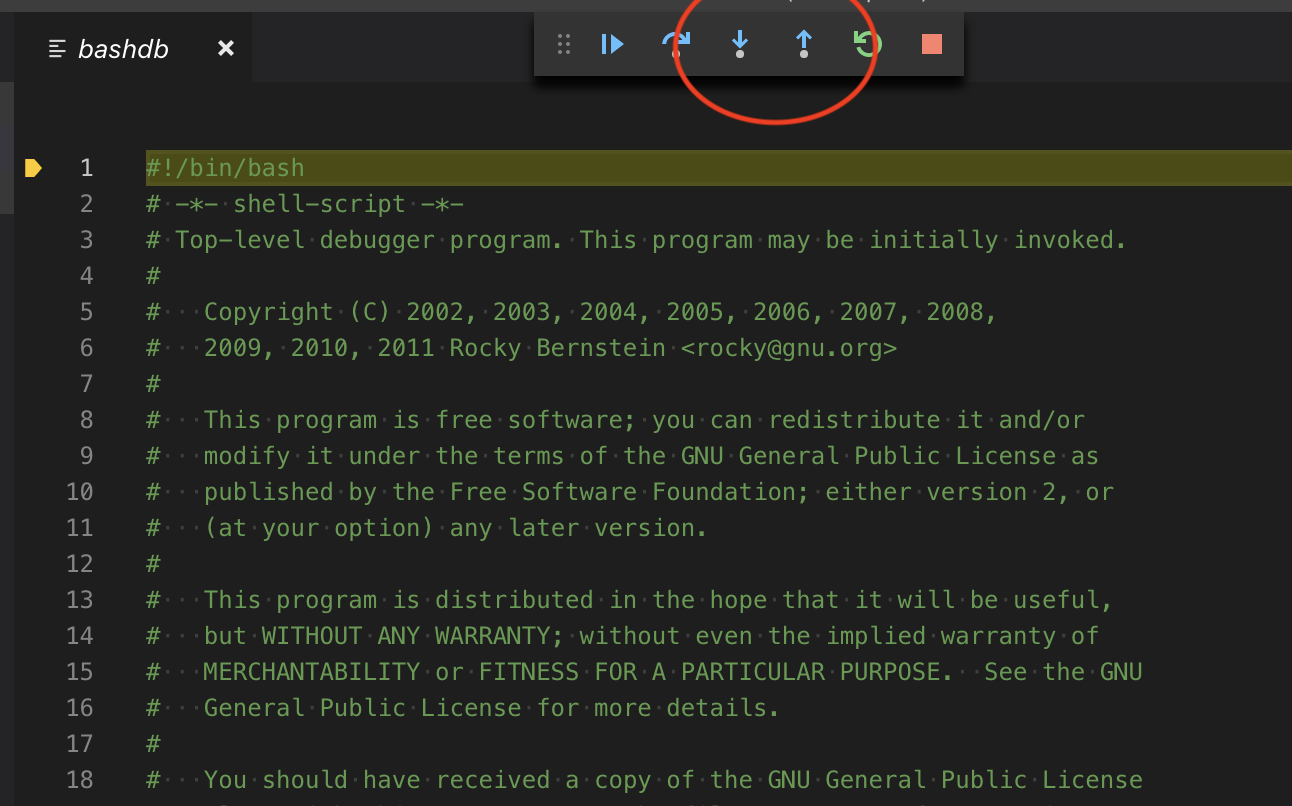
Please add :
"showDebugOutput": true
to launch json add paste the full log from debug console here.
Step out is not supported yet, while step in should work fine. At the end of the script, the step will go back to bashdb, since debugging is launched via this file...
::PROXYID::21868
(/Users/svenvogel/Sync/VSCode/bash/test.sh:3):
3:	echo "test"
Debug environment: bash_ver=4.4.19(1)-release, bashdb_ver=4.4-0.94-mod, program=/Users/svenvogel/.vscode-insiders/extensions/rogalmic.bash-debug-0.3.2/bashdb_dir/bashdb, args=
21924
############################################################
backtrace
->0 in file `/Users/svenvogel/Sync/VSCode/bash/test.sh' at line 3
##1 source("/Users/svenvogel/Sync/VSCode/bash/test.sh") called from file `/Users/svenvogel/.vscode-insiders/extensions/rogalmic.bash-debug-0.3.2/bashdb_dir/bashdb' at line 100
##2 main("--quiet", "--tty", "/tmp/vscode-bash-debug-fifo-15514", "--tty_in", "/tmp/vscode-bash-debug-fifo-15514_in", "--library", "/Users/svenvogel/.vscode-insiders/extensions/rogalmic.bash-debug-0.3.2/bashdb_dir", "--", "/Users/svenvogel/Sync/VSCode/bash/test.sh") called from file `/Users/svenvogel/.vscode-insiders/extensions/rogalmic.bash-debug-0.3.2/bashdb_dir/bashdb' at line 0
21924############################################################
backtrace
->0 in file `/Users/svenvogel/Sync/VSCode/bash/test.sh' at line 3
##1 source("/Users/svenvogel/Sync/VSCode/bash/test.sh") called from file `/Users/svenvogel/.vscode-insiders/extensions/rogalmic.bash-debug-0.3.2/bashdb_dir/bashdb' at line 100
##2 main("--quiet", "--tty", "/tmp/vscode-bash-debug-fifo-15514", "--tty_in", "/tmp/vscode-bash-debug-fifo-15514_in", "--library", "/Users/svenvogel/.vscode-insiders/extensions/rogalmic.bash-debug-0.3.2/bashdb_dir", "--", "/Users/svenvogel/Sync/VSCode/bash/test.sh") called from file `/Users/svenvogel/.vscode-insiders/extensions/rogalmic.bash-debug-0.3.2/bashdb_dir/bashdb' at line 0
21924############################################################
Program stopped.
It stopped after being stepped.
Next statement to be run is:
	echo "test"
examine <$PWD>
/Users/svenvogel/Sync/VSCode
examine <$? # from . "$_Dbg_script_file">
0 # from '. "$_Dbg_script_file"'
21924############################################################
Seems that the log does not contain the actual step in/out call.
According to this output, the VS Code should show following file/line:
(/Users/svenvogel/Sync/VSCode/bash/test.sh:3):
Did you press the "step" key before collecting the log?
Hi Rogal,
i press the step and then it opens the bashdb file with settings.
::PROXYID::22688
(/Users/svenvogel/Sync/VSCode/bash/test.sh:3):
3:	echo "test"
Debug environment: bash_ver=4.4.19(1)-release, bashdb_ver=4.4-0.94-mod, program=/Users/svenvogel/.vscode-insiders/extensions/rogalmic.bash-debug-0.3.2/bashdb_dir/bashdb, args=
22712
############################################################
backtrace
->0 in file `/Users/svenvogel/Sync/VSCode/bash/test.sh' at line 3
##1 source("/Users/svenvogel/Sync/VSCode/bash/test.sh") called from file `/Users/svenvogel/.vscode-insiders/extensions/rogalmic.bash-debug-0.3.2/bashdb_dir/bashdb' at line 100
##2 main("--quiet", "--tty", "/tmp/vscode-bash-debug-fifo-15763", "--tty_in", "/tmp/vscode-bash-debug-fifo-15763_in", "--library", "/Users/svenvogel/.vscode-insiders/extensions/rogalmic.bash-debug-0.3.2/bashdb_dir", "--", "/Users/svenvogel/Sync/VSCode/bash/test.sh") called from file `/Users/svenvogel/.vscode-insiders/extensions/rogalmic.bash-debug-0.3.2/bashdb_dir/bashdb' at line 0
22712############################################################
backtrace
->0 in file `/Users/svenvogel/Sync/VSCode/bash/test.sh' at line 3
##1 source("/Users/svenvogel/Sync/VSCode/bash/test.sh") called from file `/Users/svenvogel/.vscode-insiders/extensions/rogalmic.bash-debug-0.3.2/bashdb_dir/bashdb' at line 100
##2 main("--quiet", "--tty", "/tmp/vscode-bash-debug-fifo-15763", "--tty_in", "/tmp/vscode-bash-debug-fifo-15763_in", "--library", "/Users/svenvogel/.vscode-insiders/extensions/rogalmic.bash-debug-0.3.2/bashdb_dir", "--", "/Users/svenvogel/Sync/VSCode/bash/test.sh") called from file `/Users/svenvogel/.vscode-insiders/extensions/rogalmic.bash-debug-0.3.2/bashdb_dir/bashdb' at line 0
22712############################################################
Program stopped.
It stopped after being stepped.
Next statement to be run is:
	echo "test"
examine <$PWD>
/Users/svenvogel/Sync/VSCode
examine <$? # from . "$_Dbg_script_file">
0 # from '. "$_Dbg_script_file"'
22712############################################################
examine <bash>
/usr/local/bin/bash
22712############################################################
step
(/Users/svenvogel/.vscode-insiders/extensions/rogalmic.bash-debug-0.3.2/bashdb_dir/bashdb:1):
1:	#!/bin/bash
22712############################################################
backtrace
->0 in file `/Users/svenvogel/.vscode-insiders/extensions/rogalmic.bash-debug-0.3.2/bashdb_dir/bashdb' at line 1
##1 main("--quiet", "--tty", "/tmp/vscode-bash-debug-fifo-15763", "--tty_in", "/tmp/vscode-bash-debug-fifo-15763_in", "--library", "/Users/svenvogel/.vscode-insiders/extensions/rogalmic.bash-debug-0.3.2/bashdb_dir", "--", "/Users/svenvogel/Sync/VSCode/bash/test.sh") called from file `/Users/svenvogel/.vscode-insiders/extensions/rogalmic.bash-debug-0.3.2/bashdb_dir/bashdb' at line 0
22712############################################################
Program stopped.
It stopped after being stepped.
Next statement to be run is:
	. "$_Dbg_script_file"
examine <$PWD>
/Users/svenvogel/Sync/VSCode
examine <$? # from echo "test">
1 # from 'echo "test"'
22712############################################################
step
Debugged program terminated with code 1. Use q to quit or R to restart.
Terminated: 15
Seems that 'echo "test"' cannot write to terminal (why could this be?):
examine <$? # from echo "test">
1 # from 'echo "test"'
https://stackoverflow.com/questions/36651786/can-bash-echo-command-return-non-zero-exit-code
Is this the only script line? Can you provide this test script?