

 robotools
Toolbar doesn't respect NSImageName…Template ratio
Using the testAll.py provides an example on how to use the toolbar. The example includes the NSImageNameInfo image which seems to have just the right image size.
However using any of the NSImageName…Template results in distorted toolbar items:
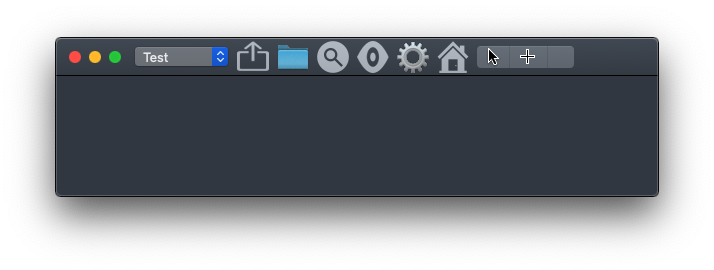
The parameter imageTemplate does not have an effect on these.

Indeed, it seems that images added to a toolbar this way are expected to be square. I looked through the code, but I don't immediately see how this can be fixed.

build square toolbar icons, see: https://developer.apple.com/design/human-interface-guidelines/macos/icons-and-images/custom-icons/
import vanilla
import AppKit


# build square toolbar icons
squareToolBarIcon = AppKit.NSImage.alloc().initWithSize_((32, 32))

sourceImage = AppKit.NSImage.imageNamed_(AppKit.NSImageNameQuickLookTemplate)

w, h = sourceImage.size()

if w > h:
    diffx = 0
    diffy = w - h
else:
    diffx = h - w
    diffy = 0

maxSize = max([w, h])
squareToolBarIcon.lockFocus()
sourceImage.drawInRect_fromRect_operation_fraction_(AppKit.NSMakeRect(diffx, diffy, 32, 32), AppKit.NSMakeRect(0, 0, maxSize, maxSize), AppKit.NSCompositeSourceOver, 1)
squareToolBarIcon.unlockFocus()


squareToolBarIcon.setTemplate_(True)


class Test:

    def __init__(self):

        self.w = vanilla.Window((400, 100))

        self.popUpButton = vanilla.PopUpButton((0, 0, 0, 0), ["foo", "bar"])
        self.popUpButton.getNSPopUpButton().setFrame_((((0, 0), (140, 35))))

        toolbarItems = [
            dict(itemIdentifier="popup",
                 label="Pop Up",
                 view=self.popUpButton.getNSPopUpButton(),
            ),
            dict(itemIdentifier="image",
                label="Image",
                imageObject=squareToolBarIcon,
                callback=self.callback
            ),
        ]

        items = self.w.addToolbar(toolbarIdentifier="test", toolbarItems=toolbarItems, addStandardItems=False)


        self.w.getNSWindow().setTitleVisibility_(True)
        self.w.getNSWindow().toolbar().setShowsBaselineSeparator_(False)

        self.w.open()

    def callback(self, sender):
        print("hit")


Test()
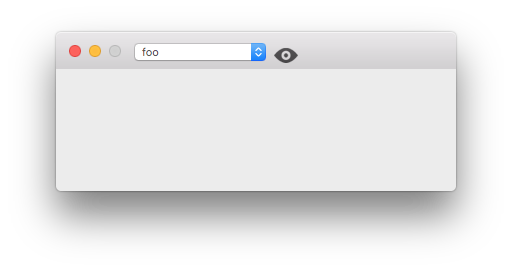

@typemytype Thanks for the snippet. Interestingly, there is no offset on Catalina when I run your code, but instead it's perfectly aligned:

However, I pretty much guess there is actual whitespace in the source SVG of NSImageNameQuickLookTemplate. Compared toNSImageNameRefreshTemplate which draws its bounds to the maximum of available space:

I can actually fix this by tweaking the Rect like this:
sourceImage.drawInRect_fromRect_operation_fraction_(NSMakeRect(diffx, diffy+4, 22, 22), NSMakeRect(0, 0, maxSize, maxSize), NSCompositeSourceOver, 1)

However, I'm concerned that this will still look odd if this appearance is related to the OS version used.
Tweaking the the position of the rect is idd necessary to get a better alignment, and maybe its better to use your own square pdf icons, where you have control of the offset. As macOS templates could change over different OSs (my screenshot is taken on 10.13)