

 robotframework
RIDE 1.7.4b2 freezes on clean Xubuntu 18.04/wxPython 4.0.7 when importing libraries
Hi.
I was trying to build our TA environment with updated components, however newest RIDE is not working for me with Xubuntu 18.04/wxPython 4.0.7. Our TA environment has a lot of dependencies and I have already identified that there is strange problem when importing some libraries e.g. Screenshot or ScreenCapLibrary. That is why I had set up from the scratch Xfce based Xubuntu 18.04 in Virtualbox with wxPython4.0.7 (pip install wxpython). Dependencies for building it:
apt install make gcc libgtk-3-dev libwebkitgtk-dev libwebkitgtk-3.0-dev libgstreamer-gl1.0-0 freeglut3 freeglut3-dev python-gst-1.0 python3-gst-1.0 libglib2.0-dev ubuntu-restricted-extras libgstreamer-plugins-base1.0-dev Compilation when fine, so I have installed pip install robotframework==3.0.4 robotframework-ride==1.7.4.b2. It worked fine. I was able to start RIDE with ride.py script. I have created simple test suite with test case and called one keyword Log to Console Test. I was able to save this and run test without any issues. Now I wanted to import Screenshot library using import option on test suite level. Unfortunately, this is the point when RIDE just freezes and it is not giving me any error, so I cannot find myself root cause of the problem. I guess that it is easy to replicate this issue with this description. Please, let me know if I should try something else to make RIDE work.
BR, Krzysztof

@ksokolowski There is a big difference on versions robotframework==3.0.4 and the library RIDE is using: robotframework==3.1.2. This is the one used to parse the Library imports, so it may be here the root cause. You did not mention what is the Python version you are using.
Also, I suspect that you don't have pyTKInter installed. You should see if running outside RIDE with robot a test case with Dialogs library.

Hello
Thank you for quick answer. In general we have quite large project that is still based on Python 2.7. I would like to migrate both to Python 3 and current version of Robot Framework, yet there will be another challenges ahead to do it. Currently I have started with OS upgrade and wanted to change as little as possible in all libraries we currently use in our TA framework.
Anyway, I have changed robotframework version to current 3.1.2, yet the problem is still occurring.

I was able to import String library. Next I have imported Dialogs - and I have received clear information both in RIDE UI and in terminal that this import is not working. Yes, there is a problem with pyTKinter missing from python2.7 standard libraries in Ubuntu18.04 for some strange reason. Finally I have tried to import Screenshot library, and it frozen RIDE UI totally - without any error in the console.
I'm really hopping that we can still use some RIDE version with Ubuntu 18.04 with Python2.7 as base for some time.
pyTKinter is a package installed with system package manager, like 'apt-get'.
Hello.
I guess there might be some problem getting Python2 version of pyTKinter with apt on Ubuntu 18.04. Apt is reporting for me:
_$sudo apt install python-tk
Reading package lists... Done
Building dependency tree
Reading state information... Done
Package python-tk is not available, but is referred to by another package.
This may mean that the package is missing, has been obsoleted, or
is only available from another source
E: Package 'python-tk' has no installation candidate_
However, this is not the issue here. If I'm importing Dialogs library, RIDE still works as expected - if there is dependency missing in OS - I can see information about this in terminal, and Dialogs name is highlighted with red in RIDE UI.
The main issue here is that when I'm importing Screenshot library with RobotFramework 3.1.2 or 3.0.4 RIDE just hangs. It looks like a bug for me. If there would be some dependency problem I would expect that I should receive at least some information about this as for the failed Dialogs import.
First make sure that a Dialogs test can run and produce a dialog, with robot. The graphics subsystem must be working. Then test Screenshots, if it works in shell and keeps failing in RIDE, then we have a bug.
Hello.
I have installed python-tk and now I'm able to import Dialogs library.
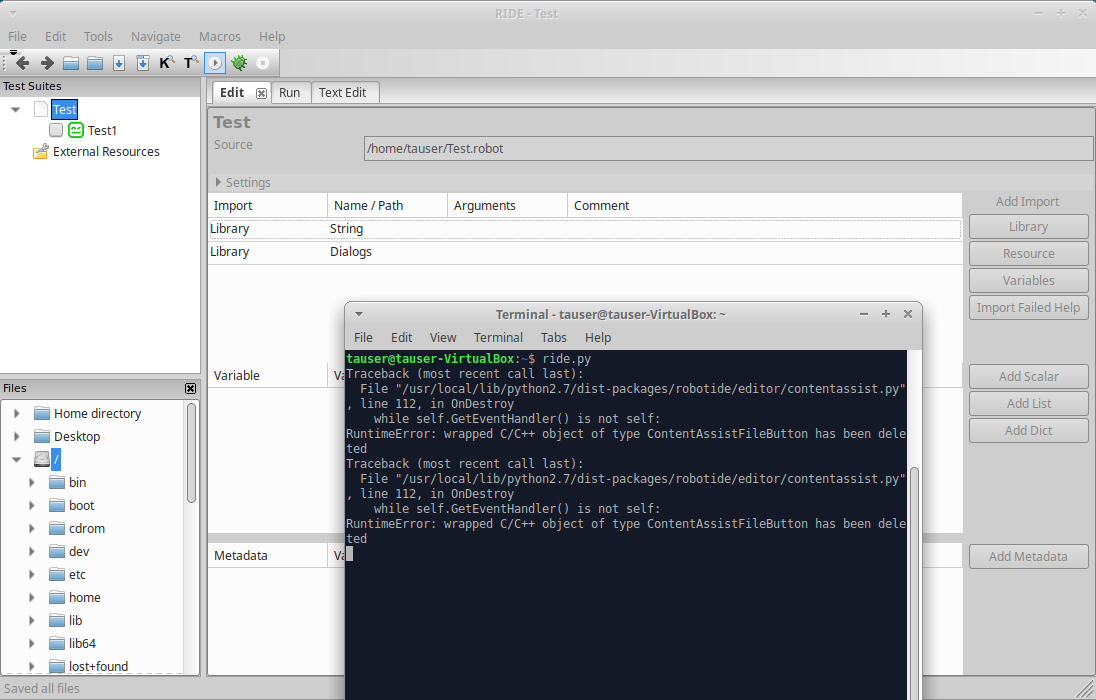 However, the problem with importing Screenshot library remains.
Any suggestions?
However, the problem with importing Screenshot library remains.
Any suggestions?
BR, Krzysztof
I need that you run a test importing Screenshot library from the shell terminal, not using RIDE. There should be error messages (or if needed to run with debug flag). It may be that wxPython version is not compatible with the library. I agree that RIDE should not block or crash when using any library, but we must be sure first that the tests run from command line/terminal/shell. You can also use other graphic frameworks as suggested on the Screenshot documentation, so please help us to see if the problem is with wxPython:
- Run the test with Screenshot library with current setup, in shell. It will use wxPython or PyGTK, and should report errors.
- Install Scrot (and change the library import to use it), then run again in shell.
- After having a successful test run in shell, there should not be problems with RIDE.
- If test runs OK in shell but RIDE blocks or crashes, we have a bug and needs research to fix.
Hello.
I have checked all options that you have suggested. I have used this simple code to check what is going on: tauser@tauser-VirtualBox:~$ more Test_screenshot.robot *** Settings *** Library String Library Screenshot
*** Test Cases *** Test1 Log To Console Testing screenshot library Take Screenshot Test123
When I'm explicate importing Screenshot library with screenshot_module=PyGTK or Scrot it works fine with robot directly!
There is a problem with running this code directly with robot without any screenshot_module defined or with screenshot_module=wxPython (I guess this is default option for Screenshot library):
tauser@tauser-VirtualBox:~$ robot Test_screenshot.robot
Test screenshot
Test1 Testing screenshot library
.Segmentation fault (core dumped)
Regardless what kind of screenshot_module is added to Import Screenshot - opening this test suite with RIDE still freezes it.
Hi.
Core dump for this issue from my VM with clean Xubuntu 18.04 LTS install + Robot Framework + RIDE dependencies.
@ksokolowski Sorry, I will not investigate your problem, because there are problems with the normal use of robot in shell command. You are using a Virtual Machine and there may be problems with graphic card system. Please use our Slack to talk about this, maybe some other users can know what is going on.
Hello.
I guess that this is not only my problem, and I have documented here real bug - I'm still able to run tests with robot in this env. as long as I don't use wxPython. It is not related to VM but IMO it is some dependency problem with current wxPython 4.0.x. And as long as RIDE will be using wxPython 4.0.x and Linux is supported I guess this is valid issue.
@ksokolowski I did not marked this as invalid issue. I just want you to prove that a test case using Screenshot is running on shell. Then, if that is working and RIDE is not, I will investigate.
Hello.
So we actually have this kind of scenario. If we will be using screenshot_module=PyGTK or Scrot in this sample code, it will work with robot directly, yet it will still freeze RIDE.
@ksokolowski You can try to replace Screenshot.py on robotframework installation, with this changed file: Screenshot.py But you need to install the gtk2 package of wxPython (not the gtk3).
Hello @HelioGuilherme66 Thank you for modified version of Screenshot.py. I have used this and it is possible now to RIDE with Screenshot library. It doesn't freeze RIDE anymore, but it prints to console error: tauser@tauser-VirtualBox:~$ ride.py ('FAILED', u'Screenshot', DataError(u'Importing test library 'robot.libraries.Screenshot' failed: SyntaxError: invalid syntax (Screenshot.py, line 7)\nTraceback (most recent call last):\n File "/usr/local/lib/python2.7/dist-packages/robotide/lib/robot/utils/importer.py", line 153, in _import\n return import(name, fromlist=fromlist)\nPYTHONPATH:\n /usr/local/bin\n /usr/lib/python2.7\n /usr/lib/python2.7/plat-x86_64-linux-gnu\n /usr/lib/python2.7/lib-tk\n /usr/lib/python2.7/lib-old\n /usr/lib/python2.7/lib-dynload\n /usr/local/lib/python2.7/dist-packages\n /usr/lib/python2.7/dist-packages\n /usr/lib/python2.7/dist-packages/gtk-2.0\n /usr/local/lib/python2.7/dist-packages/robotide/spec\n /usr/local/lib/python2.7/dist-packages/robotide/lib\n /usr/local/lib/python2.7/dist-packages/robotide/contrib/testrunner/../../lib\n /usr/local/lib/python2.7/dist-packages/robotide/contrib/testrunner/../../lib',)) ('FAILED', u'Screenshot', DataError(u'Importing test library 'robot.libraries.Screenshot' failed: SyntaxError: invalid syntax (Screenshot.py, line 7)\nTraceback (most recent call last):\n File "/usr/local/lib/python2.7/dist-packages/robotide/lib/robot/utils/importer.py", line 153, in _import\n return import(name, fromlist=fromlist)\nPYTHONPATH:\n /usr/local/bin\n /usr/lib/python2.7\n /usr/lib/python2.7/plat-x86_64-linux-gnu\n /usr/lib/python2.7/lib-tk\n /usr/lib/python2.7/lib-old\n /usr/lib/python2.7/lib-dynload\n /usr/local/lib/python2.7/dist-packages\n /usr/lib/python2.7/dist-packages\n /usr/lib/python2.7/dist-packages/gtk-2.0\n /usr/local/lib/python2.7/dist-packages/robotide/spec\n /usr/local/lib/python2.7/dist-packages/robotide/lib\n /usr/local/lib/python2.7/dist-packages/robotide/contrib/testrunner/../../lib\n /usr/local/lib/python2.7/dist-packages/robotide/contrib/testrunner/../../lib',)) Traceback (most recent call last): File "/usr/local/lib/python2.7/dist-packages/robotide/editor/contentassist.py", line 112, in OnDestroy while self.GetEventHandler() is not self: RuntimeError: wrapped C/C++ object of type ContentAssistFileButton has been deleted ('FAILED', u'Screenshot', DataError(u'Importing test library 'robot.libraries.Screenshot' failed: SyntaxError: invalid syntax (Screenshot.py, line 7)\nTraceback (most recent call last):\n File "/usr/local/lib/python2.7/dist-packages/robotide/lib/robot/utils/importer.py", line 153, in _import\n return import(name, fromlist=fromlist)\nPYTHONPATH:\n /usr/local/bin\n /usr/lib/python2.7\n /usr/lib/python2.7/plat-x86_64-linux-gnu\n /usr/lib/python2.7/lib-tk\n /usr/lib/python2.7/lib-old\n /usr/lib/python2.7/lib-dynload\n /usr/local/lib/python2.7/dist-packages\n /usr/lib/python2.7/dist-packages\n /usr/lib/python2.7/dist-packages/gtk-2.0\n /usr/local/lib/python2.7/dist-packages/robotide/spec\n /usr/local/lib/python2.7/dist-packages/robotide/lib\n /usr/local/lib/python2.7/dist-packages/robotide/contrib/testrunner/../../lib\n /usr/local/lib/python2.7/dist-packages/robotide/contrib/testrunner/../../lib',)) Traceback (most recent call last): File "/usr/local/lib/python2.7/dist-packages/robotide/editor/contentassist.py", line 112, in OnDestroy while self.GetEventHandler() is not self: RuntimeError: wrapped C/C++ object of type ContentAssistFileButton has been deleted ('FAILED', u'Screenshot', DataError(u'Importing test library 'robot.libraries.Screenshot' failed: SyntaxError: invalid syntax (Screenshot.py, line 7)\nTraceback (most recent call last):\n File "/usr/local/lib/python2.7/dist-packages/robotide/lib/robot/utils/importer.py", line 153, in _import\n return import(name, fromlist=fromlist)\nPYTHONPATH:\n /usr/local/bin\n /usr/lib/python2.7\n /usr/lib/python2.7/plat-x86_64-linux-gnu\n /usr/lib/python2.7/lib-tk\n /usr/lib/python2.7/lib-old\n /usr/lib/python2.7/lib-dynload\n /usr/local/lib/python2.7/dist-packages\n /usr/lib/python2.7/dist-packages\n /usr/lib/python2.7/dist-packages/gtk-2.0\n /usr/local/lib/python2.7/dist-packages/robotide/spec\n /usr/local/lib/python2.7/dist-packages/robotide/lib\n /usr/local/lib/python2.7/dist-packages/robotide/contrib/testrunner/../../lib\n /usr/local/lib/python2.7/dist-packages/robotide/contrib/testrunner/../../lib',)) Traceback (most recent call last): File "/usr/local/lib/python2.7/dist-packages/robotide/editor/contentassist.py", line 112, in OnDestroy while self.GetEventHandler() is not self: RuntimeError: wrapped C/C++ object of type ContentAssistFileButton has been deleted
I have tried to import Screenshot with all supported modules. But it doesn't seem to matter as there is syntax error reported in the same place. I hope we can continue with investigation.
BR, Krzysztof
@ksokolowski Good that it does not crash anymore :)
Did you take care of this?
But you need to install the gtk2 package of wxPython (not the gtk3).
To be clear, you'll need to uninstall wxPython and then install the GTK2 package from wxpython.org.
Hello.
Thank you for reminding me about this GTK2 requirement :) Yes, I have mixed up GTK2 libs that wanted to import functions from GTK3 based wxPython. I have been working on preparing new development environment that should still support existing large code base of tests written with RF 3.0.x and based on Python2.7 and GTK2 libs.
I would like to migrate sooner to Python 3 with GTK3 and RF 3.1+, however it is not possible now.
I guess there might be some other people with similar requirements, so I can share my solution here.
If someone would like to already try RF 3.1 with Python2.7, GTK2 libs it is possible to use RIDE 1.7.4b2 for this. On Xubuntu 18.04 you should just do following:
change to root "sudo su -"
apt install libsdl1.2debian pip install https://extras.wxpython.org/wxPython4/extras/linux/gtk2/ubuntu-18.04/wxPython-4.0.7.post2-cp27-cp27mu-linux_x86_64.whl
(more wheels https://extras.wxpython.org/wxPython4/extras/linux/)
pip install --upgrade robotframework-ride==1.7.4b2
If you still need legacy RIDE (1.5.2.1) to be installed on Xubuntu 18.04 for RF 3.0.x devel. (GTK2/Python2.7) - like we do you can use this more hackish way:
mkdir ride_deps cd ride_deps
Create file (nano ride_urls_deps.txt) with following content
http://ftp.ca.debian.org/debian/pool/main/g/gstreamer0.10/libgstreamer0.10-0_0.10.36-1.5_amd64.deb http://ftp.ca.debian.org/debian/pool/main/g/gst-plugins-base0.10/libgstreamer-plugins-base0.10-0_0.10.36-2_amd64.deb http://ppa.launchpad.net/nilarimogard/webupd8/ubuntu/pool/main/w/wxwidgets2.8/python-wxgtk2.8_2.8.12.1+dfsg2-2ubuntu2+1~webupd8~xenial0_amd64.deb http://ppa.launchpad.net/nilarimogard/webupd8/ubuntu/pool/main/w/wxwidgets2.8/libwxbase2.8-0_2.8.12.1+dfsg2-2ubuntu2+1~webupd8~xenial0_amd64.deb http://ppa.launchpad.net/nilarimogard/webupd8/ubuntu/pool/main/w/wxwidgets2.8/libwxgtk2.8-0_2.8.12.1+dfsg2-2ubuntu2+1~webupd8~xenial0_amd64.deb http://ppa.launchpad.net/nilarimogard/webupd8/ubuntu/pool/main/w/wxwidgets2.8/wx2.8-examples_2.8.12.1+dfsg2-2ubuntu2+1~webupd8~xenial0_all.deb http://ppa.launchpad.net/nilarimogard/webupd8/ubuntu/pool/main/w/wxwidgets2.8/libwxgtk-media2.8-0_2.8.12.1+dfsg2-2ubuntu2+1~webupd8~xenial0_amd64.deb http://ppa.launchpad.net/nilarimogard/webupd8/ubuntu/pool/main/w/wxwidgets2.8/wx2.8-i18n_2.8.12.1+dfsg2-2ubuntu2+1~webupd8~xenial0_all.deb https://launchpad.net/~ubuntu-security/+archive/ubuntu/ppa/+build/15108504/+files/libpng12-0_1.2.54-1ubuntu1.1_amd64.deb
wget --content-disposition --trust-server-names -i ride_urls_deps.txt
change to root "sudo su -"
apt install python-wxversion dpkg -i /path/todebs/*.deb
pip install --upgrade robotframework-ride==1.5.2.1
IMO those instructions should be added to RIDE documentation. At least it would be very helpfully for me, 3 weeks ago when I have started building env. for our TA. :)
Closing because should have lost relevance for modern systems. Current versions are:
- Python 3.11
- wxPython 4.2.1
- RIDE 2.0.7 (and 2.0.8dev13)