

 robinpowered
Glamorous component does not render correctly
-
glamorous-nativeversion: 1.2.0 -
react-nativeversion: 0.48.4 -
reactversion: 16.0.0-alpha.12
What you did: I tried to implement a simple <View> element as a "Glamorous component"
What happened: The view is styled as follows:
<View style={{ paddingTop: 8, paddingBottom: 8, backgroundColor: 'red' }}>
I decided to make a Glamorous component of it:
import glamorous from 'glamorous-native'
const Wrapper = glamorous.view(
 {
   backgroundColor: 'red'
 },
 props => ({
   paddingTop: props.top ? props.gutter : 0,
   paddingRight: props.right ? props.gutter : 0,
   paddingBottom: props.bottom ? props.gutter : 0,
   paddingLeft: props.left ? props.gutter : 0
 })
)
That I then rendered as follows:
<Wrapper gutter={8} top bottom>
// code ...
</Wrapper>
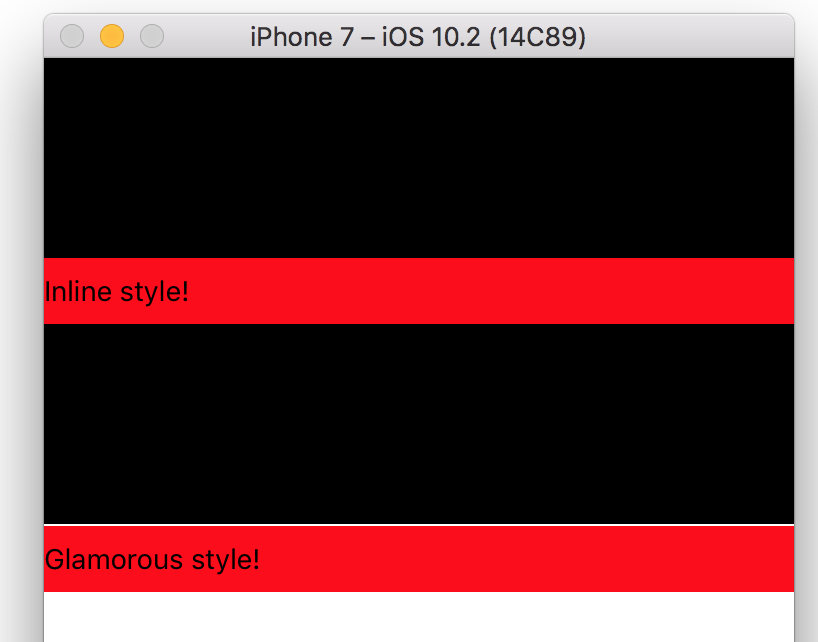
But I observed a difference in terms of a single pixel or two between the two implementations (see screenshots). When using the Glamorous component a few pixels are added to the top of the component breaking the layout.
CORRECT (using inline-styled View)

INCORRECT (using Glamorous component)

Reproduction: Please see above description

That's.. very interesting. The only difference I can see between the "vanilla" and glamorous version would be that the glamorous component is a higher-order component of an underlying View.. But I still can't think of what could go wrong there.
Would you be able to reproduce this in a repository that you can share here?

Thanks for your reply @ajwhite! Here is the code for reproduce (in App.js on blank CRNA):
import React from "react";
import { StyleSheet, Text, View } from "react-native";
import Glamorous from "glamorous-native";

const Wrapper = Glamorous.view(
  {
    backgroundColor: "red"
  },
  props => ({
    paddingTop: props.top ? props.gutter : 0,
    paddingRight: props.right ? props.gutter : 0,
    paddingBottom: props.bottom ? props.gutter : 0,
    paddingLeft: props.left ? props.gutter : 0
  })
);

export default class App extends React.Component {
  render() {
    return (
      <View>
        <View style={{ height: 100, backgroundColor: "black" }} />
        <View style={{ paddingTop: 8, paddingBottom: 8, backgroundColor: "red" }} >
          <Text>Inline style!</Text>
        </View>
        <View style={{ height: 100, backgroundColor: "black" }} />
        <Wrapper gutter={8} top bottom>
          <Text>Glamorous style!</Text>
        </Wrapper>
      </View>
    );
  }
}
RESULT
Thanks @lindekaer - this'll do. I likely won't be able to take a look at this until next week, but thanks for providing all the information 💯
