
aws-stepfunctions-samples
 aws-stepfunctions-samples copied to clipboard
 rlondner
AWS Step Function Sample with MongoDB Atlas, Twilio and AWS Simple Email Service
AWS Step Function Sample State Machine with MongoDB Atlas
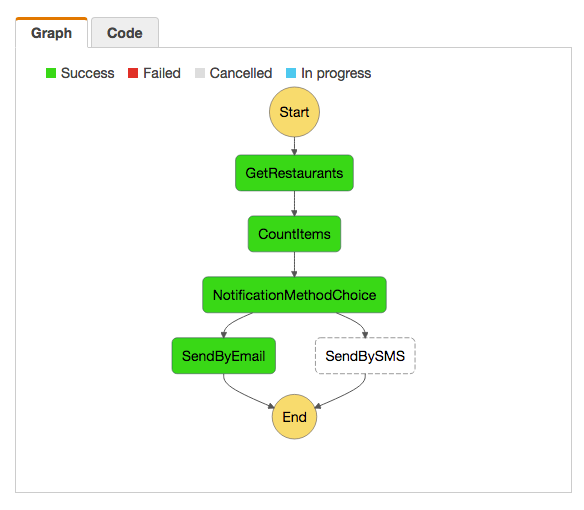
This repository provides the source code of 3 AWS Lambda functions written in Node.js and combined into one AWS Step Function State Machine to illustrate the workflow and orchestration capabilities of AWS Step Functions.
Software Requirements
In order to use this repository, you will need:
- A local computer with Node.js
- An Amazon Web Services account
- A MongoDB Atlas cluster (see this video to get started with a free M0 cluster)
- A Twilio account. A trial account is fine, but you will need to add the phone numbers you'd like to send text messages to on the Verified Called IDs page.
Note: this repository was built and tested on Mac OS X Sierra and Node.js 6.9.4
Setup
MongoDB Atlas
Since this Step Function relies on an existing dataset of restaurants, you must first import a sample dataset to your MongoDB Atlas cluster:
- Customize the import.sh script to import the restaurants.json file.
- Alternatively, you can download this dataset (also used in the MongoDB Shell Tutorial) and follow the next steps below.
- Edit the following command line by replacing the
$parameters with your own values:mongoimport --host $ATLAS_CLUSTER_URI --ssl -u $ATLAS_ADMIN -p $ATLAS_PWD --authenticationDatabase admin --db travel --collection restaurants --drop --file primer-dataset.json - Run your customized
mongoimportcommand above to import the dataset to your Atlas cluster. - (Optional) verify with MongoDB Compass that your
restaurantscollection was properly imported. The MongoDB Compass with Atlas blog post might help you configure Compass with MongoDB Atlas.
Amazon Web Services
This repository is made of the following Lambda functions:
- A GetRestaurants function that queries a collection of restaurants stored in a MongoDB Atlas database.
- A CountItems helper function whose role is solely to count the number of items in an array.
- A SendBySMS function that sends a text message using SMS by Twilio.
- A SendByEmail function that sends an email using AWS Simple Email Service.
The Common setup tasks below lists the tasks that you must perform for each of the 3 Lambda functions.
The Function-specific configuration tasks section below lists the tasks that are specific to each Lambda function.
Common setup tasks
For each of the 4 Lambda functions listed above (except the CountItems function), please perform the following tasks:
- Navigate to the root folder of the Lambda function (i.e. restaurants, email and sms) and run
npm installfrom a Terminal console to restore the required Node.js dependencies. - Run the
zip.shscript to zip all the files required by AWS Lambda (you might have to runchmod 744 zip.shfirst to allow thezip.shfile to run). This will generate anarchive.zipfile in every function folder. - Create a new AWS Lambda function and use the
archive.zipfile as the Upload a .ZIP file Code entry type. Refer to this AWS Lambda tutorial for additional help on AWS Lambda development and deployment. - Increase the timeout to 5 or 6s (optional but strongly recommended)
Function-specific configuration tasks
Here are the specific configuration tasks you must make for each Lambda function:
-
GetRestaurants function:
- Add a
MONGODB_ATLAS_CLUSTER_URIenvironment variable with the value of your MongoDB Atlas connection string (see this blog post for further details). - Copy/paste the contents of the
event.jsonfile in the Lambda Input test event window. - Note how the Node.js code is using performance optimization enhancements to speed up queries after the first call to the Lambda function.
- Add a
-
CountItems function:
- Create a blank Lambda function and copy/paste the content of the
index.jsfile into the AWS Lambda code editor. - Copy/paste the contents of the
event.jsonfile in the Lambda Input test event window.
- Create a blank Lambda function and copy/paste the content of the
-
SendBySMS function:
- Add a
TWILIO_ACCOUNT_SIDenvironment variable with the value of your Twilio account ID. - Add a
TWILIO_AUTH_TOKENenvironment variable with the value of your Twilio Auth Token. - Add a
TWILIO_PHONE_NUMBERenvironment variable with the value of your Twilio Phone Number. - Copy/paste the contents of the
event.jsonfile in the Lambda Input test event window.
- Add a
-
SendByEmail function:
- You must first set up AWS Simple Email Service in order for it to accept your sender email address as well as the recipient adress(es) you are planning to use.
- Create an S3 bucket and in that S3 bucket, create a Templates folder. Upload the Templates/Restaurants.html file into this Templates bucket.
- Add an
S3_BUCKETenvironment variable with the value of the S3 bucket you created in the previous step. - Add an
FROM_ADDRESSenvironment variable with the value of SES-verified email address you want to use as your sender email address. - Copy/paste the
event.jsonfile as your test event input and at least update theemailToattribute with an SES-verified email address (and potentially thefirstnameToattribute too). - Make sure the IAM role you use to run your Lambda function includes the following permissions (created as an inline or managed policy):
{
  "Version": "2012-10-17",
  "Statement": [
      {
          "Effect": "Allow",
          "Action": [
              "ses:SendEmail"
          ],
          "Resource": "*"
      },
      {
          "Effect": "Allow",
          "Action": [
              "s3:GetObject"
          ],
          "Resource": "*"
      }
  ]
}
AWS Step Functions
Once you have successfully created and tested the 4 Lambda functions above, head over (or go back) to the AWS Step Functions setup and code walkthrough for the last mile!
 rlondner