
rust-doc.vim
 rust-doc.vim copied to clipboard
 rhysd
rhysd
Search Rust documents and open with browser from Vim.
Open Rust document in Vim
cargo has a nice feature to generate document. But it doesn't have a feature to search it yet.
This plugin searches documents (standard libraries, libraries your crate depends on, and so on) from Vim.
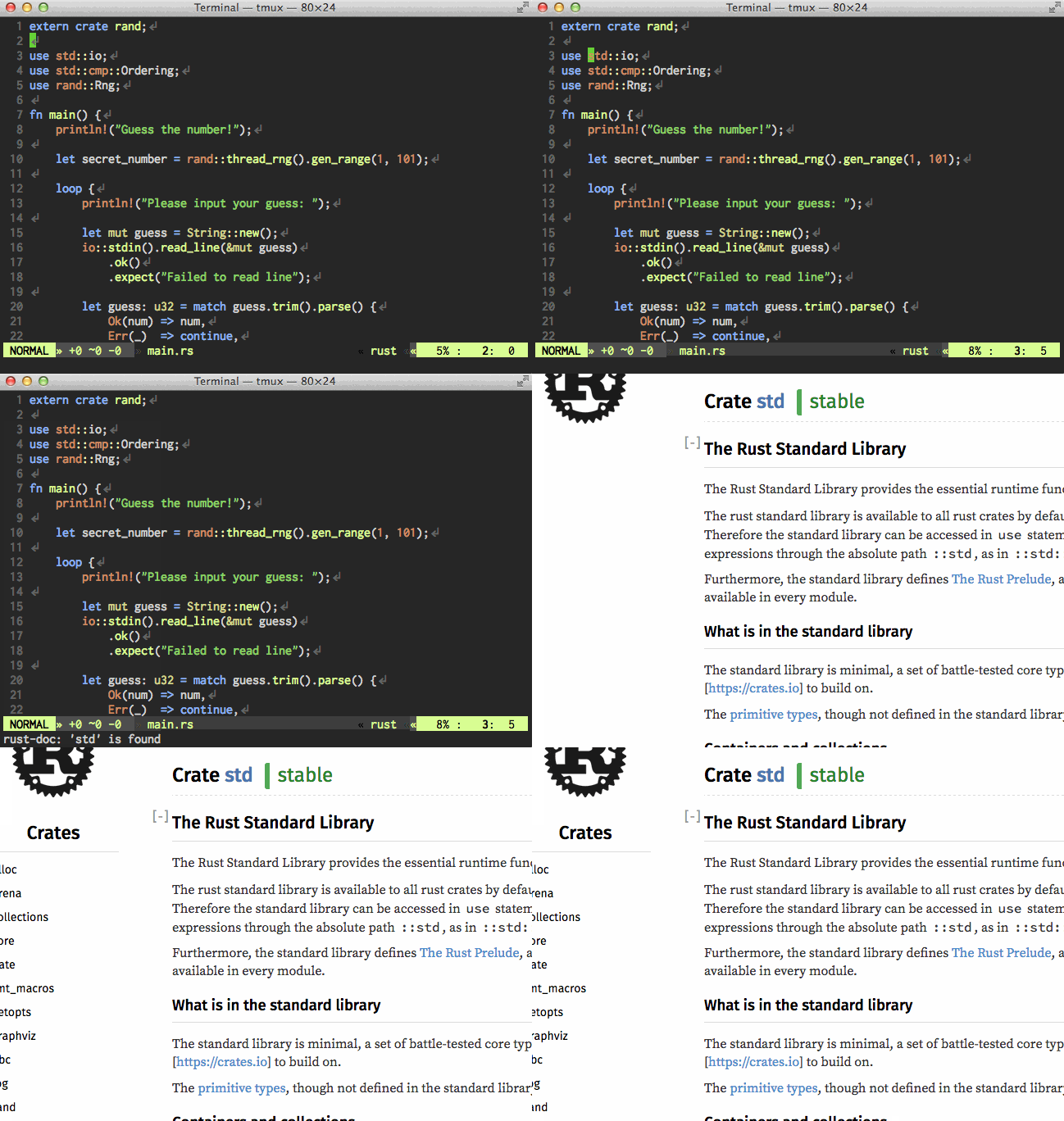
- Open a document for the word under cursor
std
- Search documents with unit.vim interface
Usage
:RustDoccommand
:RustDoc {crate or module name} [{identifier name}]
For example, assume that your crate uses rand.
:RustDoc randopens the document for craterand.:RustDoc rand::distributionsopens the document for modulerand::distributions.:RustDoc rand Rngopens the document for traitrand::Rng.
All arguments of the command can be completed. Please enter <Tab> to complete them.
Of course you can search standard libraries.
:RustDoc std::vec
And :RustDocFuzzy and :RustDocModule are also available.
Please see document for them for more detail.
- Mapping
K
Entering key K in your Rust source opens a document most corresponding to a word under the cursor.
K mapping is available in normal mode and visual mode. In normal mode, the word under the cursor is used.
In visual mode, the selected text is used.
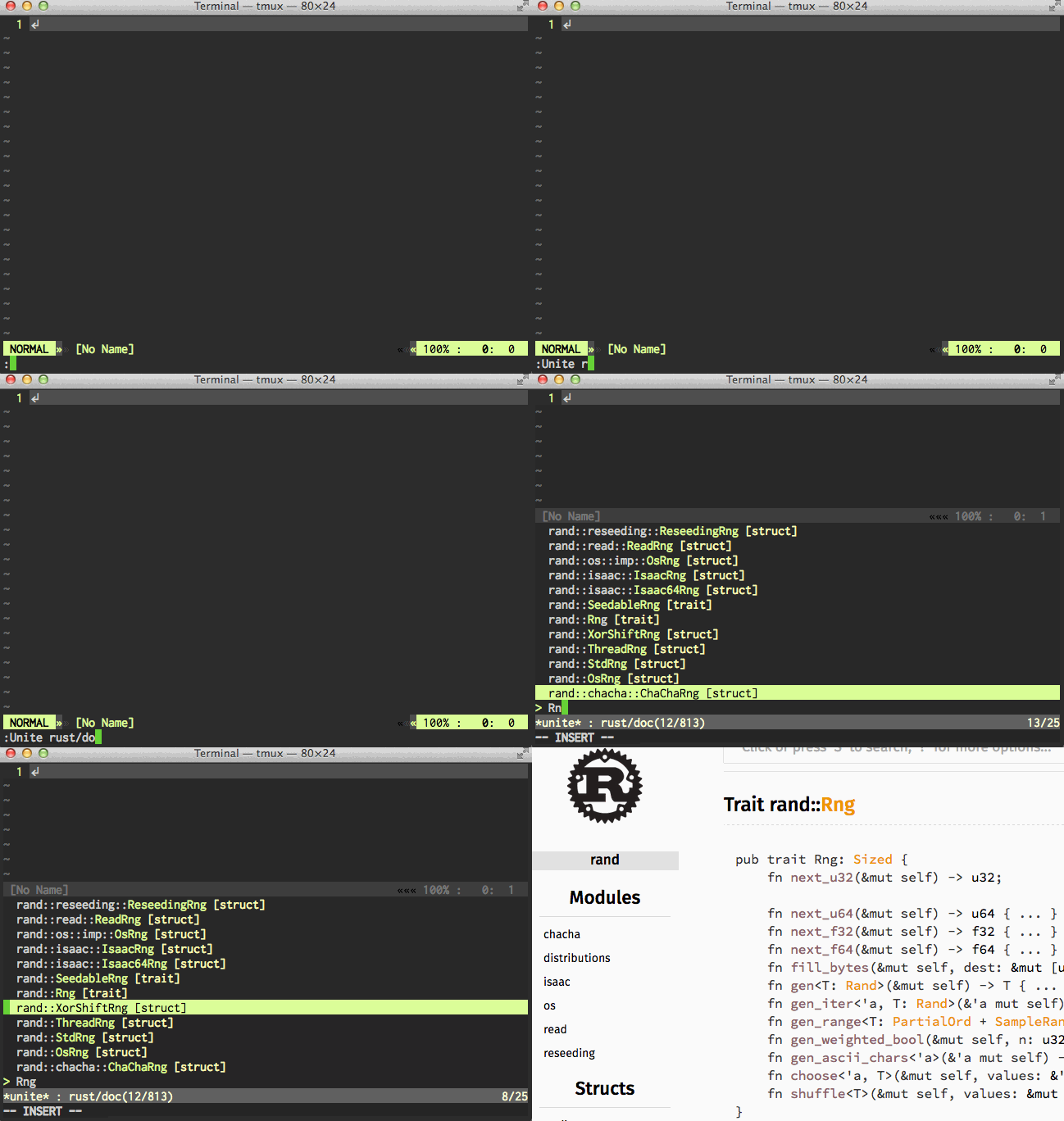
- unite.vim source
:Unite rust/doc
You can select from all document candidates with unite.vim interface.
And if you want to use unite.vim for K mapping, you can setup in your vimrc as follows.
let g:rust_doc#define_map_K = 0
augroup vimrc-rust
    autocmd!
    autocmd FileType rust nnoremap <buffer><silent>K :<C-u>Unite rust/doc:cursor -no-empty -immediately<CR>
    autocmd FileType rust vnoremap <buffer><silent>K :Unite rust/doc:visual -no-empty -immediately<CR>
augroup END
It may takes some time to prepare candidates. If you don't want to wait and it is enough for you to search only module names,
please specify modules to the argument of rust/doc source as below.
:Unite rust/doc:modules
- denite.nvim source
:Denite rust/doc
You can select from all document candidates with denite.nvim interface.
And if you want to use denite.nvim for K mapping, you can setup in your vimrc as follows.
let g:rust_doc#define_map_K = 0
augroup vimrc-rust
    autocmd!
    autocmd FileType rust nnoremap <buffer><silent>K :<C-u>DeniteCursorWord rust/doc<CR>
augroup END
It may takes some time to prepare candidates. If you don't want to wait and it is enough for you to search only module names,
please specify modules to the argument of rust/doc source as below.
:Denite rust/doc:modules
Installation
1. Install This Plugin
If you use some plugin manager, please follow the instruction of them. For example, you can install this plugin with neobundle.vim as below.
NeoBundle 'rhysd/rust-doc.vim'
If you use no plugin manager, copy all directories and files in autoload, plugin, ftplugin
and doc directories to your ~/.vim directory's corresponding directories.
Or you can also use Vim's standard package management. Please read :help packages.
2. (Optional) Setup Standard Library Documents
rust-doc.vim searches documents downloaded by rustup. If there is a toolchain installed by rustup, rust-doc.vim tries to use documentations in it.
If you want to see your own standard library documents, you must set g:rust_doc#downloaded_rust_doc_dir.
The variable should be string type and contain the path to rust documents bundled in downloaded rust tar.
e.g.:
$ wget https://static.rust-lang.org/dist/rust-1.0.0-i686-unknown-linux-gnu.tar.gz
$ tar xf rust-1.0.0-i686-unknown-linux-gnu.tar.gz
$ mv rust-1.0.0-i686-unknown-linux-gnu/rust-doc ~/Documents/
Then set the variable as below
let g:rust_doc#downloaded_rust_doc_dir = '~/Documents/rust-docs'
Customization
g:rust_doc#vim_open_cmd
Vim command to open the path to a document. rust-doc.vim uses it to open the document if it is not empty. The command must take a url to the local file.
g:rust_doc#open_cmd
Shell command to open the path to a document. rust-doc.vim uses it to open the document if it is not empty. The command must take a url to the local file.
g:rust_doc#do_not_ask_for_module_list
If the value is 1, rust-doc.vim never ask if it shows the list of modules/identifiers when no document is found.
The default value is 0.
g:rust_doc#define_map_K
If the value is 1, K mappings described above is defined. The default value is 1.
g:rust_doc#downloaded_rust_doc_dir
As described above, the path to directory of rust standard library documents.
License
This plugin is distributed under the MIT License.
Copyright (c) 2015 rhysd
 rhysd
rhysd