

 rhizome-ai
import age report an error
when I execute command:
sudo apt-get update
sudo apt-get install python3-dev libpq-dev
pip install --no-binary :all: psycopg2
pip install antlr4-python3-runtime
pip install apache-age-python,
when import age, report an error:


I think apache-age-python version you installed is not latest.
Please uninstall module and re-install it.
pip uninstall apache-age-python pip install apache-age-python==0.0.4

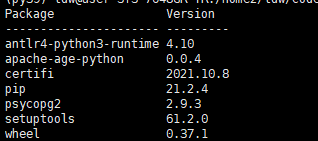
Is there any update on this issue? Any fix? I'm running into the same error. Thank you.

Sorry for late reply.
antlr4-python3-runtime package has some changes in recent version.
So, uninstall current antlr package first
pip uninstall antlr4-python3-runtime
And, please re-install specific version 4.9.2
pip install antlr4-python3-runtime==4.9.2
Any chance of pushing out an updated release to PyPi. The version on Pip definately does not work with the instructions provided.

You can build apache-age-python from source code
sudo apt-get update
sudo apt-get install python3-dev libpq-dev
pip install --no-binary :all: psycopg2
pip install antlr4-python3-runtime==4.11.1

python setup.py install
And, I just relaased apache-age-python 0.0.5 to PyPi.
pip uninstall apache-age-python pip install apache-age-python==0.0.5