

 reworkd
sh: 1: next: not found
But I reported an error when executing npm run dev
> [email protected] dev
> next dev

sh: 1: next: not found

system configuration:Linux ITX 5.19.0-40-generic #41~22.04.1-Ubuntu SMP PREEMPT_DYNAMIC Fri Mar 31 16:00:14 UTC 2 x86_64 x86_64 x86_64 GNU/Linux


npm ERR! code 1
npm ERR! path /mnt/256G/docker/AgentGPT/node_modules/prisma
npm ERR! command failed
npm ERR! command sh -c node scripts/preinstall-entry.js
npm ERR! ┌─┐
npm ERR! │   …│
npm ERR! └┘

npm ERR! A complete log of this run can be found in:
npm ERR!     /root/.npm/_logs/2023-04-16T13_54_31_166Z-debug-0.log
 @yourepicservices
2023-04-16T13_54_31_166Z-debug-0.log
@yourepicservices
2023-04-16T13_54_31_166Z-debug-0.log
npm ERR! Missing script: "dev"
npm ERR!
npm ERR! To see a list of scripts, run:
npm ERR!   npm run

npm ERR! A complete log of this run can be found in:
npm ERR!     /root/.npm/_logs/2023-04-16T14_13_54_083Z-debug-0.log
27 timing npm:load Completed in 10ms
28 silly logfile start cleaning logs, removing 1 files
29 timing command:run Completed in 2ms
30 verbose stack Error: Missing script: "dev"
30 verbose stack
30 verbose stack To see a list of scripts, run:
30 verbose stack   npm run
30 verbose stack     at RunScript.run (/usr/share/nodejs/npm/lib/commands/run-script.js:95:13)
30 verbose stack     at async module.exports (/usr/share/nodejs/npm/lib/cli.js:66:5
Looks to me like you need to update nodejs, assuming that's the engine it's referring to.
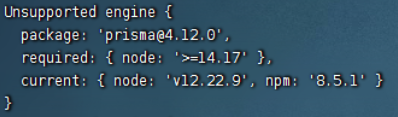

Even I get the same error whenever I try to do 'npm install'(all the dependencies are latest) Sometimes I get the issue as "pngquant not installed" but getting error while installing that too. Any help would be appreciated


I run the following command: num=os.system("cat test.txt | wc -l")
, and face the problem too, sh: 1: 224400: not found

Sorry @QinHsiu I don't think I'm following, why are you running that command?