

 reflex-dev
Cannot filter out data using a Korean keyword in Datatable.
Describe the bug I want to filter out some data using Select component which is composed to different language keyword. I made a list of keyword using original DataFrame and State class including variables and a filtering function. It worked well about English keywords but didn't work about Korean keywords
I printed a keyword variable in filtering function and found difference between English and Korean bleow. Korean(전기차) : \uc804\uae30\ucc28 English: electric car
To Reproduce Steps to reproduce the behavior:
`raw_result_keywords = sorted(raw_results.Keywords.unique().astype(str))
class State(pc.State): # Variables for Raw Results raw_result_keywords: str
@pc.var def raw_result_df(self) -> pd.DataFrame: """The data."""
    results = raw_results.copy().reset_index(drop=True)
    results = results.iloc[:,[0,1,8,2,3,4,15,16,18]]
    print(self.raw_result_keywords)

   if self.raw_result_keywords:
        results = results[(results.Keywords == self.raw_result_keywords)]
def index() -> pc.Component: return pc.center( pc.tabs( pc.tab_list( pc.tab("Raw Data"), ), pc.tab_panels( pc.tab_panel( pc.vstack( raw_selection(), pc.data_table( data=State.raw_result_df, pagination=True, search=True, sort=True, resizable=True, ), ), ), width="100%", ), bg="white", color="black", shadow="lg", width="100%", ), ` Expected behavior I want to filter out using Korean Keywords
Screenshots If applicable, add screenshots to help explain your problem.
** Specifics (please complete the following information):**
- Python Version: 3.9.13
- Pynecone Version: 0.1.16
- OS: windows 10
- Browser (Optional): Edge
Additional context Add any other context about the problem here.


@d29107d
Actually, my code is too long. So i attached some code below.
from pcconfig import config

import pynecone as pc
import pandas as pd
import plotly.express as px
import plotly.graph_objects as go
import os

dir_path = 'D:/Data/Demonstration/'

### loading result data
result_file_path = dir_path+'/Result_Data/'
result_file_list = os.listdir(result_file_path)
result_file_name = result_file_list[-1]
print(result_file_name)

result_data = pd.read_csv(result_file_path+result_file_name, encoding='UTF-8',  index_col=0)

df_result = result_data.copy()
result_keywords = sorted(df_result.Keywords.unique().astype(str))

class State(pc.State):
    """The app state."""
    # Variables for Results
    result_keywords: str

    @pc.var
    def filtered_result_df(self) -> pd.DataFrame:
        """The data."""
        filtered_result = df_result.copy().reset_index(drop=True)
        filtered_result = filtered_result.iloc[:,[0,1,2,3]]

        **print(self.result_keywords)** # printed a different result
        if self.result_keywords:
            filtered_results = filtered_result[(filtered_result.Keywords == self.result_keywords)]

        if filtered_result.empty:
            return pd.DataFrame()
        else:
            return filtered_result.fillna("")

def keyword_selection():
    return pc.vstack(
        pc.hstack(
            pc.text("Keyword: ", font_size="1em", as_="b"),
            pc.select(
                filtered_result_keywords,
                placeholder="Select a keyword (ALL)",
                on_change=State.set_filtered_result_keywords,
            ),
            spacing="1em",
        ),
        width="100%",
    )

def index() -> pc.Component:
    return pc.center(
        pc.vstack(
            pc.divider(),
            pc.tabs(
                pc.tab_list(
                    pc.tab("Data with Filtering function"),
                 ),
                pc.tab_panels(
                    pc.tab_panel(
                        pc.vstack(
                            keyword_selection(),
                            pc.data_table(
                                data=State.filtered_result_df,
                                pagination=True,
                                search=True,
                                sort=True,
                                resizable=True,
                            ),
                        ),
                    ),
                    width="100%",
                ),
                bg="white",
                color="black",
                shadow="lg",
                width="100%",
            ),
            pc.divider(),
            padding_top="6em",
            width="100%",
        )
    )

# Add state and page to the app.
app = pc.App(state=State)
app.add_page(index)
app.compile()
Thanks in advance.
@leadline42 I try to run your code locally, but it doesn't work. Can you provide some code that I can run locally?
@d29107d
I am so sorry about that and i attach modified code with data.
# type: ignore
"""Welcome to Pynecone! This file outlines the steps to create a basic app."""
from pcconfig import config

import pynecone as pc
import pandas as pd
import plotly.express as px
import plotly.graph_objects as go
import os
from .top import navbar

### result data
result_data = pd.DataFrame({"Products":["Tesla model X", "아이오닉3", "Tesla model Y", "아이오닉4"],
                            "Keywords":["Electric Car", "전기차", "Electric Car", "전기차"]})

df_result = result_data.copy()
filtered_result_keywords = sorted(df_result.Keywords.unique().astype(str))

class State(pc.State):
    """The app state."""
    # Variables for Results
    filtered_result_keywords: str

    @pc.var
    def filtered_result_df(self) -> pd.DataFrame:
        """The data."""
        filtered_result = df_result.copy().reset_index(drop=True)

        print(self.filtered_result_keywords) # printed a different result
        if self.filtered_result_keywords:
            filtered_result = filtered_result[(filtered_result.Keywords == self.filtered_result_keywords)]

        if filtered_result.empty:
            return pd.DataFrame()
        else:
            return filtered_result.fillna("")

def keyword_selection():
    return pc.vstack(
        pc.hstack(
            pc.text("Keyword: ", font_size="1em", as_="b"),
            pc.select(
                filtered_result_keywords,
                placeholder="Select a keyword (ALL)",
                on_change=State.set_filtered_result_keywords,
            ),
            spacing="1em",
        ),
        width="100%",
    )

def index() -> pc.Component:
    return pc.center(
        pc.vstack(
            pc.divider(),
            pc.tabs(
                pc.tab_list(
                    pc.tab("Data with Filtering function"),
                 ),
                pc.tab_panels(
                    pc.tab_panel(
                        pc.vstack(
                            keyword_selection(),
                            pc.data_table(
                                data=State.filtered_result_df,
                                pagination=True,
                                search=True,
                                sort=True,
                                resizable=True,
                            ),
                        ),
                    ),
                    width="100%",
                ),
                bg="white",
                color="black",
                shadow="lg",
                width="100%",
            ),
            pc.divider(),
            padding_top="6em",
            width="100%",
        )
    )

# Add state and page to the app.
app = pc.App(state=State)
app.add_page(index)
app.compile()
You can get some values in terminal when you change a keyword in Selection. (below)
Electric Car \uc804\uae30\ucc28
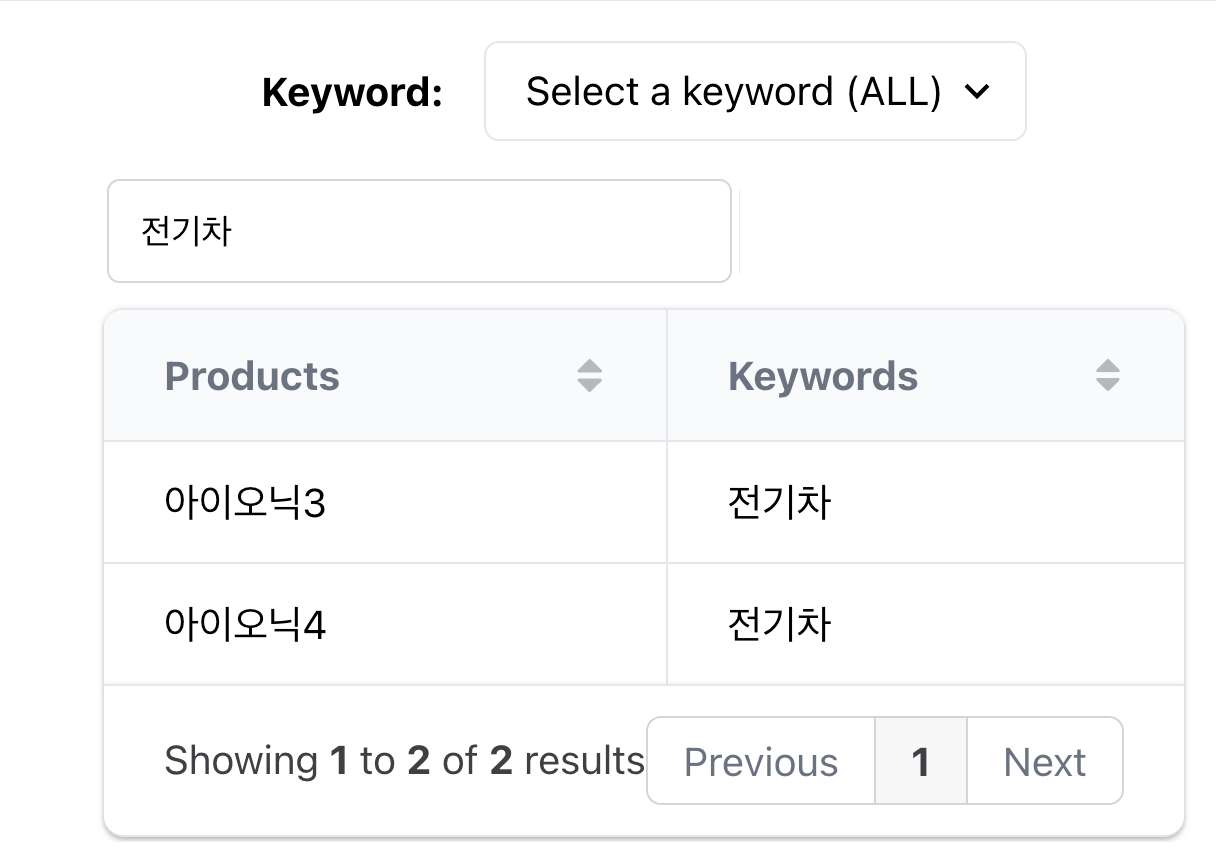 It works well in my local.
@d29107d
I want to use Select component which is 'Keyword: Select a keyword (ALL)'. I knew that it worked well with Input component which is 'Type a keyword'.
@leadline42
self.filtered_result_keywords = self.filtered_result_keywords.encode('utf-8').decode('unicode_escape')
You can fix like above.
@Alek99 Does pynecone have a way to change a var before rendering?
@leadline42
self.filtered_result_keywords = self.filtered_result_keywords.encode('utf-8').decode('unicode_escape')You can fix like above.@Alek99 Does pynecone have a way to change a var before rendering?
This response may be way overdue but we do have computed vars for this purpose

Closing this issue now, feel free to reopen or open another issue if you face further issues