

 react-navigation
Custom component in headerTitle has wrong position
Current behavior
I have following config in navigation (basically I want the title to wrap to two lines if it does not fit)
<Stack.Screen
	name={"ScreenName}
	component={ScreenComponent}
	options={() => ({
		headerTitle: () => (
			<Text
				numberOfLines={2}
				ellipsizeMode="tail"
				adjustsFontSizeToFit
				style={{ marginRight: 64, flex: 1, textAlign: 'center'}}
			>
				Custom header title component
			</Text>
		),
	})}
/>
leads to correct position on iPhone 11 pro max, but wrong on iPhone 14 pro. It's also good on iPhone 13 pro. Don't mind the horizontal alignment, I upgraded to current versions and something works different, works fine on versions I actually use in project.

Replacing the Text component with simple <Text>Custom header title component</Text>

In the linked repro, the behavior is different, I will try to identify why, but there's still some issue:
- after rendering the first screen, the title is at the bottom
- after navigating, the title on the next screen is in correct centered position
- after navigation back to the first screen, the title on the first screen is moved to correct centered position
Expected behavior
custom component in headerTitle is rendered same on iPhone 11 and iPhone 14
Reproduction
https://github.com/CptFabulouso/react-navigation-header-issue
Platform
- [ ] Android
- [X] iOS
- [ ] Web
- [ ] Windows
- [ ] MacOS
Packages
- [ ] @react-navigation/bottom-tabs
- [ ] @react-navigation/drawer
- [ ] @react-navigation/material-bottom-tabs
- [ ] @react-navigation/material-top-tabs
- [ ] @react-navigation/stack
- [x] @react-navigation/native-stack
Environment
- [x] I've removed the packages that I don't use
| package | version |
|---|---|
| @react-navigation/native | ^6.0.12 |
| @react-navigation/bottom-tabs | ^6.3.3 |
| @react-navigation/material-top-tabs | ^6.2.3 |
| @react-navigation/native-stack | ^6.8.0 |
| react-native-safe-area-context | ^4.3.3 |
| react-native-screens | ^3.17.0 |
| react-native-gesture-handler | ^1.10.3 |
| react-native-reanimated | 1.13.3 |
| react-native-tab-view | ^3.1.1 |
| react-native-pager-view | ^5.4.25 |
| react-native | 0.66.1 |

Hey! Thanks for opening the issue. The issue doesn't seem to contain a link to a repro (a snack.expo.dev link, a www.typescriptlang.org/play link or link to a GitHub repo under your username).
Can you provide a minimal repro which demonstrates the issue? Please try to keep the repro as small as possible and make sure that we can run it without additional setup.
A repro will help us debug the issue. The issue will be closed automatically after a while if you don't provide a repro.
![github-actions[bot] avatar](https://avatars.githubusercontent.com/in/15368?v=4 "Published by a pub.dev verified publisher")

Hey! Thanks for opening the issue. Seems that this issue is related to react-native-screens library which is a dependency of React Navigation. Can you also post your issue in this repo so that it's notified to the maintainers of that library? This will help us fix the issue faster since it's upto the maintainers of that library to investigate it.

Got a similar issue with the iphone 14 pro devices dynamic island.
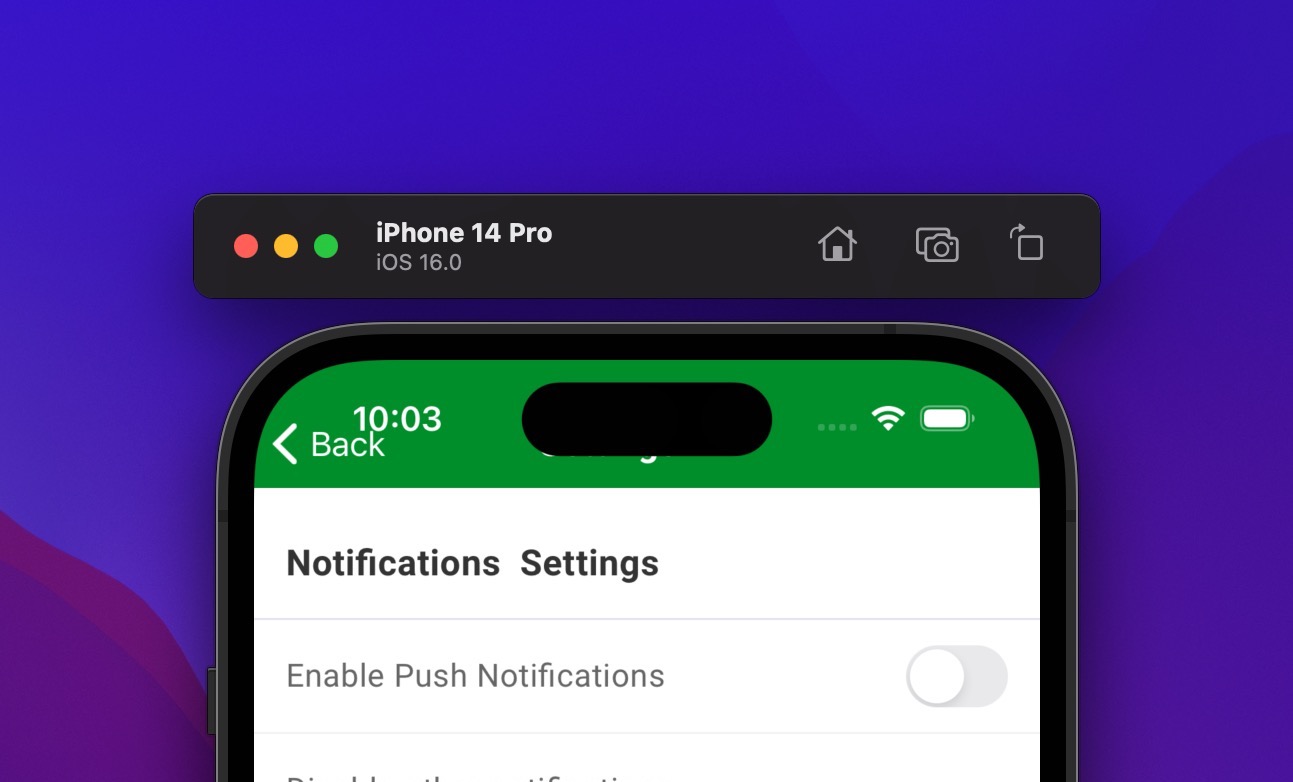
This happens in simulator and when deployed to the app store but for some reason it works correctly in testflight

@johhansantana Had a similar issue on iPhone Max Pro 14
But found that I did pass a custom header-height in the options and when I removed this:
headerStyle: {
  backgroundColor: theme.colors.primary['500'],
  // height: 50 + statusHeight,
},
the issue vas fixed:

Any updates to this? Workarounds using a paddingTop if there is a dynamic island work quite fine, but this blocks the use of the header blur effect because there's a non translucent padding...
