

 react-dates
Auto position when reached when reached end of parent
It would be nice to have option to auto position the date selector when you react the end of the parent or the browser window.

Hi @Rafi993 The date selector should auto-position according to the browser window (there's a responsive function that checks for the edge of the screen and shifts over the datepicker accordingly). Can you share a screenshot of the behavior you are seeing and the version of react-dates you are using?

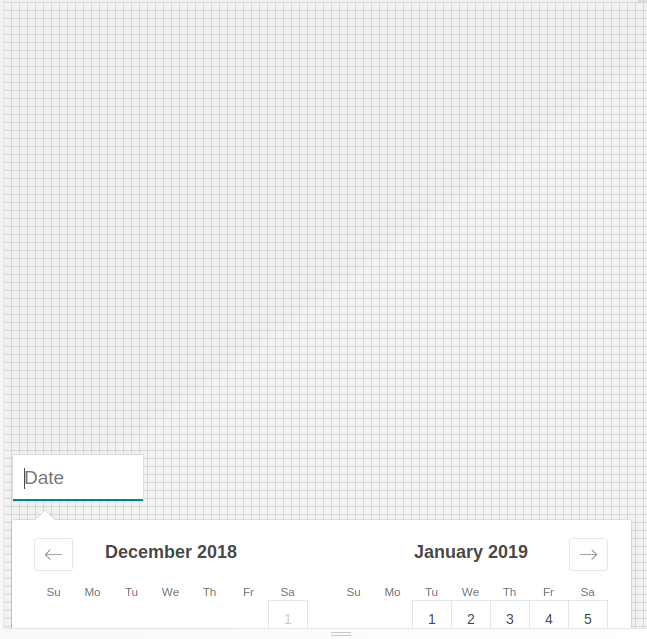
Ah, specifically from the bottom. It is responsive to the left and right edges of the screen, but does not scroll the page up when the picker is out of view.
@Rafi993 Are you suggesting that the picker automatically open up when the calendar is below the fold or that the viewport scroll up to show the calendar? I think for the latter, you could probably do right now by setting a ref on the SingleDatePicker component, checking where it is in relation to the viewport and updating the openDirection prop accordingly.
Internally there is not any code for that although I guess it is a possible addition. I am not certain that it is a high priority ask, but it is a potential addition.
Hi @majapw, I'm also interested in the picker automatically opening upward when there isn't enough space in the viewport for the calendar.
I think for the latter, you could probably do right now by setting a ref on the SingleDatePicker component, checking where it is in relation to the viewport and updating the
openDirectionprop accordingly.
Would I need to subscribe to scroll and resize events to achieve this or is there an easier way that you had in mind?

It would be nice if this feature was built in just like the left/right repositioning is. To do it properly requires some boilerplate for re-checking on scroll and resize and it would be great if that was just included in the existing check for left/right.

This feels like a feature that should definitely be baked into the component.

Just adding my +1 here.
Having to do some hacky workarounds due to lack of this feature.

