

 react-component
The last column with no width specified is hidden in case of lack of space (fixed layout, scroll.x=true)
Reproduction link: https://codesandbox.io/s/goofy-mccarthy-714t3?file=/src/App.js
Preconditions:
- table-layout: fixed
- scroll={ x: true }
- all columns have specified width, the last one - not
Steps to reproduce:
- Reduce the page size so the half of the table is under the horizontal scroll
- Scroll horizontal scrollbar to the end
Actual result: the last column "Operations" is hidden Expected result: "Operations" column is visible.

I think I'm facing the same issue, or a similar one

by giving all the columns fixed width, excluding one, it auto expands to take all the available space. but it also means that it doesn't have a min-width, which cases to column to disappear on smaller screen resolutions/sizes
by looking at the source code, and specifically this code snippets
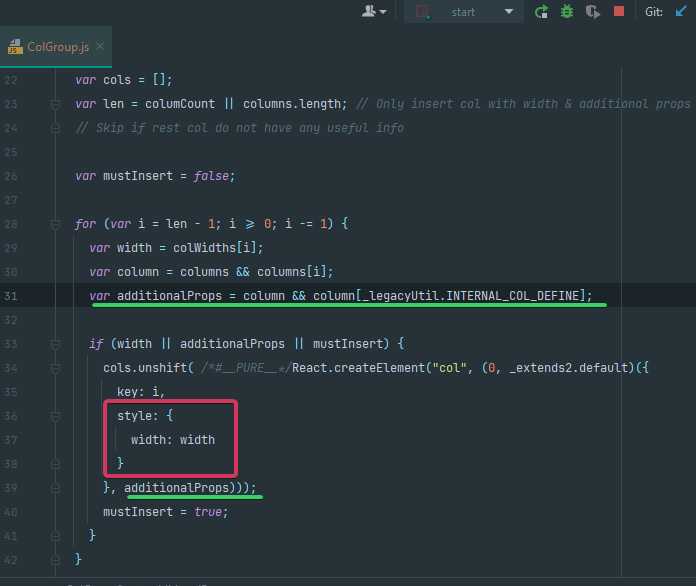

you can override the html attributes passed to the <col> tag by adding an "RC_TABLE_INTERNAL_COL_DEFINE" field to the desired column options
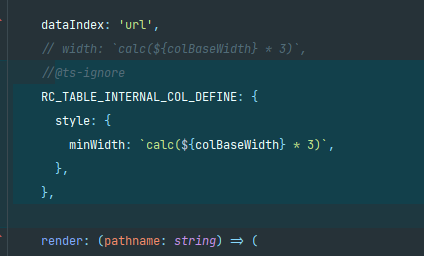
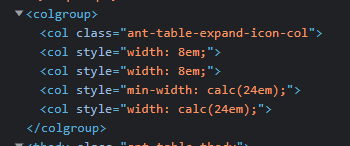
which should resolve the issue in an "unofficial" way

@MorisR, that is a good idea. But unfortunately, it doesn't work in Firefox. Please, check it here. https://codesandbox.io/s/autumn-shadow-22bjj?file=/src/App.js