

 rbjaxter
Spy Disguise Menu Stuck in Top Left?
I heard how good this hud was and decided to use it but when I played Spy, the disguise menu was stuck in the top left unlike being stuck in the middle where it always is. Now I have heard some people say it is because I prefer to play TF2 with a controller but that would make no sense since literally every hud never has had this issue before.
Below is a screenshot I took to show my issue:
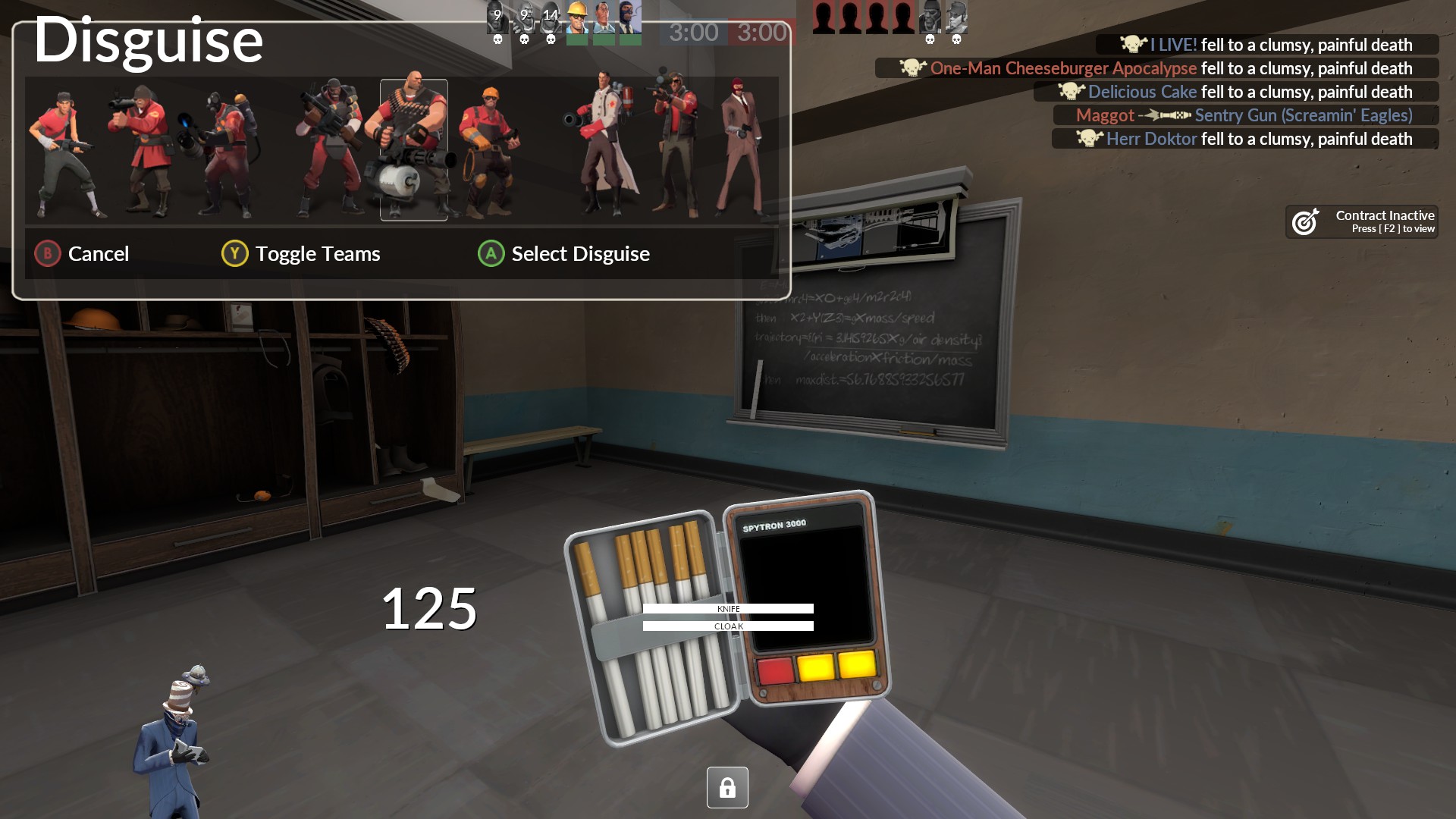
I hope this helps, if you need anymore info that I did not list, please let me know.

Unfortunately this is just an issue with me not having touched the controller-portion of the disguise/build UIs; controllers aren't entirely supported at the moment with the hud.
There are two commands that exist to switch it back to the proper displaying UI (tf_build_menu_controller_mode 0 & tf_disguise_menu_controller_mode 0), but I'm assuming this might also affect the ability to use the controller (not sure if it will).

I can try to see if it works, is this a command I put in the files somewhere or do I use the console ingame? Thanks for responding.
EDIT: I tested them with inserting it into the console, they work but the only issue is it doesn't show what I am going to select like in the screenshot before where it has an indicator for what you are selecting from buildings and disguises. Controller inputs still work though.
may or may not be kinda fixed based on the above commit, not sure. I still have no way to easily test with a controller
Okay yeah I am seeing the new menu for engineer and spy, the only issue is unlike with the controller menus, these have no indication of what building I am picking/destroying or what class im disguising as.
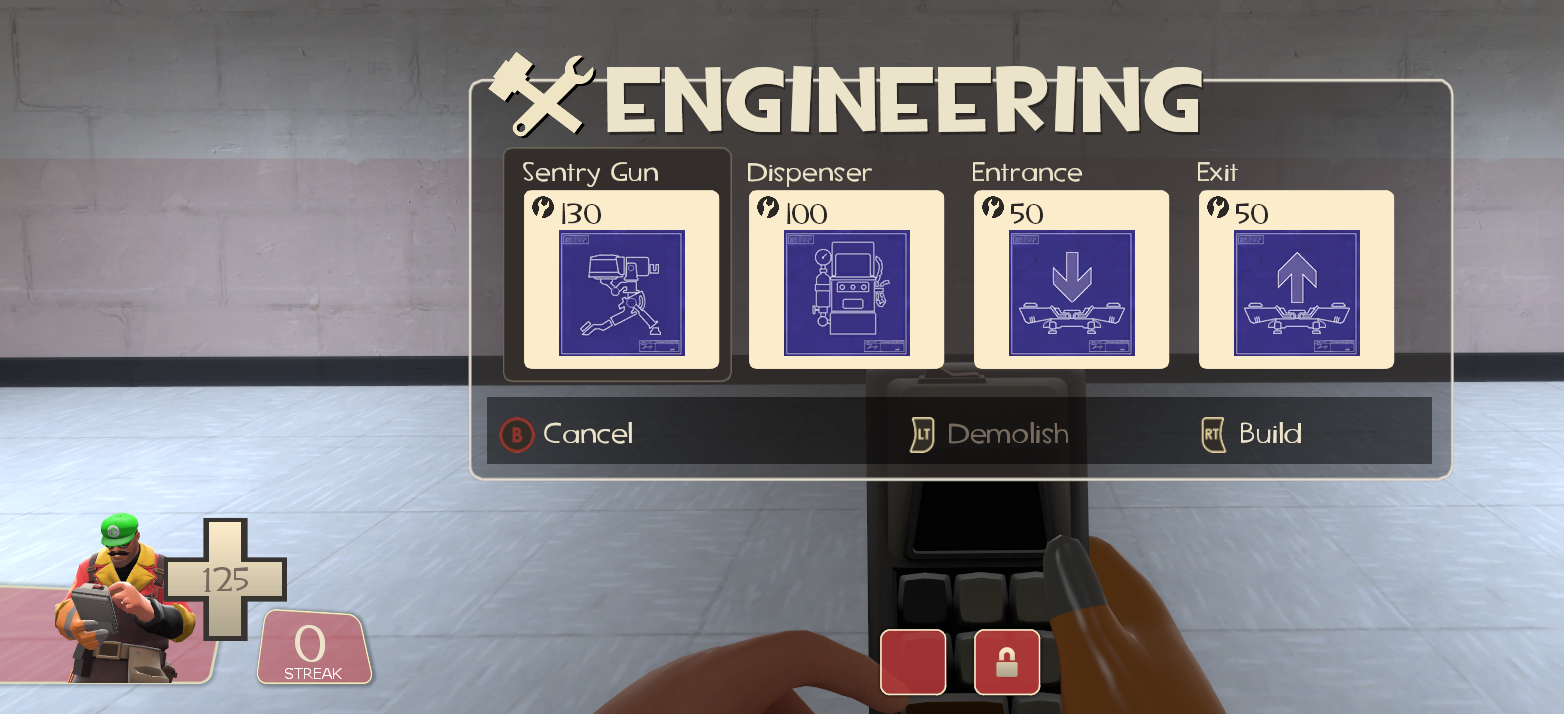 Example being this outline of the Sentry Gun
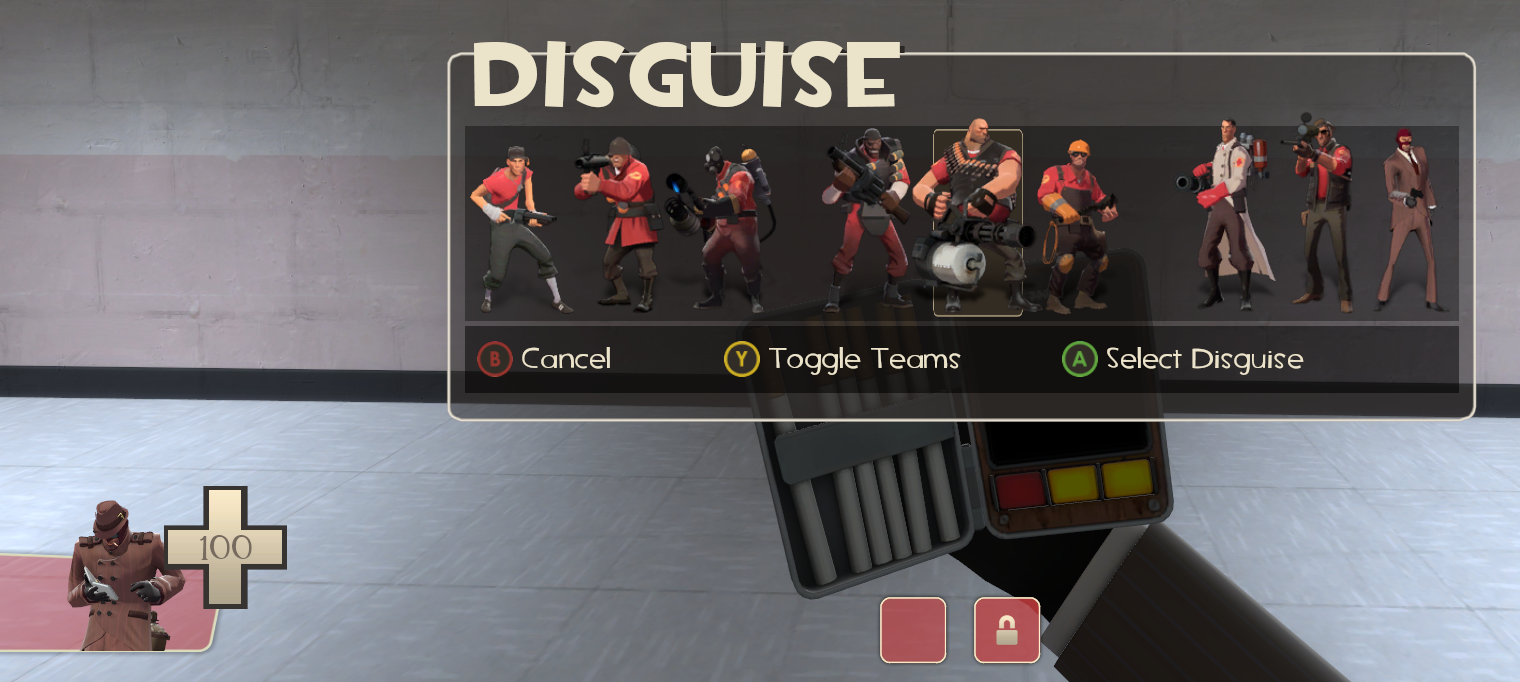 and the outline of the class you disguise as.
Hope this maybe helps!
Yeah, that's the part I was worried about. Hmm... I need to do some more digging around on how to get a virtual controller running on my PC. If I could just see the same console UI you're seeing it'd be much easier to fix, haha.
I decided to mess with this a bit more, I think I've made some good progress:
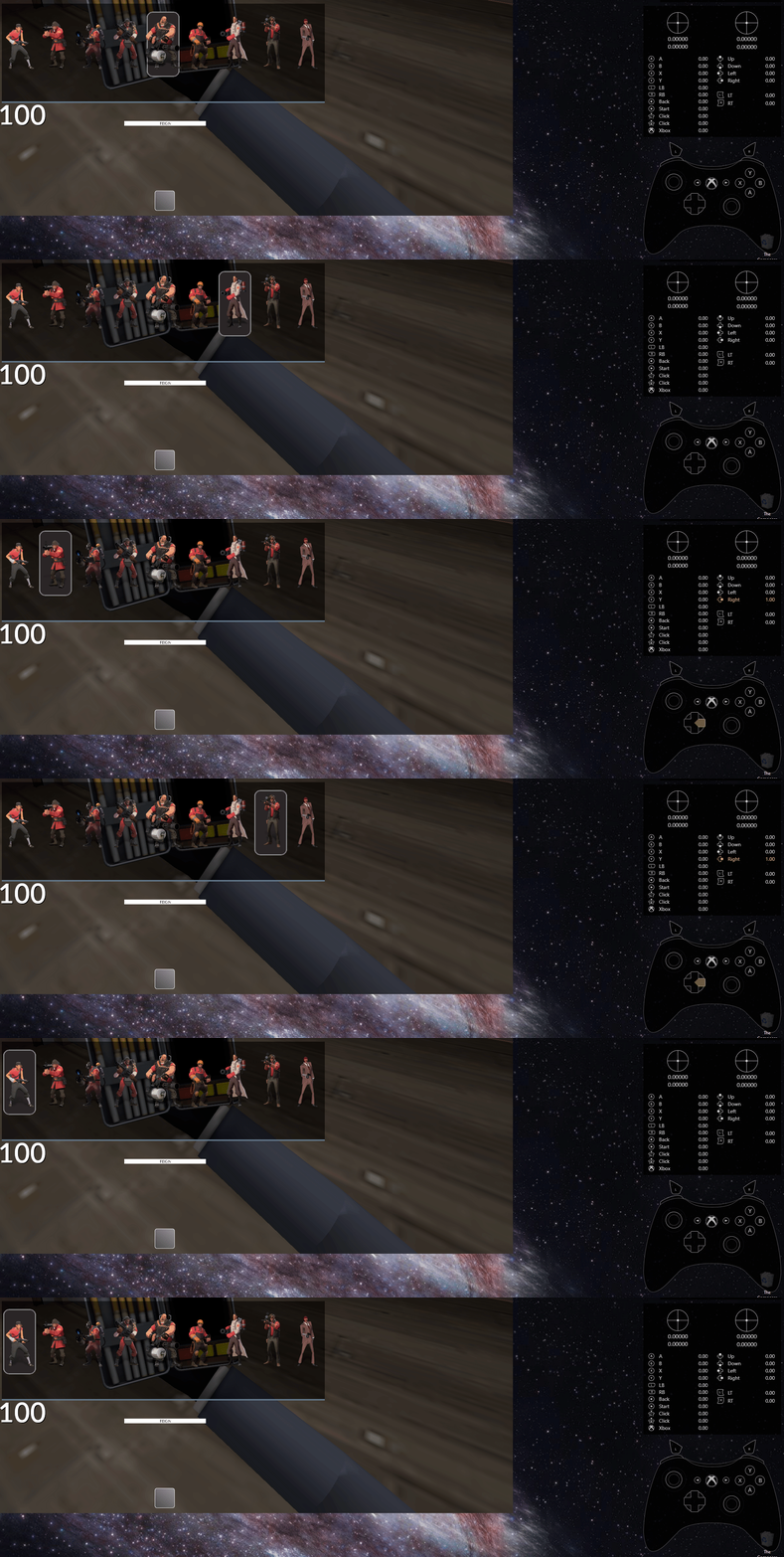
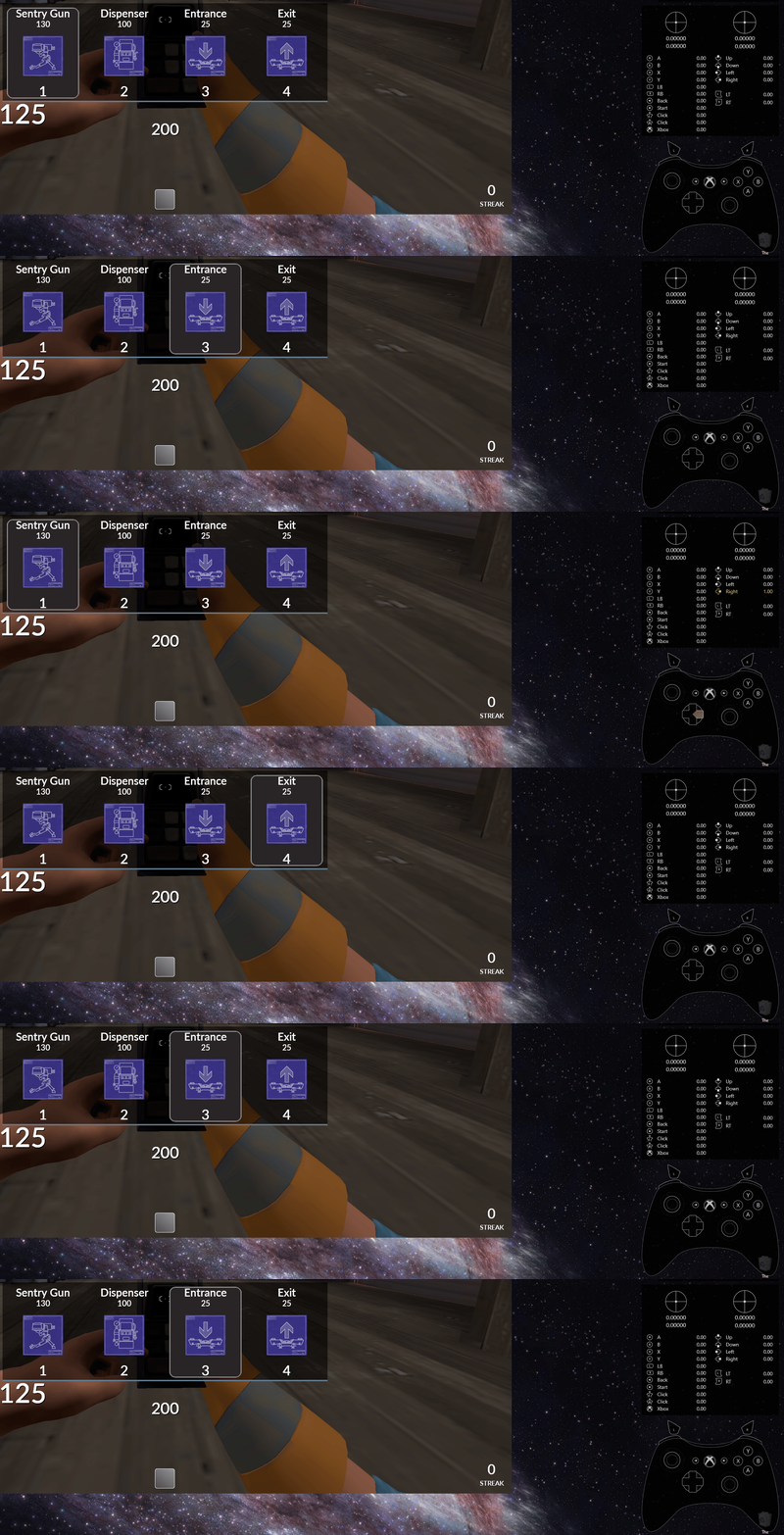 (program that finally made this easy to test was reWASD, though it's a paid program so I'm just using a trial)
@SirLuigi5528 Do you happen to know of anything else that is broken with a controller? I saw a stream using budhud with a controller (koyotemoone), maybe have been an older version of the hud but it seemed like the taunt UI as well as the respawn screen were a bit strange (showing bars at top/bottom, etc).
I'd have to check to see, but I will make sure. Great to see you are doing well with the controller menus. Thats why I have been stuck with toonhud since others huds dont factor controllers. As for destroy UI, there isnts a destroy menu, its left trigger to destroy unlike where you have to open a separate menu to destroy buildings
Alright, using the hud the build and disguise menus are in the middle with the build menu having the outline of what you're building but I still don't see the outline for the disguise (unless you are still working on that since I saw it on the examples you showed). Other than that, the only thing I wasn't sure about was with the vaccinator as I don't know if the resistance indicator is supposed to be there
Example:
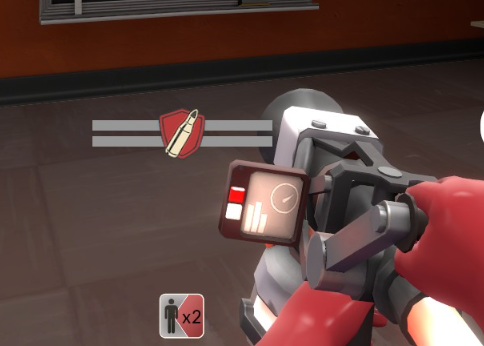 Again other than that, it is much more controller accessible!
Yeah, that's where the shield should be displayed. Glad to hear it's coming across passably on your end too :)
The taunt menu seems okay too? I may need to look at the eureka effect too actually...heck
Oh you're right! Lemme check that real quick for you! I almost forgot!
Okay just checked and yeah you were right about the eureka effect, I completely overlooked it. No indicators or image for exit teleporter.
Eureka Effect Menu:
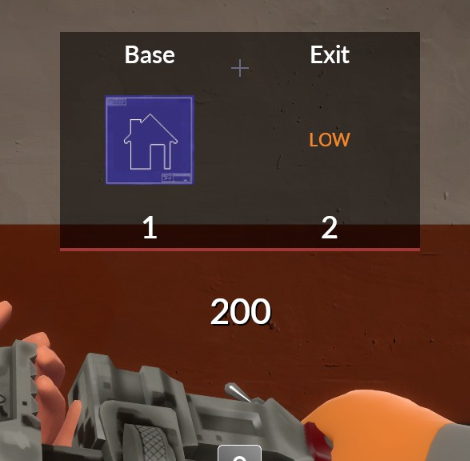 As for the taunt menu, they never really did indicators for taunts so I always just used the taunt menu like everyone else except opening it with the X button on controller
Taunt Menu:
As for the taunt menu, they never really did indicators for taunts so I always just used the taunt menu like everyone else except opening it with the X button on controller
Taunt Menu:
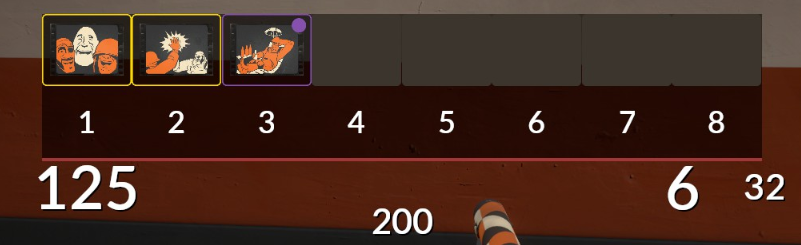
Again, it's great to have you listen to feedback even from me who plays TF2 on controller lol. I get a lot of hate for playing with controller in TF2.
Thank you for finding all of that. And of course, it's my pleasure :D. I never know how many people use certain features or play under certain conditions (controller, etc) so I'd like to cover as many as I can. I was just unfortunately having a lot of troubles getting the controller elements to display to work on them.
I'll try to see what I can do with those to get it all touched up
I see. I know nothing about hud development so I didn't think it was much trouble to try and make a hud accessible to controller players but it's nice to hear you want to cover center conditions of how people play TF2. If I could, I would want to help other hud developers find issues with their huds with controller compatibility but it's hard since usually some huds don't have good github pages. If you need me to check anything else, I can check. Again, thanks!
It's a bit tricky with my hud just because there's a lot of #base shenanigans going on. You effectively have to have twice the amount of engineer files to account for 360 and non-360 (triple if you want to support steam controller too).
the tricky part is more so figuring out how to use #base in such a way that you only have to change a few files to change the entire appearance. how I'm doing it at the moment means that, if I change the non-360 UI in the future, it'll also update the 360 UI version. simply copying the files over and editing both 360 and non-360 files at the same time would be doable, but a pain if it ever actually came to it.
here's some progress on the build UI. I wasn't too sure whether or not I should keep the buttons, but I also improved the quality of them (because they look horrible on lower graphics quality)
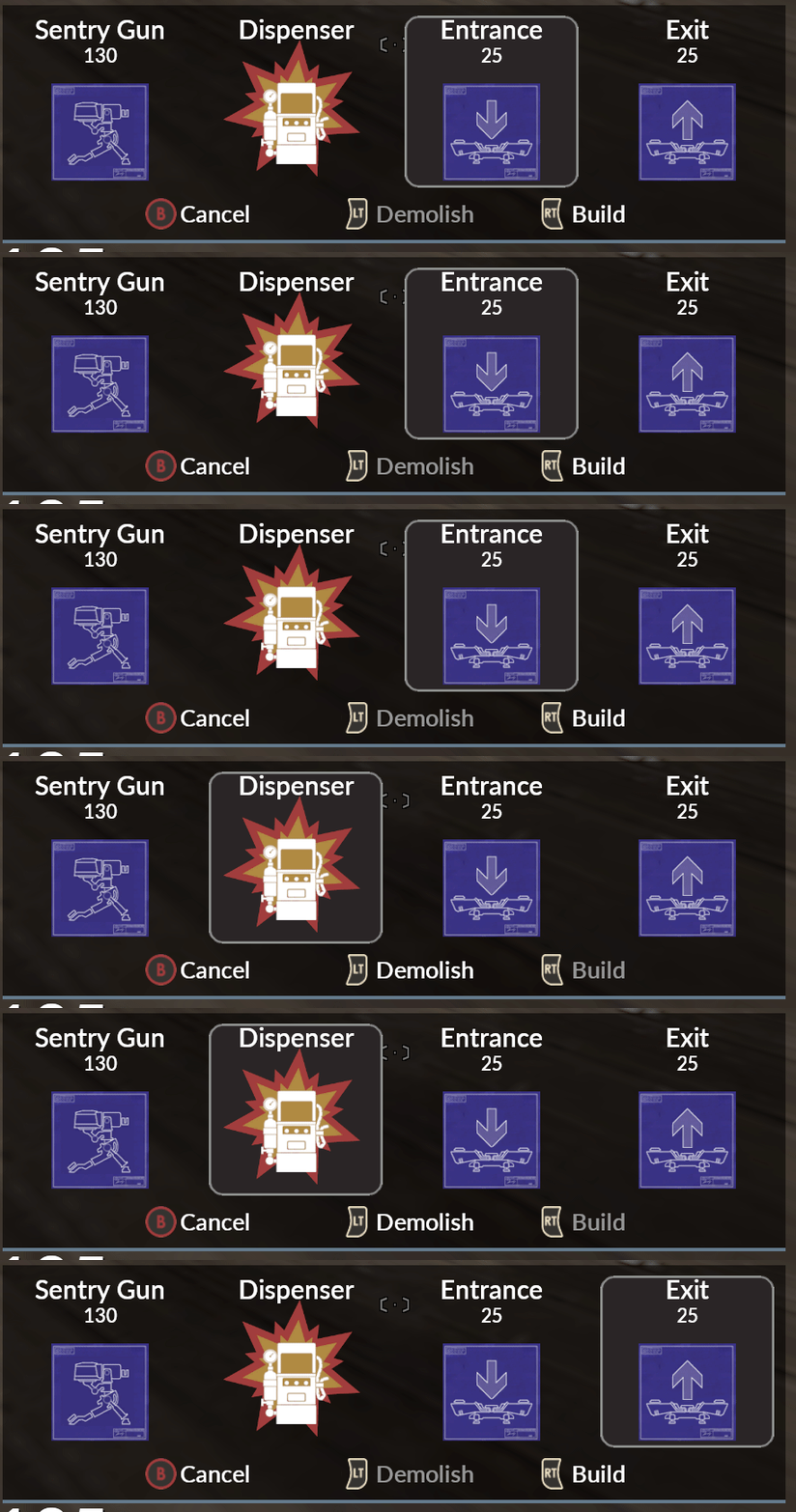 :
:
Wow, I see. I guess thats why hud devs usually skip over the controller ui. It would make sense. I would say keep the buttons since it helps players know what buttons do what like in the disguise menu how Y swaps the team to disguise as.
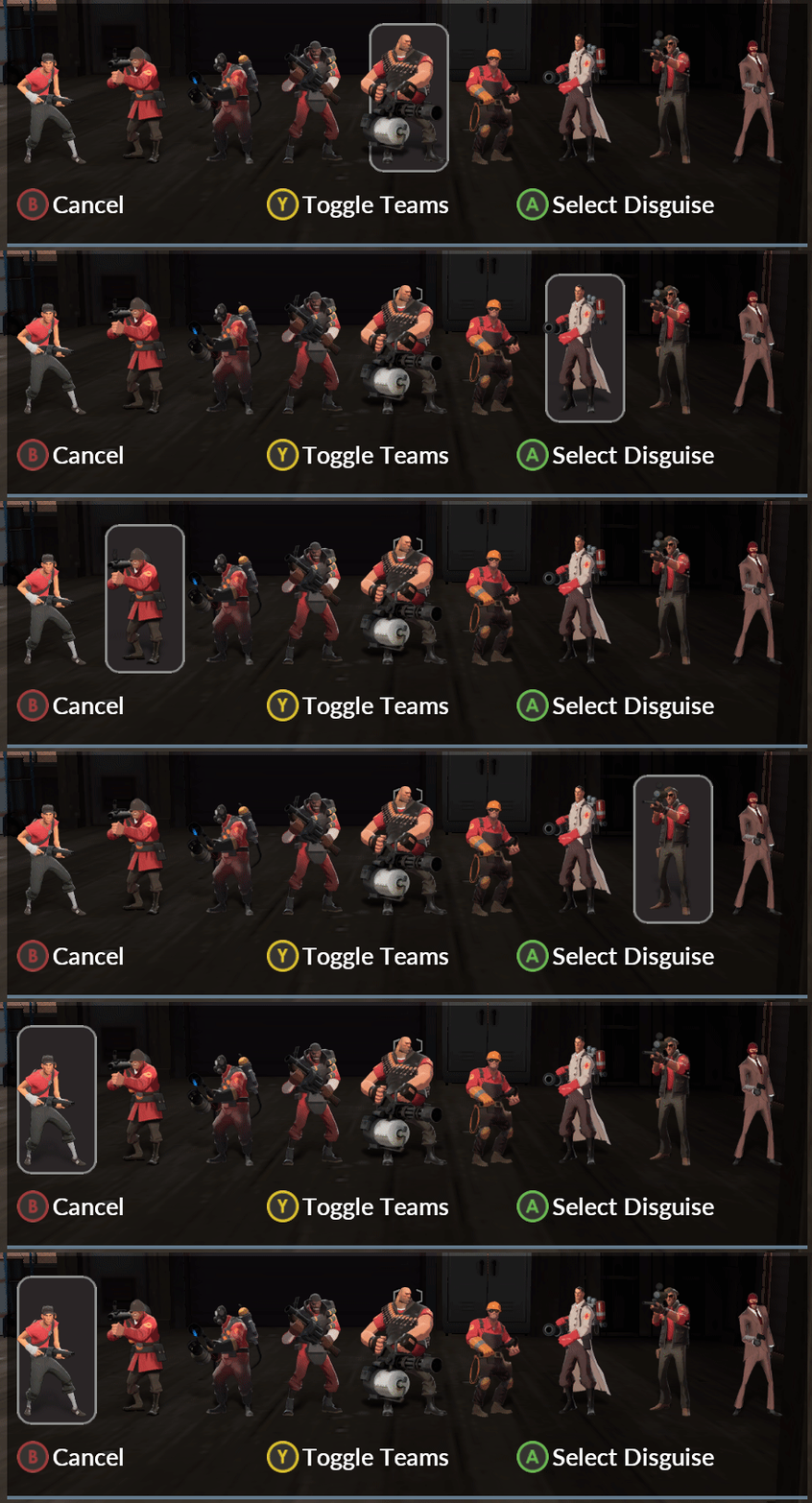
Spy done as well now. Just left aligned the buttons because I imagine those playing on other languages will have issues with it being centered anyways.
Looking into the default files a bit more, I don't think there...actually is an "active background" box for the Eureka effect, as well as the taunt menu hahaha, so I guess this may be sufficient for now. I'll upload the changes shortly but keep this open, as I'm sure I'm missing something somewhere...it'll also give an idea of how many changes this required hahaha
Weird, I wonder why they don't have active backgrounds. Maybe there's a way to fix that but again I don't know since I am not gifted in hud development. Glad to be of some help looking for hud issues with controller for you! Maybe I should help other hud devs with finding these issues if they want to make their huds controller friendly. If you ever need me to check anything else in the hud, let me know!
I'll be sure to let you know :). honestly this issue with your screenshots is probably a good reference for other hud developers, since they'll need to emulate a controller anyways to get proper positioning/etc
Well if you know any hud developers with huds that want to make them controller friendly, I can totally download their hud and check everything we have before that needs fixing and screenshot the menus and uis to show them. Ill be sure to update my budhud to see if everything works.
Okay went to check the update to the hud. Build menu is perfect but the disguise menu is for some reason still missing its indicator. I did see the buttons for team disguise and selecting the disguise. Other than that one issue, its great!
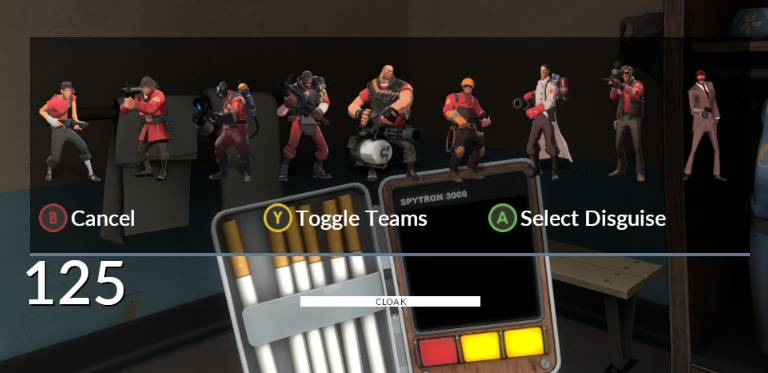
strange, I think the visibility was getting mucked up a bit, hopefully the spy UI is fixed now (just a small file change thankfully)
Yep, it is fixed now!
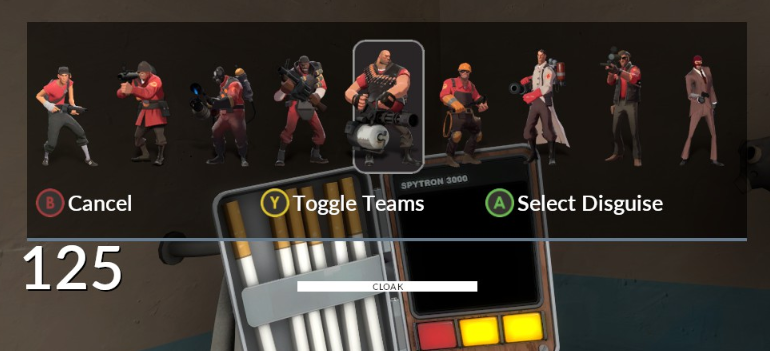 The only thing is the Eureka Effect menu but I don't use that weapon much at all so it's not a huge issue atm. I do have a question though, is there a way to move the chat to its default position since budhud puts it in the upper left?
In budhud/#customization/ there's a file called bh_chat_lowerleft.res that you can move into the _enabled folder, it should be pretty near the default chat location
Oh wow, that's really simple to customize unlike other huds where I have to mess with a notepad. Thanks again for all the help and I hope you can figure out that Eureka Effect active background problem! :D
As far as I can tell, the Eureka Effect is the same as the taunt menu; it doesn't actually have a selector like the others do.
What is weird is that the person I've seen use a controller with budhud had xbox buttons appearing in their taunt menu, but I can't get that to happen on my end, and I don't see anything in the file for it. Quite strange
Actually, they may have combined 360 and steam controller versions of that element into just hudmenutauntselection_sc.res, so I may need to mess with that more. But yeah, it shows the taunt menu as you show it, not as I saw it in a stream. Let me see if I can get a screenshot of how it appeared in a stream of someone using their taunt menu