

 ravibpatel
Changelog is blank when used in VSTO addin
Thanks for all your work on this this project it's very impressive. I'm having some trouble which I cannot get a resolution for. It appears the issue is related to the WebView2 package.
I am implementing into an MS Outlook VSTO application. I'm using AutoUpdater.NET v1.7.4 and Web2View v1.0.1293.44 and targeting .NET Framework 4.8 The installer is NSIS and I have included the dependencies for the WebView2 files which I believe to be correct. The app runs without admin rights and executes in the user context, installed in AppData\Roaming
- {appdir}\Microsoft.Web.WebView2.WinForms.dll
- {appdir}\Microsoft.Web.WebView2.Wpf.dll
- {appdir}\Microsoft.Web.WebView2.Core.dll
- {appdir}\runtimes\win-arm64\native\WebView2Loader.dll"
- {appdir}\runtimes\win-x64\native\WebView2Loader.dll"
- {appdir}\runtimes\win-x86\native\WebView2Loader.dll"
Everything works as expected with notification dialog using the XML file but the changelog on the GUI is totally blank. No error displayed but just not rendered on screen. I've tried using many different alternative URLs for it but none work. I've also verified the example project AutoUpdaterTest works correctly on my machine and displays changelog using the same configuration of versions, so the problem seems to lie in the combo of VSTO project.
Appreciate any support, thanks in advance.

Has anyone used AutoUpdater.NET or WebView2 with a VSTO addin before?
I don't have any experience with VSTO add in, but you can try to debug the app by adding it in your solution. You can also try debugging WebView2 itself. You can do it as shown here. I also found the bunch of issues related to VSTO addin on WebView2 issues page.

Thanks @ravibpatel, have just been testing now since compiling a debug version of AutoUpdater.NET and running it in my project. The following error is where it is failing during initialisation.
It seems to happen in WebView_CoreWebView2InitializationCompleted, on line 89.
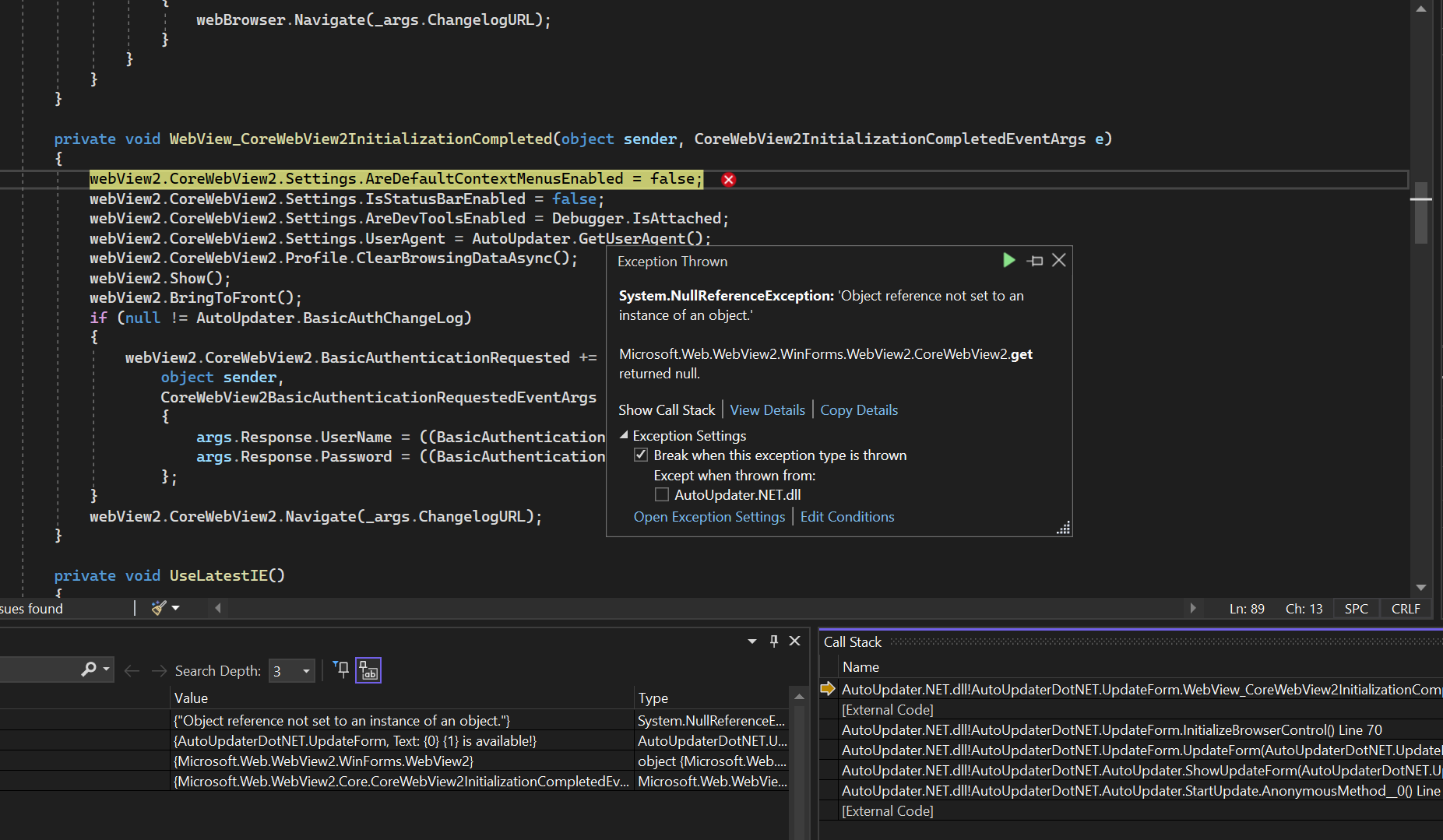
I noticed that when compiling it also forced me to update WebView2 to the latest version since it was then dependent on this in my project. 1.0.1293.44
Can you try adding the following line at the start of that function body?
if (!e.IsSuccess)
{
    MessageBox.Show(e.InitializationException.Message);
    return;
}
Thanks @ravibpatel. This is the result:
Access is denied. (Exception from HRESULT: 0x80070005 (E_ACCESSDENIED))
Seems to be pointing to a misconfiguration of where the cache gets created. https://stackoverflow.com/questions/66374105/opening-webview2-in-wpf-causes-system-unauthorizedaccessexception-while-calling https://github.com/MicrosoftEdge/WebView2Feedback/issues/1128 https://github.com/MicrosoftEdge/WebView2Feedback/issues/1893
Can you try changing InitializeBrowserControl method signature with the following?
private async void InitializeBrowserControl()
{
    if (string.IsNullOrEmpty(_args.ChangelogURL))
    {
        var reduceHeight = labelReleaseNotes.Height + webBrowser.Height;
        labelReleaseNotes.Hide();
        webBrowser.Hide();
        webView2.Hide();
        Height -= reduceHeight;
    }
    else
    {
        bool webView2RuntimeFound = false;
        try
        {
            string availableBrowserVersion = CoreWebView2Environment.GetAvailableBrowserVersionString();
            string requiredMinBrowserVersion = "86.0.616.0";
            if (!string.IsNullOrEmpty(availableBrowserVersion)
                && CoreWebView2Environment.CompareBrowserVersions(availableBrowserVersion, requiredMinBrowserVersion) >= 0)
            {
                webView2RuntimeFound = true;
            }
        }
        catch (WebView2RuntimeNotFoundException)
        {
            // ignored
        }
        if (webView2RuntimeFound)
        {
            webBrowser.Hide();
            webView2.CoreWebView2InitializationCompleted += WebView_CoreWebView2InitializationCompleted;
            await webView2.EnsureCoreWebView2Async(await CoreWebView2Environment.CreateAsync(null, Path.GetTempPath()));
        }
        else
        {
            if (null != AutoUpdater.BasicAuthChangeLog)
            {
                webBrowser.Navigate(_args.ChangelogURL, "", null,
                    $"Authorization: {AutoUpdater.BasicAuthChangeLog}");
            }
            else
            {
                webBrowser.Navigate(_args.ChangelogURL);
            }
        }
    }
}
Thanks @ravibpatel that's perfect, it solved the problem! Must be that the path to the cache is different in a VSTO environment? Hopefully you can incorporate this change into the main code as I don't think it'll cause any problems with other implementations. Thanks again for your help.
Yes, It should work fine with other implementations. I will add it to main code tomorrow. Thanks for testing it out.
I pushed changes to the repo. You can try out the latest DLL from here by manually referencing it. If everything works fine, then I will push the NuGet release.
Thank you @ravibpatel I can confirm that after a quick test using your latest compiled version 1.7.5, it is still working perfectly.