

 raspberrypi
VSCode instructions for hello_serial and hello_usb
New PI 4+8GB /128GB USB - Clean with LAMP installed. 4/10/2021 Python 3.9.4 From https://datasheets.raspberrypi.org/pico/getting-started-with-pico.pdf followed the steps to the point of trying to enter hello_usb but there is a menu difference, I had no drop down list. I Clicked around and ended up building all, but:
-- Could NOT find Doxygen (missing: DOXYGEN_EXECUTABLE) ELF2UF2 will need to be built PIOASM will need to be built I checked the 'pico/pico_examples/build/hello_world/usb/hello_usb.uf2 was there with 65.5KiB

-- Could NOT find Doxygen (missing: DOXYGEN_EXECUTABLE) ELF2UF2 will need to be built PIOASM will need to be built
Those are only warnings, they're safe to ignore.
I checked the 'pico/pico_examples/build/hello_world/usb/hello_usb.uf2 was there with 65.5KiB
Yup, that looks perfectly fine.
When talking about "drop down list" are you referring to VS Code? There was a late-change where we split the single hello_world example up into hello_serial and hello_usb so it's possible some of the VS Code instructions don't match up. I'll check next week. BTW I'm not sure what the LAMP stack has to do with anything Pico-related?
@kilograham Please move this to the pico-feedback repo.

Note i have change certain info about things that will need to be done to DEBUG level output also, so there is less spam in the build.

Re-opening, because I still want to double-check the VSCode instructions (and screenshots) at some point.

Hey! Thanks for the guides on VSCode. I think they are not ordered on the most intuitive way, but that is usually my problem.
However, there is something I want to suggest for improvement. In my case I was seeing an error on the include "pico/stdlib.h" line, as you can see on this screenshot:

The solutio is quite easy: click on the quick fix button on that same notification, select edit include paths and add the path of the sdk to the list of paths:
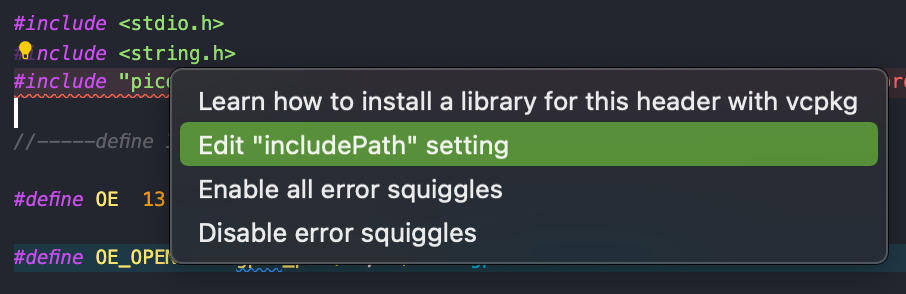

Will be awesome if that can be added to the guide. Regards

@danielo515 Manually adding include path other than CMakeLists.txt isn't a good idea, just let cmake-tools do the config.
Sometimes, vscode will be dumb enough to ignore that info. In that case, export compile_commands.json and tell the C/C++ extension its path.
example c_cpp_properties.json:
{
    "configurations": [
        {
            "configurationProvider": "ms-vscode.cmake-tools",
            "compileCommands": "${workspaceFolder}/build/compile_commands.json"
        }
    ],
    "version": 4
}

Ok, thanks. I will try that next time I can get into a pico project. Cheers!
On Fri, Apr 8, 2022 at 3:03 AM SubaruArai @.***> wrote:
@danielo515 https://github.com/danielo515 Manually adding include path other than CMakeLists.txt isn't a good idea, just let cmake-tools https://marketplace.visualstudio.com/items?itemName=ms-vscode.cmake-tools do the config.
Sometimes, vscode will be dumb enough to ignore that info. In that case, export compile_commands.json https://cmake.org/cmake/help/latest/variable/CMAKE_EXPORT_COMPILE_COMMANDS.html and tell the C/C++ extension its path.
example c_cpp_properties.json:
{ "configurations": [ { "configurationProvider": "ms-vscode.cmake-tools", "compileCommands": "${workspaceFolder}/build/compile_commands.json" } ], "version": 4 }
— Reply to this email directly, view it on GitHub https://github.com/raspberrypi/pico-feedback/issues/144#issuecomment-1092339785, or unsubscribe https://github.com/notifications/unsubscribe-auth/AARKJWJ4PKCQPPUNQOQQD73VD6AXXANCNFSM43AG7KPQ . You are receiving this because you were mentioned.Message ID: @.***>
--
https://danielorodriguez.com