

 raspberrypi
mmc0: Unable to change the MicroSD reader clock on latest kernel 5.15.56
Describe the bug
I have noticed that my sdcard speeds are much lower than they should be, maxing out at 40MB/s for Sandisk Extreme MicroSD A2 V30 UHS-3
Having read guides like this one: https://jamesachambers.com/raspberry-pi-3-samsung-pro-32gb-microsd-overclocking/
I delved into attempting to change my microsd reader clock rate to 100MHz.
I've found multiple ways to enable the overclock, but none seems to work anymore, here's my /boot/config.txt
https://pastebin.com/cku6wWi5
Steps to reproduce the behaviour
- Install
https://downloads.raspberrypi.org/raspios_armhf/images/raspios_armhf-2022-04-07/2022-04-04-raspios-bullseye-armhf.img.xzsystem image - sudo apt update
- sudo apt upgrade
- sudo rpi-update
- No overclock is possible
- Switching to 64 bits doesn't help with the problem
Device (s)
Raspberry Pi 4 Mod. B
System
Raspberry Pi reference 2022-04-04 Generated using pi-gen, https://github.com/RPi-Distro/pi-gen, 226b479f8d32919c9fe36dd5b4c20c02682f8180, stage4
Aug 9 2022 13:44:40 Copyright (c) 2012 Broadcom version 273b410636cf8854ca35af91fd738a3d5f8b39b6 (clean) (release) (start)
Linux pi 5.15.56-v8+ #1575 SMP PREEMPT Fri Jul 22 20:31:26 BST 2022 aarch64 GNU/Linux
Logs
olokos@pi:~ $ dmesg | grep mmc
[    1.101061] mmc-bcm2835 fe300000.mmc: mmc_debug:0 mmc_debug2:0
[    1.109099] mmc-bcm2835 fe300000.mmc: DMA channel allocated
[    2.090043] mmc2: sdhost-bcm2835 loaded - DMA enabled (>1)
[    2.133425] mmc0: SDHCI controller on fe340000.mmc [fe340000.mmc] using ADMA
[    2.242006] mmc0: new ultra high speed DDR50 SDXC card at address aaaa
[    2.249199] mmcblk0: mmc0:aaaa SN64G 59.5 GiB
[    2.256031]  mmcblk0: p1 p2
[    2.259138] mmcblk0: mmc0:aaaa SN64G 59.5 GiB
[    2.284059] EXT4-fs (mmcblk0p2): mounted filesystem with ordered data mode. Opts: (null). Quota mode: none.
[    4.059581] EXT4-fs (mmcblk0p2): re-mounted. Opts: (null). Quota mode: none.
olokos@pi:~ $ sudo cat /sys/kernel/debug/mmc0/ios
clock:          50000000 Hz
actual clock:   50000000 Hz
vdd:            21 (3.3 ~ 3.4 V)
bus mode:       2 (push-pull)
chip select:    0 (don't care)
power mode:     2 (on)
bus width:      2 (4 bits)
timing spec:    7 (sd uhs DDR50)
signal voltage: 1 (1.80 V)
driver type:    0 (driver type B)
olokos@pi:~ $
Additional context
I am getting maximum of 40MB/s which is far below of what this card is capable of, serverly crippling performance of the system.
From my understanding, this might be due to the fact that this is now hardcoded in the kernel or the bootloader itself.
Perhaps related to the latest firmware update which introduced:
Switch to the newer SDIO HC and increase SPI clock speed
Which could increase the speeds for some cards, but for those that can run far above the standard, keeps it limited and takes away the option for the user to change the clock speed, as reported by
sudo cat /sys/kernel/debug/mmc0/ios
Going by the sdcard standards here: https://www.sdcard.org/developers/sd-standard-overview/bus-speed-default-speed-high-speed-uhs-sd-express/
This results in a hard limit of a mere 50MB/s maximum, which is abysmal, considering what the card is capable of. There's also SanDisk Extreme Pro with even better performance and higher price, which wouldn't provide any improvements with RPi.
Is this because the sdcard reader itself in the RPi 4B is limited to UHS-1?
If so, regaining control over clock speed would in fact improve throughput greatly, if it's able to read UHS-3, then the microsd card reader speeds can be natively improved by a lot, leaving the sdcard being the performance bottleneck.

The Pi 4 family (BCM2711) supports DDR50 SD cards - a 4-bit interface to effectively a 100MHz clock (both edges of a 50MHz clock), giving a 50MB/s theoretical maximum half-duplex transfer. Getting over 40MB/s is actually pretty good, considering.
The sdhci driver we use for the EMMC2 interface of BCM2711 does not support overclocking. I'm not saying it couldn't possibly be added because I don't know for sure, but Raspberry Pi won't be doing it.

The previous driver did support it, so I was thinking of possibly some override that would reenable tinkering with sdcard clock again, if possible?
I've read this overview and it does go deep on the topic: https://www.slideshare.net/ennael/kernel-recipes-2018-overview-of-sdemmc-their-high-speed-modes-and-linux-support-gregory-clment
here's the most interesting part for this issue:
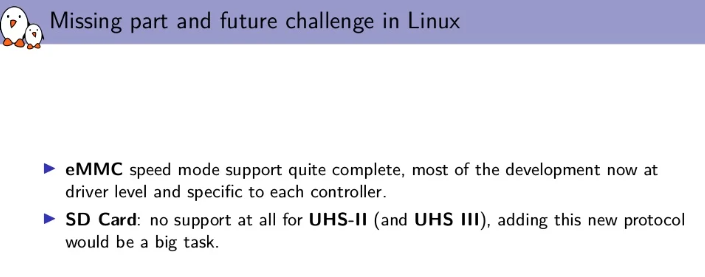
But the card that I am using, which is:
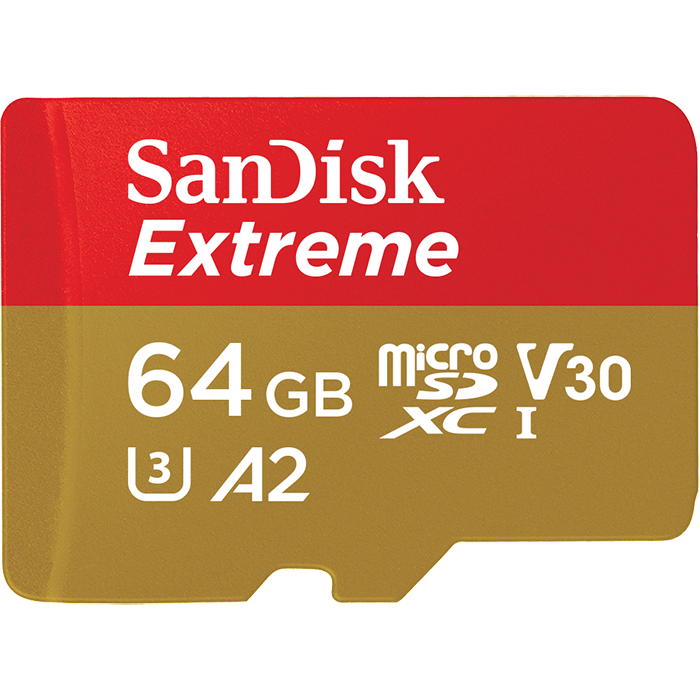
Is in fact UHS-1, but UHS-Speed class 3.
So to use it's full bandwidth, even if there was support for UHS2/3 in linux kernel, then we wouldn't be able to use it to get full performance, since barely any microsd card supports true UHS2/3 interface and not just the UHS3 speed class, which are separate designations, UHS bus is the roman numbers, while UHS Speed Class is a number inside of a U. More details here: https://www.kingston.com/en/blog/personal-storage/memory-card-speed-classes
With all of the above said, this means that we're already using the right UHS-1 mode, but still not getting the full speed of the card.
I believe that bringing back:
dtparam=sd_overclock=90
Together with using the DDR50 mode (if it's even possible to do both) Would be a great way to use the full power of the Pi in terms of storage, without having to attach a separate storage device over USB3.0
https://github.com/raspberrypi/linux/blob/aeaa2460db088fb2c97ae56dec6d7d0058c68294/drivers/mmc/host/sdhci-iproc.c#L171
or
https://github.com/raspberrypi/linux/blob/aeaa2460db088fb2c97ae56dec6d7d0058c68294/drivers/mmc/host/sdhci-iproc.c#L194
Might be great places to override the numbers
Using the other interface if it were possible (it isn't - the SD pins on BCM2711 aren't switchable by an overlay) wouldn't remove DDR as an option, eliminating any gains you might get by raising the clock rate.
Feel free to build as many experimental kernel as you like (see https://www.raspberrypi.com/documentation/computers/linux_kernel.html#building for a step-by-step guide), but users who really care about storage bandwidth either go the USB3 route or use a CM4 on a carrier that exposes PCIe (and hence NVME) - although admittedly that's difficult in a world where the IC supply chain has imploded.
What about increasing the clock rate of the DDR mode itself?
I used SDR104 mode as an example, that changing the clock rate above 50MHz is in fact possible and was done with shdci overlay, as by switching to SDR mode we would lose full-duplex communication, which will downgrade the performance on its own, I think.
From what I've gathered, the DDR50 mode works by having 50MHz clock for each cycle, so 100MHz in total, since it's DDR.
This seems to me like the final bandwidth of SD104 and DDRR50 differs only by 2%.
If my understanding of this is correct, then it should be possible to raise the sdcard reader clock, if the card on hand actually is able to push that clock and as a lot of people online reported, it is possible.
Is there any documentation regarding the sdcard reader itself? It is crucial to know the hardware we're working with (RPi 4B rev 1.2 4GB) before the kernel source is cloned and compiled, otherwise it would be just shooting blindly.
I was trying to find the technical manual or any documentation, but I couldn't find any that listed the model or specs of the sdcard reader.
For my use-case I cannot really use USB3/CM4 with my Pi 4B, as I'm very limited by the space around the Pi and really tiny pendrives tend do overheat a lot, which might again downgrade the performance.
As I said above,
I'm not saying [ overclocking the EMMC2 interface ] couldn't possibly be added because I don't know for sure, but Raspberry Pi won't be doing it.
As I said above,
I'm not saying [ overclocking the EMMC2 interface ] couldn't possibly be added because I don't know for sure, but Raspberry Pi won't be doing it.
I don't quite understand the reason behind "pi won't be doing it", why it won't do it?
https://www.jeffgeerling.com/blog/2016/how-overclock-microsd-card-reader-on-raspberry-pi-3
In the above blog post written by a very knowledgable person it was possible, why it won't do it anymore? Maybe I could just downgrade the kernel to bring this back?
The reason why I am asking those questions is that if You know of some hardware limitation, that would save me a lot of time, so please do let me know, maybe the sdcard reader model is known?
Pi 4 uses the newer EMMC2/SD interface of the BCM2711. Pi 3 uses the older MMC/SD interface of the BCM2710. EMMC2 has a different driver to MMC. The MMC driver supports overclocking. The EMMC2 driver doesn't support overclocking.
Right, I've just read this: https://www.jeffgeerling.com/blog/2019/raspberry-pi-microsd-card-performance-comparison-2019
And Pi3 overclocked is still slower than 4, despite all odds.
Is there no legacy driver support for 4, just for testing purposes?
It is theoretically possible to enable the older EMMC block to drive the SD card interface, but it requires cooperation from the firmware and a custom Device Tree overlay, i.e. it's not something you are going to find easy to do. Even if you could, it wouldn't be any faster than the overclocked Pi 3, which has been shown to be slower than the unmodified Pi 4 with a good card.