

 rapidsai
[QST]Failed to dlopen libcuda.so
Trying to import cuGraph but failed.
Error feedback is as follows:
RuntimeError Traceback (most recent call last)
File ~/miniconda3/envs/rapids-22.06/lib/python3.9/site-packages/cuda/_cuda/ccuda.pyx:3671, in cuda._cuda.ccuda._cuInit() File ~/miniconda3/envs/rapids-22.06/lib/python3.9/site-packages/cuda/_cuda/ccuda.pyx:435, in cuda._cuda.ccuda.cuPythonInit()
RuntimeError: Failed to dlopen libcuda.so
Canceled future for execute_request message before replies were done
The Kernel crashed while executing code in the the current cell or a previous cell. Please review the code in the cell(s) to identify a possible cause of the failure. Click here for more info. View Jupyter log for further details.
NVIDIA-SMI is as follows:
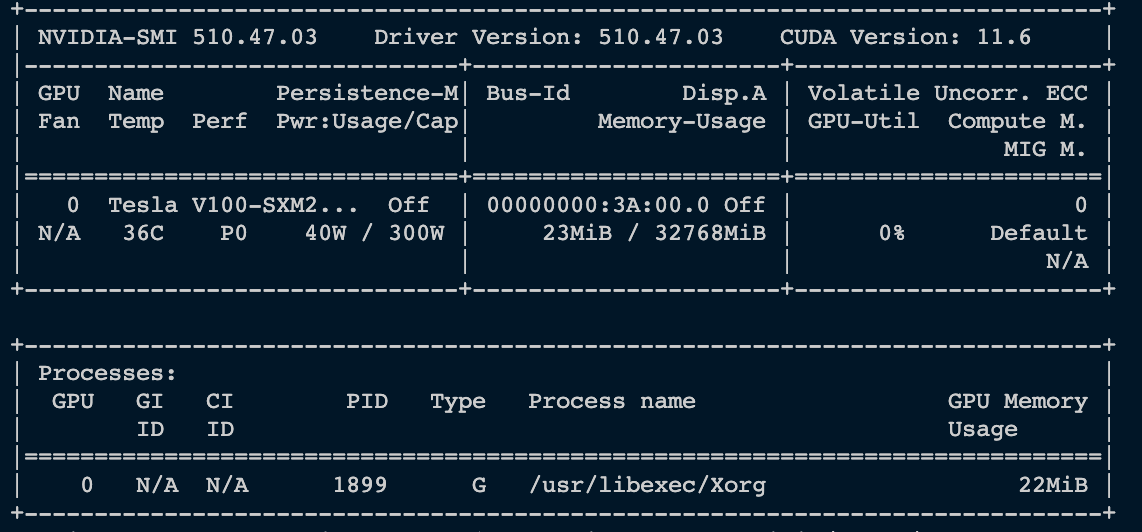

@pp850110 Can you share the output of conda list in the environment you are seeing this error?

@pp850110 Can you share the output of
conda listin the environment you are seeing this error?
@galipremsagar Sure. It is as the .txt attachment
@pp850110 Could you share the output of ldconfig -p | grep libcuda.so
@galipremsagar I got nothing from ldconfig -p | grep libcuda.so. Hereby sharing the output of ldconfig -p.
ldconfig_p.txt
Interesting, can you print your $LD_LIBRARY_PATH?
and also output of:
sudo find /usr/ -name 'libcuda.so.*'
@galipremsagar Actually, I can get the output of ldconfig -p | grep libcuda.so once connecting to the remote GPU. BTW, it is not a local GPU in this case. However, I cannot print $LD_LIBRARY_PATH and also do not have the authority to sudo.
Please check the output of ldconfig -p | grep libcuda.so as follows:
grep libcuda.so.txt
Could you share the outputs of the following:
ls -al /lib64/libcuda.so.1
ls -al /lib/libcuda.so.1
ls -al /lib64/libcuda.so
ls -al /lib/libcuda.so
Could you share the outputs of the following:
ls -al /lib64/libcuda.so.1
ls -al /lib/libcuda.so.1
ls -al /lib64/libcuda.so
ls -al /lib/libcuda.so
as follows: ls.txt
What do the following environment variables have?:
CUDA_PATH
LD_LIBRARY_PATH
PATH
CUDA_HOME
$printenv
CUDA_PATH=/home/~/~/miniconda3/envs/rapids-22.06\
MODULES_RUN_QUARANTINE=LD_LIBRARY_PATH LD_PRELOAD\
PATH=/software/all/bin:/software/all/bin:/~/~/home/~/.vscode-server/bin/6d9b74a70ca9c7733b29f0456fd8195364076dda/bin/remote-cli:/home/~/~/miniconda3/envs/rapids-22.06/bin:/home/~/~/miniconda3/condabin:/home/~/.local/bin:/home/~/bin:/
There is not any result of CUDA_HOME.
Looks like your environment might be missing paths to libcuda.so, can you try setting these environment variables:
export CUDA_PATH=/usr/local/cuda
export LD_LIBRARY_PATH=$CUDA_PATH/lib64:$LD_LIBRARY_PATH
export CUDA_HOME=/usr/local/cuda
export LD_LIBRARY_PATH=$LD_LIBRARY_PATH:/usr/local/cuda/lib64:/usr/local/cuda/extras/CUPTI/lib64
export PATH=$PATH:$CUDA_HOME/bin
All the above assumed you have a valid installation of CUDA at /usr/local/cuda, if you have it at any other location, you will need to tweak the paths accordingly.
@galipremsagar
Thanks for the suggestion. It did not work in the VS code studio via ssh. However, after loading the CUDA module, it works on the Jupyter notebook web interface provided by the host.
This issue has been labeled inactive-30d due to no recent activity in the past 30 days. Please close this issue if no further response or action is needed. Otherwise, please respond with a comment indicating any updates or changes to the original issue and/or confirm this issue still needs to be addressed. This issue will be labeled inactive-90d if there is no activity in the next 60 days.
![github-actions[bot] avatar](https://avatars.githubusercontent.com/in/15368?v=4 "Published by a pub.dev verified publisher")
Thanks, @pp850110. Looks like an issue with vs code, closing this issue for now.