

 radio24
improve bridge's listing
This can be useful to activate, deactivate or delete bridges. For now, the code below just displays them:
#!/usr/bin/env bash

torrc="/etc/tor/torrc"

all_bridges="$(sudo grep "Bridge obfs4" "${torrc}")"
#activated_bridges="$(grep "^Bridge obfs4" <<< "${all_bridges}")"

while IFS= read -r line || [ -n "$line" ]; do
  bridge_ip=$(awk '{print $3}' <<< "${line}" )
  bridge_fingerprint=$(awk '{print $4}' <<< "${line}" )
  bridge_list="$(printf "%s\n%s\n%s\n" "${bridge_list}" "${bridge_ip}" "${bridge_fingerprint}")"
done <<< "${all_bridges}"

# shellcheck disable=SC2086
whiptail --menu "Bridges" 20 80 10 ${bridge_list} 3>&1 1>&2 2>&3
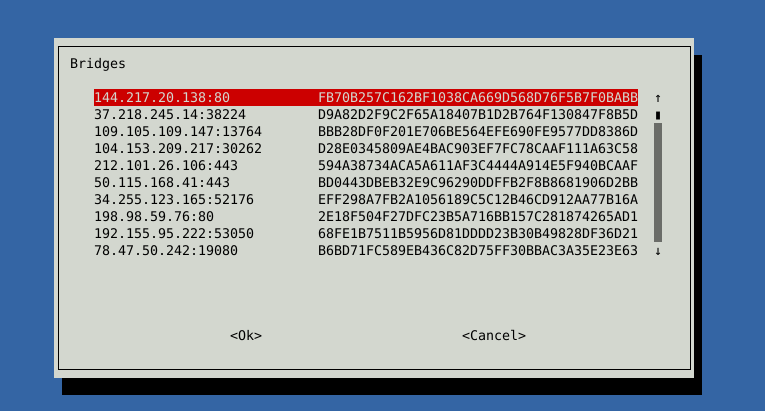

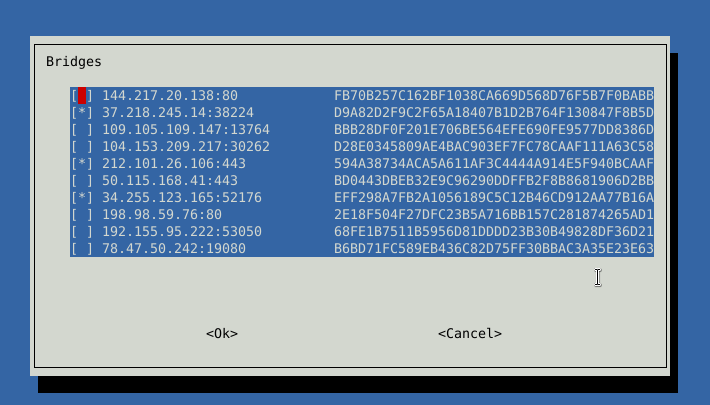
I think checklist can be simple also, if the bridge is activated, it will be marked with an x by defaylt, if not, it will be unchecked as in deactivated.
this script prints to stdout the bridge ip which should be activated or at least continue to be, the rest must be deactivated. An way to deal with this is deactivate all bridges and them just activate them by their ip, or fingerprint if selected.
#!/usr/bin/env bash

torrc="/etc/tor/torrc"

all_bridges="$(sudo grep "Bridge obfs4" "${torrc}")"
#activated_bridges="$(grep "^Bridge obfs4" <<< "${all_bridges}")"

while IFS= read -r line || [ -n "$line" ]; do
  bridge_status=0
  grep -q "^Bridge obfs4" <<< "$line" && bridge_status=1
  bridge_ip=$(awk '{print $3}' <<< "${line}" )
  bridge_fingerprint=$(awk '{print $4}' <<< "${line}" )
  bridge_checklist="$(printf "%s\n%s\n%s\n%s\n" "${bridge_checklist}" "${bridge_ip}" "${bridge_fingerprint}" "${bridge_status}")"
  bridge_menu="$(printf "%s\n%s\n%s\n" "${bridge_menu}" "${bridge_ip}" "${bridge_fingerprint}")"
done <<< "${all_bridges}"

dialog_type=checklist
case $dialog_type in
  menu)
    # shellcheck disable=SC2086
    menu_result="$(whiptail--menu "Bridges" 20 80 10 ${bridge_menu} 3>&1 1>&2 2>&3)"
  ;;
  checklist)
    # shellcheck disable=SC2086
    menu_result="$(whiptail --separate-output --checklist "Bridges" 20 80 10 ${bridge_checklist} 3>&1 1>&2 2>&3)"
  ;;
esac

echo "$menu_result"
$ ./test.sh
37.218.245.14:38224
212.101.26.106:443
34.255.123.165:52176
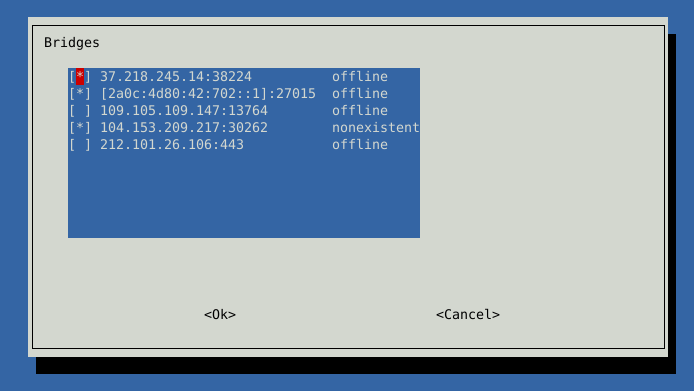
It is also possible to display their current status acquired from onionoo, but because of column space, I would prefer to drop the fingerprint from the menu and organize it like this:
$ip $status_from_onionoo $status_act_or_inact_on_torrc
But I guess as the fingerprint is sent to onionoo, them replace $ip for $fingerprint
Thanks for testing! I will look into it, and in one way or another, it will be implemented. In my view, using checklists is the way how we should deal with it.

The box is checked if the bridge is activated on the torrc. The other field is the fingerprint (ip and fingerprint does not fit, too big). The third field was acquired status of the fingeprint with the onionoo database.

#!/usr/bin/env bash

torrc="/etc/tor/torrc"

all_bridges="$(sudo grep "Bridge obfs4" "${torrc}")"
#activated_bridges="$(grep "^Bridge obfs4" <<< "${all_bridges}")"
count_bridges=$(grep -c "Bridge obfs4" <<< "${all_bridges}")

i=0
while IFS= read -r line || [ -n "$line" ]; do
  i=$((i+1))
  printf %s"(${i}/${count_bridges})"
  bridge_action=0
  grep -q "^Bridge obfs4" <<< "$line" && bridge_action=1
  bridge_ip=$(awk '{print $3}' <<< "${line}" )
  bridge_fingerprint=$(awk '{print $4}' <<< "${line}" )
  printf %s" Gathering status for bridge: ${bridge_ip} ${bridge_fingerprint}"
  bridge_status=$(./bridges_check.py --network=tor -f "${bridge_fingerprint}")
  case ${bridge_status} in
    2) bridge_status="nonexistent";;
    1) bridge_status="online";;
    0) bridge_status="offline";;
    *) bridge_status=" ";;
  esac
  printf %s" - ${bridge_status}\n"
  bridge_checklist="$(printf "%s\n%s\n%s\n%s\n" "${bridge_checklist}" "${bridge_ip}" "${bridge_status}" "${bridge_action}")"
done <<< "${all_bridges}"

# shellcheck disable=SC2086
menu_result="$(whiptail --separate-output --checklist "Bridges" 20 80 10 ${bridge_checklist} 3>&1 1>&2 2>&3)"
if [ -n "${menu_result}" ]; then
  sudo sed -i "s/^Bridge obfs4/#Bridge obfs4/" ${torrc}
  ## comment brackets for IPV6
  menu_result=${menu_result//\[/\\\[}
  menu_result=${menu_result//\]/\\\]}
  for ip in ${menu_result}; do
    bridge_address="#Bridge obfs4 ${ip}"
    uncomment_bridge_address="${bridge_address//#/}"
    sudo sed -i "s/${bridge_address}/${uncomment_bridge_address}/g" ${torrc}
  done
fi
If you notice, instead of
ORIGINAL_STR="Bridge $bridge_address"
ORIGINAL_STR="$(<<< "$ORIGINAL_STR" sed -e 's`[][\\/.*^$]`\\&`g')"
ORIGINAL_STR="^$ORIGINAL_STR"
REPLACEMENT_STR="#Bridge $bridge_address"
REPLACEMENT_STR="$(<<< "$REPLACEMENT_STR" sed -e 's`[][\\/.*^$]`\\&`g')"
I am using
menu_result=${menu_result//\[/\\\[}
menu_result=${menu_result//\]/\\\]}
which result in less sed and more parameter expansion, it just fix the brackets and less lines. Also it is done one time, not on a loop.
I am just thinking of how doing so.
-
- " 3" "Activate only selected OBFS4 bridges" \
- " 4" "List all $number_configured_bridges_total OBFS4 bridges" \
-
- "3" "Deactivate only selected OBFS4 bridges" \
- " 4" "List all $number_configured_bridges_total OBFS4 bridges" \
These options basically become the same with this new menu, except we can pass a flag to check if the bridge is online or not check at all, in the case you already now what bridge to activate/deactivate.
Option 4 on both script are the same. Option 3 is almost the same, changing between commenting and uncommenting. Because of this I would exclude them and convert those two script into only one with the following options:
- " 1" "List all configured OBFS4 bridges and manually activate/deactivate them" \
- " 2" "Activate ALL configured OBFS4 bridges" \
- " 3" "Activate only OBFS4 bridges, which are ONLINE" \
- " 4" "Deactivate ALL configured OBFS4 bridges and directly connect tor" \
- " 5" "Deactivate only OBFS4 bridges, which are not longer ONLINE" \
If you don't agree, take care of it.