

 rabanti-github
AddNextCell incremental
Hi,
I have a problem when I use AddCell() method because the incremental value is false but the columnNumber or rowNumber is still increased.

Is this an issue or there is something i don't see ?
Thanks.

Hi, Can you explain your use case a little bit further? What do you mean with "the incremental value is false"? Does it count the wrong steps or direction?
If you work with AddNextCell(...), you don't have to manipulate any counter. This is done automatically in the direction that is defined in CurrentCellDirection (col2col or row2row). If you work with AddCell(...), you have to maintain the target cell address by yourself. However, If you mix both methods, you may end up in an unclear situation, where cells may be also overwritten. So, I would rather not recommend that mixed scenario.
If this does not apply for you, could you please attach a small demo class or solution, where I can see what is wrong? Thank you in advance.

Hi,
When we use AddNextCell(...), the var incremental is set to true so the cursor jumps to the next cell in the good direction. This is working.
If we use AddCell(...), the var incremental is set to false but in my screenshot we can see that even if incremental is false the cursor jumps the next cell depending on the cell direction. In fact it does the same thing as currentColumnNumber++
What I want is that when I use AddCell(...) the cursor doesn't need to move because as you said "you have to maintain the target cell address by yourself".
Have a nice day.
Hi, OK, I think I understand now, what the problem is. Yes, it may be not very intuitive that setting the cell by AddCell is set to the cursor. Therefore, I consider adding new CellDirection options to allow or prevent that behavior.
How you can suppress the cursor to be updated by AddCell:
            Worksheet.CellDirection autoCellDirection = Worksheet.CellDirection.ColumnToColumn; // default
            if (incremental)
            {
                wb.CurrentWorksheet.CurrentCellDirection = autoCellDirection; // recall
            }
            else
            {
                autoCellDirection = wb.CurrentWorksheet.CurrentCellDirection; // remember
                // Disable the cursor for manual work
                wb.CurrentWorksheet.CurrentCellDirection = Worksheet.CellDirection.Disabled;
            }
I hope this helps.
Hi,
I think this a solution but during my excel building, i also use SetStyle(...) because i have merged cell. SetStyle(...) will call AddCell(...), so i can't update CellDirection anytime I don't need to move the cursor. It will add a lot of lines.
I will try to find a solution and come back to you.
Thank you for your help. Have a nice day.
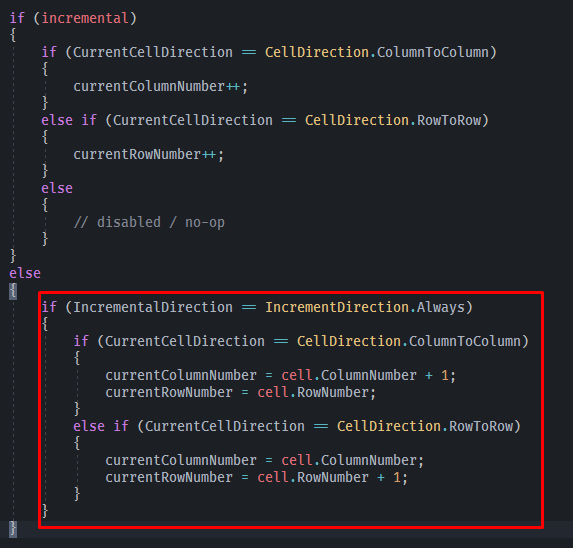
I think this solution can work without disabling the AddCell(...) base functionnement. I can't test because when I call XlsWriter, I got an error on System.IO.Packaging not found even if I have Window.Base in references.
This is all the code I add.

How have you added NanoXLSX to your project?
- By NuGet package manager?
- Manually added a DLL?
- Referencing the source code of NanoXLSX (a copy of the .cs files in your project)?
Furthermore, what platform (.NET version) are you using?
If you get an System.IO.Packagin error, then you are pointing at the .NET Standard (not the .NET 4.5) version --> See dependencies
You have to check your setup and using one of the supported platforms, according to the Framework resolution overview
I will close this issue for now, since it's open for a month. The requirement to ignore triggering the "cursor" to go to the next cell on AddCell() is added to the backlog. Please re-open this issue or file a new one if there are further problems. Thank you.