

 r-tmap
titles problem with rmarkdown - first map gets all titles
Hi
I'm facing a bug with tmap, when rending more than one map with titles it to html with Rmarkdown, with "view" mode: The first map gets all the titles of the tmaps in the document, and the others get none.
Here is an example with only 2 maps:
---
title: "tmap titles"
output: html_document
---
knitr::opts_chunk$set(echo = TRUE, warning = FALSE, message = FALSE)
tmap in interactive mode
library("tmap")
tmap_mode("view")
data("NLD_muni")
tm_shape(NLD_muni) +
	tm_dots(c("population"), size = "population") +
	tm_layout(title = "First Title")
tm_shape(NLD_muni) +
    tm_dots(c("pop_women"), size = "pop_women") +
    tm_layout(title = "Second Title")
the result:
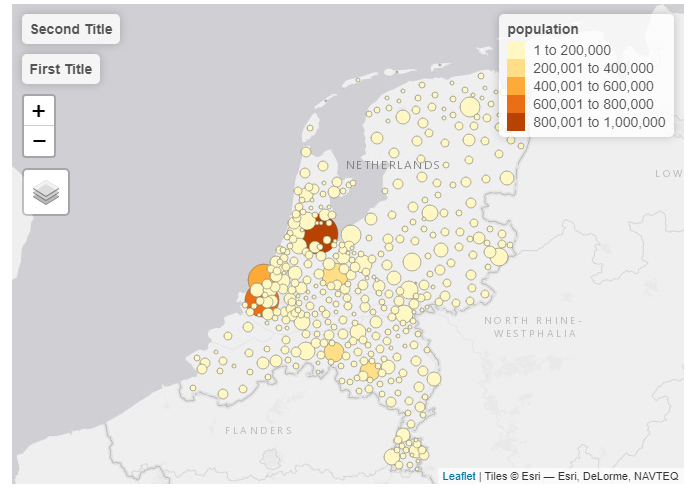
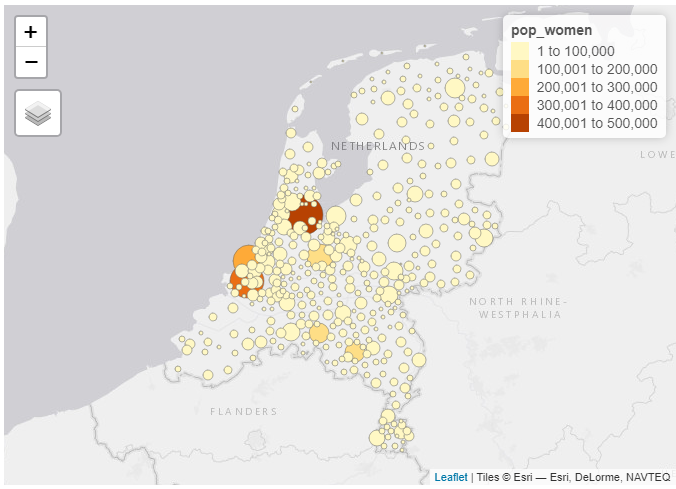
I'm using windows 10 x64, R 4.0,4, RStudio 1.4.1717, tmap 3.3-2.
What might be causing this problem? Am I missing any argument or option? Thank you!

Familiar bug, not sure how it can be fixed.
The problem is that titles are added to leaflet afterwards. See https://github.com/mtennekes/tmap/blob/master/R/view_add_leaflet_titles.R) This 'hacky' solution works well, also for facets, but not for multiple independent tmaps.
For facets, the k titles are assigned to maps 0 to k-1 in the html document (see iterator i in line 9). This goes well. However if two independent tmaps are placed in the same html document, the title is placed in the first map (line 24). Not sure how to fix it.
Have you any ideas, @tim-salabim ? Is there perhaps a leaflet extension via which labels can be added?

I just discovered this bug. Is there some other way to put a title-like thing on my maps? A big part of why I went to tmap instead of leaflet was to get titles.

I've just encountered this issue as well. I have three leaflet maps in a Quarto document, followed by a tmap in View mode with nine facets. The three leaflet maps take the first three facet names, and the tmap facet titles are in the wrong place for the first six facets, and missing for the final three.
I've hacked in a workaround. We can see from the link above that the titles are appended to all leaflet maps with a div container with the classes "leaflet-top leaflet-left". I don't need those areas (my leaflet legends are on the top right and bottom left). So the easiest thing is just to create a function which removes them from the maps that occur prior to the tmap. That way when tmap looks for the "leaflet-top leaflet-left" elements, the first ones it finds are the ones we want it to find.
The R function is:
hide_leaflet_title <- function(map) {
    js <- '
    function (el, x) {
        el.getElementsByClassName("leaflet-top leaflet-left")[0].classList.remove("leaflet-top");
    }
    '
    map |>
        htmlwidgets::onRender(js)
}
Here is a minimal Quarto file which now works as intended.
---
title: "tmap test"
format: html
---


```{r, tmap1}
library(leaflet)

hide_leaflet_title <- function(map) {
    js <- '
    function (el, x) {
        el.getElementsByClassName("leaflet-top leaflet-left")[0].classList.remove("leaflet-top");
    }
    '
    map |>
        htmlwidgets::onRender(js)
}

leaflet() |>
    hide_leaflet_title()

leaflet() |>
    hide_leaflet_title()

leaflet() |>
    hide_leaflet_title()
```


```{r, tmap2}
library(tmap)
data("NLD_muni")

nld <- NLD_muni |>
    sf::st_transform(4326)

tmap_mode("view")
tm_shape(nld) +
    tm_borders("black") +
    tm_facets("province")

```
This is a horrible hack which fixes the problem in the wrong place, because I need this document to work this evening.
Having had a quick look at the add_leaflet_tiles() R function, it seems to me that the better way to fix this would be if document.getElementsByClassName(\"leaflet-top leaflet-left\")[",i,"] could be replaced with el.getElementsByClassName(\"leaflet-top leaflet-left\")[",i,"]. The el in question could be selected with document.getElementById(id) where the id is set at the htmlwidget level, either with a user-supplied elementId parameter (as in leaflet.R), or if NULL is a unique ID generated when print_tmap() or tmap_arrange() is called.
I thought about forking and implementing this, but I can't see how it would work. In other libraries which use htmlwidgets there's usually a call to htmlwidgets::createWidget(), which has an elementId parameter (e.g. again as in leaflet.R. However I can't see elementId or createWidget anywhere in the tmap source.
I'm not at all familiar with the tmap codebase though - how is the htmlwidget actually created? Is providing an elementId a plausible solution?
