

 quantopian
qgrid does not display correctly in voila served notebooks
I'd like to use qgrid to work with dataframes in voila served notebooks.
I have a simple single cell notebook
import qgrid
import numpy as np
import pandas as pd

df = pd.DataFrame(np.random.rand(3,5))
qg = qgrid.show_grid(df)
qg
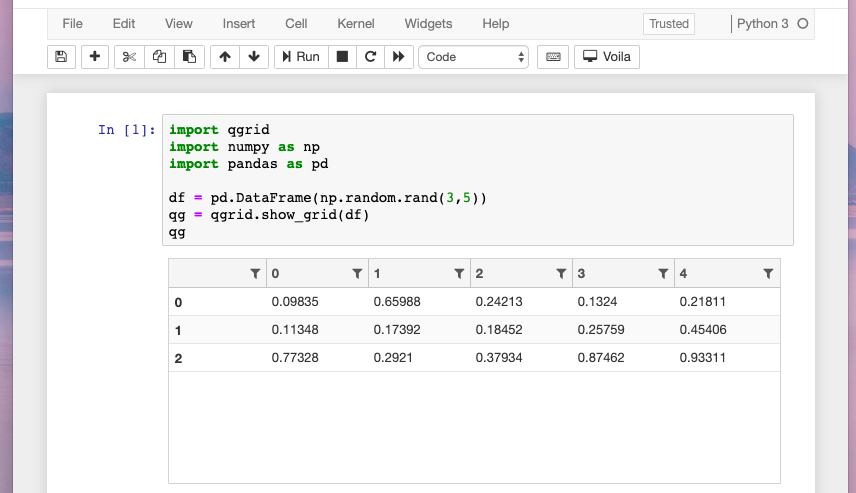
and this works fine in the Jupyter rendered notebook:
When I serve it with voila via
$ voila qgrid.ipynb
[Voila] Using /var/folders/7g/fx75l9zs4hxgqz0lm7mnblb40000gn/T to store connection files
[Voila] Storing connection files in /var/folders/7g/fx75l9zs4hxgqz0lm7mnblb40000gn/T/voila_6zhoflk_.
[Voila] Serving static files from /anaconda3/lib/python3.6/site-packages/voila/static.
[Voila] Voila is running at:
http://localhost:8866/
[Voila] Kernel started: 7400d98f-6052-4a4e-90a8-b3008938ccee
[Voila] Executing notebook with kernel:
[Voila] Adapting to protocol v5.1 for kernel 7400d98f-6052-4a4e-90a8-b3008938ccee
WARNING:tornado.access:404 GET /voila/qgrid.js (::1) 1.05ms
The qgrid widget does display, but it doesn't respect the size of the window like it does when it is displayed in the Notebook:

rather the dataframe is stretched super wide and the user has to scroll over.
I can work around this with qg = qgrid.show_grid(df, grid_options={'forceFitColumns': False, 'defaultColumnWidth': 100}):
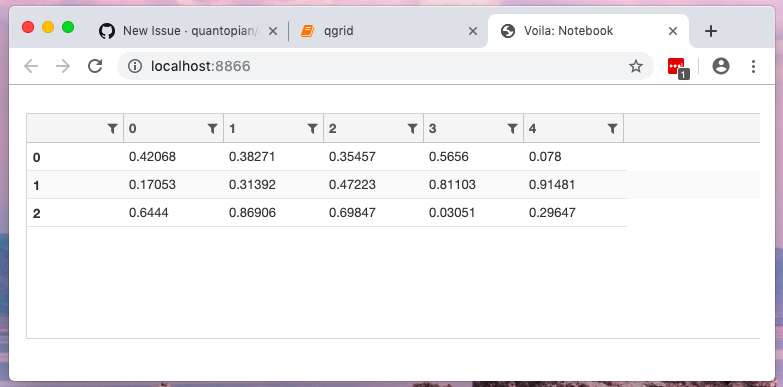
but that's not ideal as the widget still extends and it doesn't look nice.
Thanks for taking a look and for a great package.

Interim fix: Wrapping it in a ipywidgets.HBox or similar forces it to be contained.
HBox([qg], layout={'width': '250px'})
HBox([qg], layout={'width': '250px'}) does not work. it hangs and does not move from "loading widget..."
