

 qilingframework
Can not emulate linker32
*Describe the bug I use qiling emulate arm_android linker64, it worked. But when I emulate arm_android linker32, it gave an error.
Result
[+] Enable ARM VFP
[+] Set init_kernel_get_tls
[+] load 0x56555000 - 0x56613000
[+] load 0x56614000 - 0x5661b000
[+] load 0x5661b000 - 0x56624000
[+] mem_start: 0x0 mem_end: 0xcf000
[+] mmap_address is : 0x774bf000
settls(0x5661e4e4)
[+] log mmap2 - mmap2(0x0, 0x5000, 0x0, 0x22, -1, 0)
[+] log mmap2 - mmap2(0x0, 0x5000, PROT_NONE, MAP_PRIVATE | MAP_ANONYMOUS, -1, 0)
[+] log mmap2 - return addr : 0x774bf000
[+] log mmap2 - addr range  : 0x774bf000 - 0x774c4000
[+] log mmap2 - mapping needed
mmap2(0x0, 0x5000, 0x0, 0x22, -1, 0) = 0x774bf000
[+] mmap2_base is 0x774bf000
madvise() = 0
mprotect(0x774c0000, 0x3000, 0x3) = 0
[+] mprotect(0x774c0000, 0x3000, PROT_READ | PROT_WRITE) = 0
set_tid_address(5661e49c) = 6619
[!] Emulation Error

[-] r0	:	 0x5661f0e8
[-] r1	:	 0x4
[-] r2	:	 0x7ff3be4c
[-] r3	:	 0x22
[-] r4	:	 0x4
[-] r5	:	 0x5661e490
[-] r6	:	 0x7ff3be4c
[-] r7	:	 0x56555000
[-] r8	:	 0x0
[-] r9	:	 0x0
[-] r10	:	 0x0
[-] r11	:	 0x0
[-] r12	:	 0x56555000
[-] sp	:	 0x7ff3bc38
[-] lr	:	 0x565e0563
[-] pc	:	 0x565e96bc
[-] cpsr	:	 0x1f3
[-] c1_c0_2	:	 0xf00000
[-] c13_c0_3	:	 0x5661e4e4
[-] fpexc	:	 0x40000000

[+] PC = 0x565e96bc (/home/hyj/qiling/examples/rootfs/arm32_android/system/bin/linker+0x946bc)
[+] Start      End        Perm.  Path
[+] 56555000 - 56613000 - r-x    /home/hyj/qiling/examples/rootfs/arm32_android/system/bin/linker (/home/hyj/qiling/examples/rootfs/arm32_android/system/bin/linker)
[+] 56614000 - 5661b000 - rw-    /home/hyj/qiling/examples/rootfs/arm32_android/system/bin/linker (/home/hyj/qiling/examples/rootfs/arm32_android/system/bin/linker)
[+] 5661b000 - 56624000 - rwx    /home/hyj/qiling/examples/rootfs/arm32_android/system/bin/linker (/home/hyj/qiling/examples/rootfs/arm32_android/system/bin/linker)
[+] 56624000 - 56626000 - rwx    [hook_mem] (/home/hyj/qiling/examples/rootfs/arm32_android/system/bin/linker)
[+] 774bf000 - 774c4000 - rwx    [syscall_mmap2]
[+] 7ff0d000 - 7ff3d000 - rwx    [stack]
[+] ffff0000 - ffff1000 - rwx    [arm_tls]
[+] ['0xd0', '0xe8', '0x8f', '0xf', '0x10', '0xf0', '0x1', '0xf']

[+] 0x565e96bc     d0 e8 8f 0f 10 f0 01 0f 29 d0 2a 48 78 44 00 78 28 b1 28 46 21 46 bd e8 70 40 f5 f7 25 bf 26 48 78 44 00 68 01 19 11 29 30 d2 f2 68 11 68 41 b1 04 32 19 29 07 d0 51 68 02 f1 08 03 1a 46 00 29 Traceback (most recent call last):
  File "/home/hyj/qiling/examples/test.py", line 25, in <module>
    ql.run()
  File "/home/hyj/qiling/qiling/core.py", line 193, in run
    self.os.run()
  File "/home/hyj/qiling/qiling/os/linux/linux.py", line 125, in run
    self.ql.emu_start(self.ql.loader.elf_entry, self.exit_point, self.ql.timeout, self.ql.count)
  File "/home/hyj/qiling/qiling/core.py", line 252, in emu_start
    self.uc.emu_start(begin, end, timeout, count)
  File "/usr/local/lib/python3.8/dist-packages/unicorn/unicorn.py", line 317, in emu_start
    raise UcError(status)
unicorn.unicorn.UcError: Invalid instruction (UC_ERR_INSN_INVALID)
I use IDA to check, and I find this:
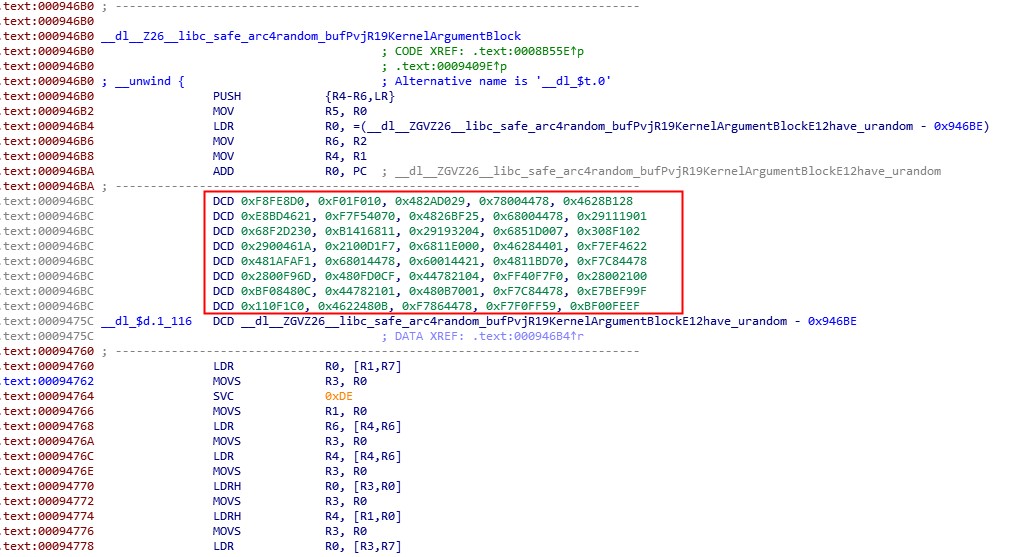 It can't be mad ecode or created a function.But this linker in my phone worked well.

Invalid instruction doesn't seems to be right for arm. that part of text section does't make sense. you might need to dig deeper to get the answer ?

Invalid instruction doesn't seems to be right for arm. that part of text section does't make sense. you might need to dig deeper to get the answer ?
I use IDA 7.0 find this
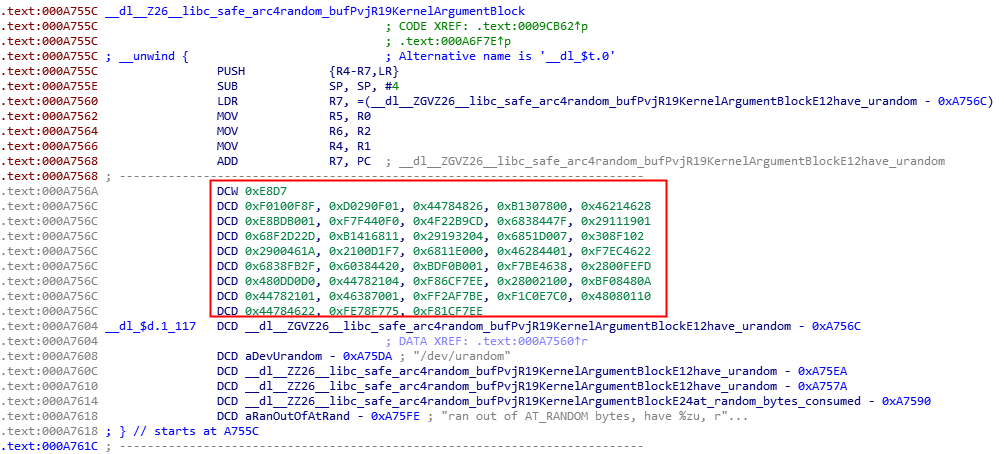 Then I use IDA 7.3 it can make code like this
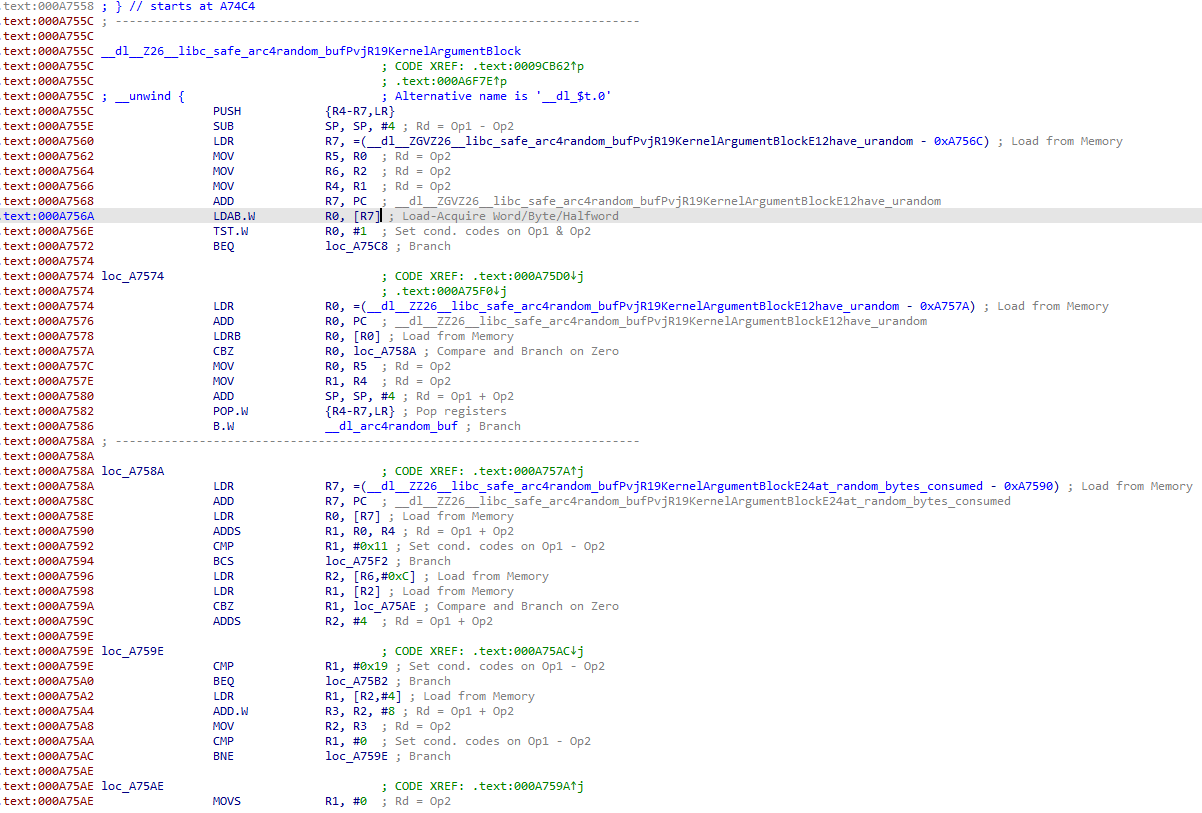
So I think maybe is an unicorn erro?
Invalid instruction for sure its Unicorn is too old. Can you check which ARM version this is binary belongs to? Unicorn is based on Qemu 2.1.2, so it should match the arm version.
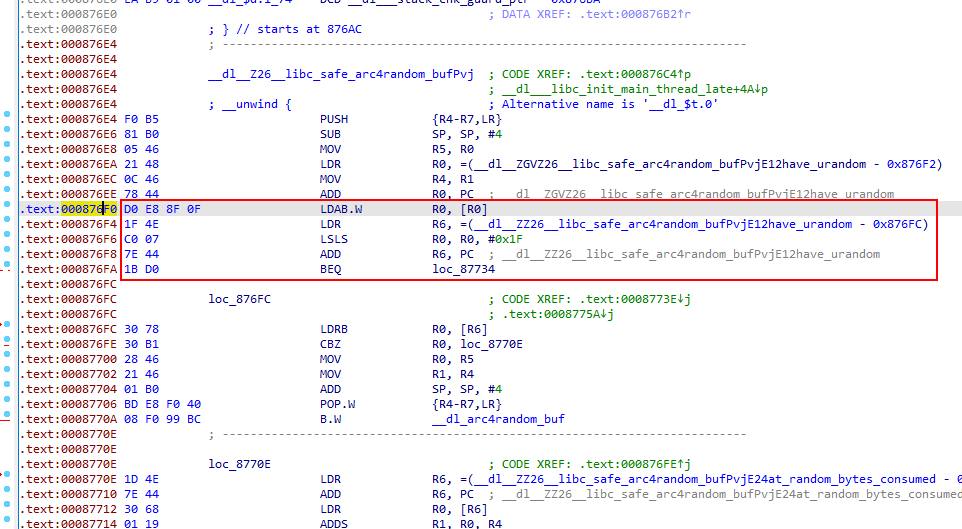 I met the same question. Is there any solutions?
So far nothing yet. We need to work with Unicorn team and see how we can solve this