

 pystardust
Ani-cli can't find mpv
Make sure you are on the latest version by running ani-cli -U
Metadata (please complete the following information)
Version: 4.10.1
OS: Windows 10
Shell: ... Windows Terminal? idk, readlink /bin/sh doesn't do anything. I'm no expert in this stuff.
Anime: All
Describe the bug Despite having mpv installed, (and having just updated it via scoop in an attempt to solve this), attempting to run ani-cli results in this error message: Program "mpv" not found. Please install it.
Steps To Reproduce
- Run ani-cli without syncplay
Expected behavior ani-cli should be able to find its dependancies
Screenshots (if applicable; you can just drag the image onto github. remove the following line if not needed)
Additional context

This looks to me like git bash and mpv installed via scoop. It should work, but somehow it doesn't. No way to really fix this for me without a windows pc

@Koyaliya Hi, I cant reproduce it
but try running mpv.exe and scoop which mpv, see if theres any result
if theres any result from the above, type which mpv.exe, copy the output but leave out "/mpv.exe" (usually its /c/ProgramData/scoop/apps/mpv/current/mpv.exe, but maybe it differs for you)
edit your ~/.bashrc and add:
export PATH="$PATH:/path/to/mpv"
replace /path/to/mpv with the copied output
then source ~/.bashrc
try re running ani-cli after that

@Koyaliya, my best guess is that despite using Git Bash, ani-cli is run through WSL. You can try editing the C:/Users/USERNAME/scoop/shims/ani-cli file (not the ani-cli.cmd file in the same folder). Remove the $WSL_INTEROP branch so that the file looks like:
#!/bin/sh
# C:\Users\USERNAME\scoop\apps\ani-cli\current\ani-cli
"$(cygpath -u 'C:\Users\USERNAME\scoop\apps\ani-cli\current\ani-cli')"  "$@"
@RaynardGerraldo, set a Windows user environment variable (or a system environment variable) called HOME and set its value to the variable %USERPROFILE%. This should get Git Bash to start in your home directory.

@RaynardGerraldo, did you set the Starting Directory of Terminal's Git Bash profile to %USERPROFILE%, according to the instructions in the ani-cli Windows installation guide? Either way will get you to stop having to cd ~ when you start Git Bash.
@RaynardGerraldo, did you set the Starting Directory of Terminal's Git Bash profile to
%USERPROFILE%, according to the instructions in the ani-cli Windows installation guide? Either way will get you to stop having tocd ~when you start Git Bash.
yep i just did it thanks for reminding, but still cant reproduce the original problem...
that $WSL_INTEROP idea sounds good btw, could be a case of its running from wsl and mpv is not installed there hence dependency error.
although i would suggest @Koyaliya to try and run echo $WSL_INTEROP from git bash and see if theres any output, if there is then definitely remove that $WSL_INTEROP line, if not try removing it anyways i guess, though it most likely wont solve it..
@Koyaliya, my best guess is that despite using Git Bash, ani-cli is run through WSL. You can try editing the
C:/Users/USERNAME/scoop/shims/ani-clifile (not theani-cli.cmdfile in the same folder). Remove the$WSL_INTEROPbranch so that the file looks like:
#!/bin/sh# C:\Users\USERNAME\scoop\apps\ani-cli\current\ani-cli"$(cygpath -u 'C:\Users\USERNAME\scoop\apps\ani-cli\current\ani-cli')" "$@"
This worked! Thanks so much 😊
Hi, i am having the same issue.
If I run ani-cli from windows cmd or powershell in the terminal app:
~$ ani-cli
/bin/bash: C:\Users\Lauloque\scoop\apps\ani-cli\current\ani-cli: No such file or directory
If i run from a git bash profile in the terminal app:
~$ ani-cli kimetsu no
Checking dependencies...
Program "mpv" not found. Please install it.
And as you can see below (in terminal git bash profile), the start directory is set up, and mpv is installed:
 ~$ pwd
/c/Users/Lauloque
~$ which mpv
which: no mpv in (a bunch of paths)
~$ which mpv.exe
/c/Users/Lauloque/scoop/apps/mpv/current/mpv.exe
~$ mpv.exe --version
<nothing printed, but no errors, and running a video path opens it in mpv player>
But it seems that git bash in the terminal still expects to use "mpv.exe" instead of "mpv", but it only runs mpv gui and doesn't seem to work as a cli tool. While in either windows cmd or powershell, "mpv.exe" doesn't print any cli prompt, but both commands open files just fine.
But if I run from git bash directly, it just works.
I used to be able to use the terminal app a few months ago.
I also tried the two solutions proposed on [Bug]: mpv command not found in gitbash · Issue #10221 · ScoopInstaller/Extras:
- Create a file in directory that it is in your path (E.g.
$HOME/.local/bin) and named itmpv.sh.- Open it with a text editor and add the following lines
#!/usr/bin/env bash
mpv.com "$@"
- Add executable permissions to the file. E.g.
chmod +x "$HOME/.local/bin/mpv.sh"That should map the binary (
mpv.comin my case) to a script that gitbash can find. That way there is no need to add the extension and modify scripts of binaries that expect mpv (without extensions).
You can also do it with scoop-shim(
scoop help shim).scoop shim add mpv 'C:\Users\humorce\scoop\apps\mpv\current\mpv.com'
While running "mpv.com" works in all terminal profiles and git bash, the first solution still gets "bash: mpv: command not found" and the last gets ERROR: Command path does not exist: 'C:\Users\Lauloque\scoop\apps\mpv\current\mpv.com' even though that path is valid. (And I also tried with ".exe" instead of ".com").
I also tried making an alias:
~$ alias mpv="mpv.exe"

~$ mpv
<no print but runs gui mpv just fine>
~$ ani-cli
Checking dependencies...
Program "mpv" not found. Please install it.
However, this works:
Cant detect mpv · Issue #959 · pystardust/ani-cli
try deleting the mpv folder and try again it should work
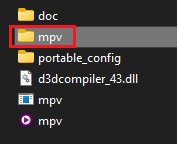
But that will probably break at next update and idk how much that folder is important to mpv

@Lauloque, do you need the bash.exe in the usr directory? Can you copy what's in the Windows install guide for your shell and icon paths and try again?
@Lauloque, do you need the bash.exe in the
usrdirectory? Can you copy what's in the Windows install guide for your shell and icon paths and try again?
You’re absolutely right! I overlooked that, my bad...
I had switched from the wrapper Bash (bin\bash.exe) to the MSYS Bash (usr\bin\bash.exe) because with the wrapper I ran into an issue with git LFS whenever I tried to push, Git would act as if there were LFS objects to upload, start the upload, and then hang at 0% forever. No amount of hard resets or even recloning the repo fixed it, but switching to MSYS Bash did. Using the wrapper Bash works fine with ani-cli, so I’ll probably have to keep two Git Bash profiles around depending on what I’m doing 🥲
Also, is your
usrGit Bash finding any scoop installed programs like fzf?
~$ scoop list
Installed apps:

Name             Version      Source Updated             Info
----             -------      ------ -------             ----
7zip             23.01        main   2024-05-07 17:33:21
ani-cli          4.8          extras 2024-05-07 17:33:19
aria2            1.37.0-1     main   2024-05-07 17:35:12
cacert           2024-03-11   main   2024-05-07 17:35:12
chafa            1.16.2       main   2025-07-31 21:10:31
element          1.11.109     extras 2025-08-25 10:10:47
ffmpeg           7.1.1        main   2025-07-31 20:47:15
fzf              0.65.0       main   2025-07-31 20:46:50
git              2.45.0       main   2024-05-07 17:33:42
mpv              0.39.0       extras 2025-08-30 12:08:00
sccache          0.10.0       main   2025-03-11 15:58:39
wget             1.21.4       main   2024-05-07 17:35:14
windows-terminal 1.22.11751.0 extras 2025-07-31 20:43:23
yt-dlp           2024.04.09   main   2024-05-07 17:35:18