

 pyfa-org
[Request] Dark/Nightmode
Even though I have no idea how feasible that is, is there any chance we could get a dark/nightmode pyfa? It's a lot easier on the eyes, even when f.lux is enabled.

@Seismix It's not impossible, but it would require a sit down and review of basically all GUI panels in pyfa, and then add code to change the default system colors. It's been requested before, just haven't ever really got around to figuring it out.
Will keep this one around for a rainy day. (note, at least in Linux, if you use a dark theme, pyfa inherits it IIRC. So just switch to Linux! :P)


Still got a long way to go, but it's a start....
https://puu.sh/wd8yc/91a796fa0f.png
(shown with the teletype font for maximum console effect 😁 )

Annnnd it's done.
Personally I don't much care for the dark modes (especially since there are some GUI elements that are difficult/impossible to change color on), but who am I to judge? :)
You can find a release here, but keep in mind that this is NOT Pyfa, but a fork. https://github.com/Pyfa-fit/Pyfa-fit/releases/tag/2017.06.08
@blitzmann feel free to merge this into Pyfa, it's mostly in a single PR. https://github.com/Pyfa-fit/Pyfa-fit/pull/123
does this mean that you'll never implement it into the main version of the program?
does this mean that you'll never implement it into the main version of the program?
It means that it's entirely up to Blitzmann to implement. The work is done.
I'm also tweaking it a bit further. Already tweaked it so that the background of the inner panes is subtly different than the main frame, as well as a bunch of improvements to scaling based on font size. https://puu.sh/wkYf4/6439d5e5b2.png
I'm not one for white text on a dark background, but that particular scheme I rather like. :)
@blitzmann any chance you can implement this good work in yours, please? the ability to change character size is really good too.
Dear god please do this >.> my vampire no life eyes need this in my life ^^;;

Can we breathe some life back into this? At this stage I'd settle for black/white reversal. My late night theory-crafting would be so much happier

So this is something I have wanted for a really long damn time and I am finally in a position to just do the work myself. I do notice someone already added something similar that never got merged into the main branch. If I take the time to do the leg work on this will it be merged in? I really want this feature and idk the details on why the previous PR wasn't merged in but I don't wanna take the time to do this if its just gonna get shoved to the side. Not wanting to be rude either, I just really wanna know lol
@blitzmann can provide details why it hasn't been merged. But i imagine it's because it looked ugly - not every wx widget is cutomizable.
Just curious, which OS are you using? If it's linux or mac - future wx versions will allow to choose between regular theme and dark theme. But if you are on windows, you are out of luck, as legacy windows widgets do not have dark versions.

I use windows primarily but I do have a linux laptop, I will probably do the code anyway because it'll be fun for me as a side project, useful for everyone, and convenient. Might take me a bit because time is a fluctuating concept for me but I'll work at it ;)
@DarkFenX basically gave one of the reasons why work on this fell through.
I felt as if it wasn't possible to get whatever resulted from this up to the proper standards of what we would release publicly. Although pyfa is a free, open source program, we still strive to release things that look good and don't feel half-baked. There were various limitations from wxWidgets that can't be overcome (or at least, overcome easily). The column headers in the various displays come to mind - you literally cannot change the colors of these as they are native widgets and controlled by the OS (of course, their are usually python-implementations, but using they are not drop-in replacements and a bunch of refactoring work would have to go into it). If you search online for wxWidget theming you'll basically find that you have to roll your own solution and it's difficult because wxWidgets just assumes native looks (this is a design limitation of the toolkit - it's supposed to look like other applications on the OS).
Another reason is that it's pretty difficult to come up with a good dark theme that doesn't... well, suck. Many people that have attempted this have either gone for a white on black background for everything, or some kind of grey tone. If there's going to be some sort of theming support, then it should at least have some accents. But again, I basically burned out trying to find a solution to various other issues and, having come to the conclusion that some widgets just aren't able to be styled, I gave up myself).
That being said, this is something that constantly comes up, so maybe it's worth revisiting by someone. I can give my two cents on the matter and on how I can think it might work. I had a branch long ago that was testing out some color choices, and this is where it settled
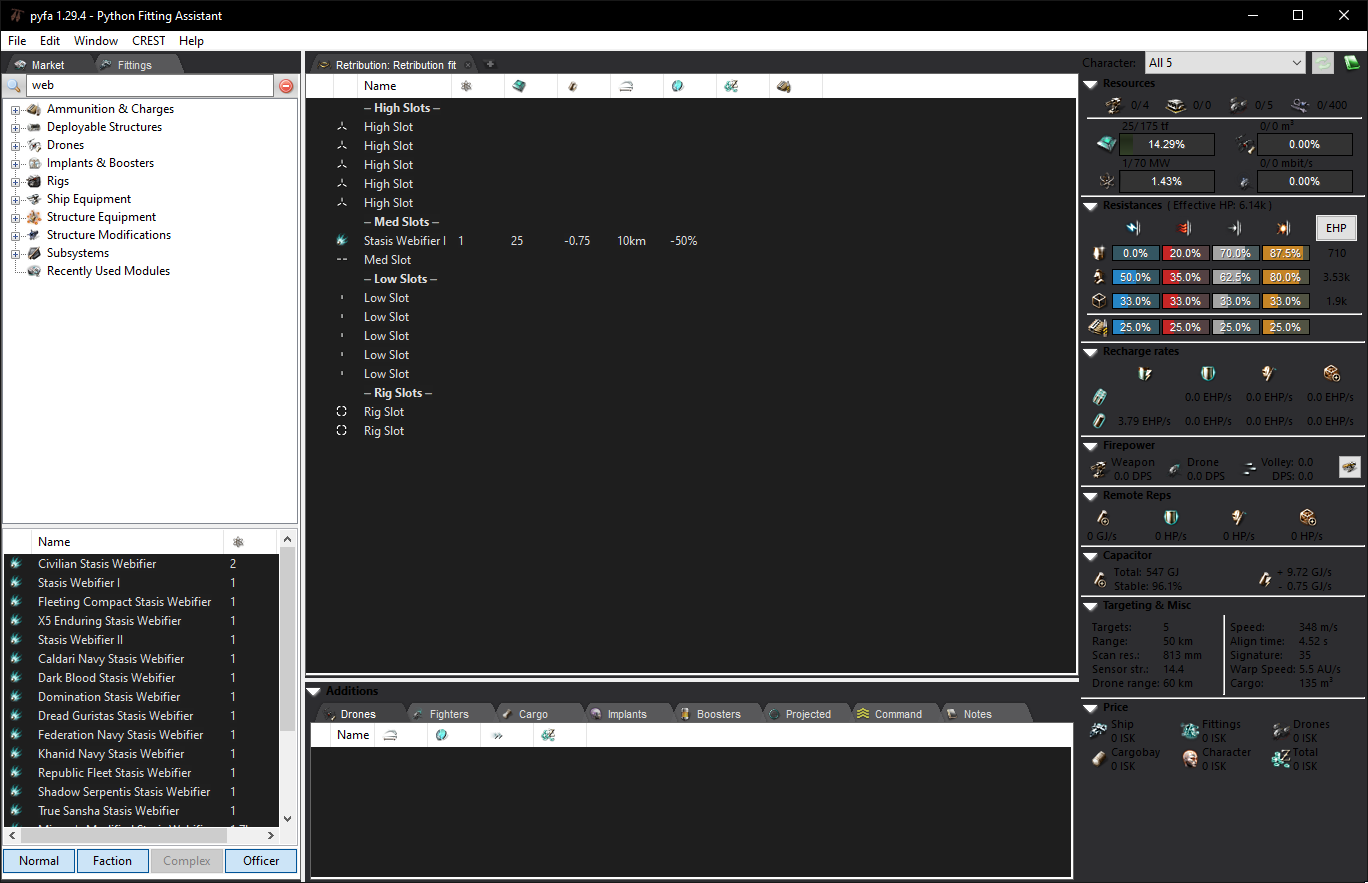
Obviously this was a preliminary test, but I think I like these general colors - it's two-toned much like the current pyfa is, and the text is muted, not white, but obviously there is a lot of work that needs to be done to get it up to snuff.
It would be preferable to have some sort of centralized system where its easier to manage theming (and so we don't litter the codebase with if darkTheme else statements). This is probably the most daunting task of them all - trying to figure out how to integrate it into sometimes 10 year old code so that it's easy to tweak in the future if ever needed. I would think a simple solution would be to have a static helper class that has various getters that returns colors, which would internally be determined by the "theme". So, you may have a getPanelColor() , getDisplayColor(), getButtonColor(), etc, and just add functions as needed for the thing you're attempting to create.
If someone is interested, the commit that produced that image is here: https://github.com/blitzmann/Pyfa/commit/2d4a8f2392eee3bc82be0a08116b31162bd8f342
That was way back in the 1.x days, so you probably aren't going to be able to run that branch without a lot of additional set up. If you're interested in tackling this, I would simply start with applying that commit line by line to the current code base to get a feel for how things might looks, and then from there delve into the other widgets and a system for centralizing the theme.
I want to summarize all my knowledge on this topic in a small status update, so that people realize it's not as easy as it sounds.
Pyfa uses wxPython as a toolkit to build UI. wxPython is a python interface built on top of wxWidgets, which has C++ interface. wxWidgets are built to mimic native OS' theme look and feel. And this comes at a cost of some flexibility.
Presently it is possible to have dark theme for pyfa, but only if your OS has dark theme. As far as I know, currently it applies to Linux only, because Linux DEs usually provide richer OS theme selection.
For a few years already, various OS have been providing ability to select between bright and dark theme for application developers. This is true at least for Mac OS X and Gnome. For instance, in Gnome many media-related applications use dark Adwaita theme while the rest of OS uses bright. However, ability to control it has not been exposed to wxPython yet. It might be exposed to the latest wxWidgets though (i think it is but I am not 100% certain), and once wxPython catches up, we might be able to add dark theme for Linux and Mac OS X users. This is something we can expect in near future, like ~6 months. But it does not depend on us atm.
Now, windows. Latest versions of windows added ability to switch to "dark theme". But Windows' widget sets are fragmented. There are "legacy" win32 widgets and modern UWP widgets (used by things like the new control center, win10 calculator etc). When you switch OS to dark mode, only UWP widgets follow this setting. Why doesn't it play well with pyfa, and it will not in near future? Well, because wxWidgets (and, consequently, wxPython) provide only win32 widget port for windows.
So, to have proper implementation of "dark mode" of pyfa for windows, we have following possibilities:
- wait until wxWidgets and wxPython provide UWP port for windows (unrealistic, unsure if it will ever happen)
- wait until MS teaches old dog new tricks - makes legacy win32 widgets to follow "dark mode" setting (unsure, but i would call it unrealistic)
- rewrite pyfa UI from scratch using some different UI toolkit (also unrealistic unless we start doing rewrite which i wanted to start for a few years already)
So, prospects of "dark mode" for pyfa under windows are grim. But on Mac and Linux there are decent chances to have it.
^^ All good info, thanks! You dove deeper into it than I did, didn't know windows had two different generations of widgets, tho it makes perfect sense
To reiterate, anything that we do to implement "themes" into pyfa as it stands now would be more of a hack rather than a properly supported feature. I'm open to PRs that do it, but it needs to be an optional feature and default to system defaults.
In Gnome you can use this extension https://extensions.gnome.org/extension/2236/night-theme-switcher/ which automatically switches to the dark theme (and back) once the Gnome integrated night mode is activated. Pyfa just works fine with that.

Hey. I just use a dark theme for windows and a Pyfa itself, it is painted in dark. Maybe this will somehow help in the development, or at least tell the correct colors. It looks cool!
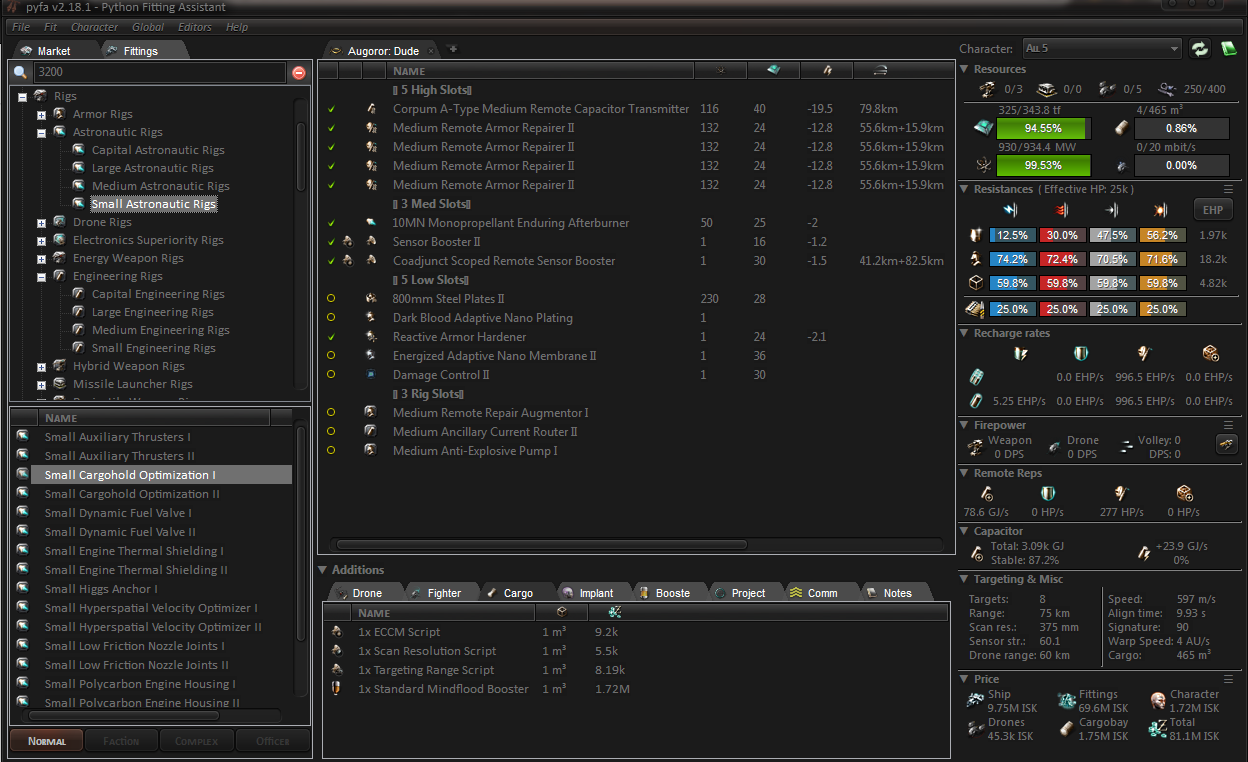

Hey. I just use a dark theme for windows and a Pyfa itself, it is painted in dark. Maybe this will somehow help in the development, or at least tell the correct colors. It looks cool!
Could you tell us how to do this? Pyfa is glaringly bright compared to all the other apps on my screen. And I spend a lot of time in PyFA, the glare causes eye strain. ( a lot of time )

Hey. I just use a dark theme for windows and a Pyfa itself, it is painted in dark. Maybe this will somehow help in the development, or at least tell the correct colors. It looks cool!
Could you tell us how to do this? Pyfa is glaringly bright compared to all the other apps on my screen. And I spend a lot of time in PyFA, the glare causes eye strain. ( a lot of time )
I very much want to know this as well.

@TRUELIKEtheRIVER @Xalorous it looks like the screenshot is from a non-Windows OS. The titlebar does not look like a Windows titlebar, unless it's heavily themed with some sort of software
@ Musiqav1
No, the screenshot was taken in windows 7 using the dark_agility___visual_style____by_djabytown theme. it not only colors the explorer, but also gives style to the applications
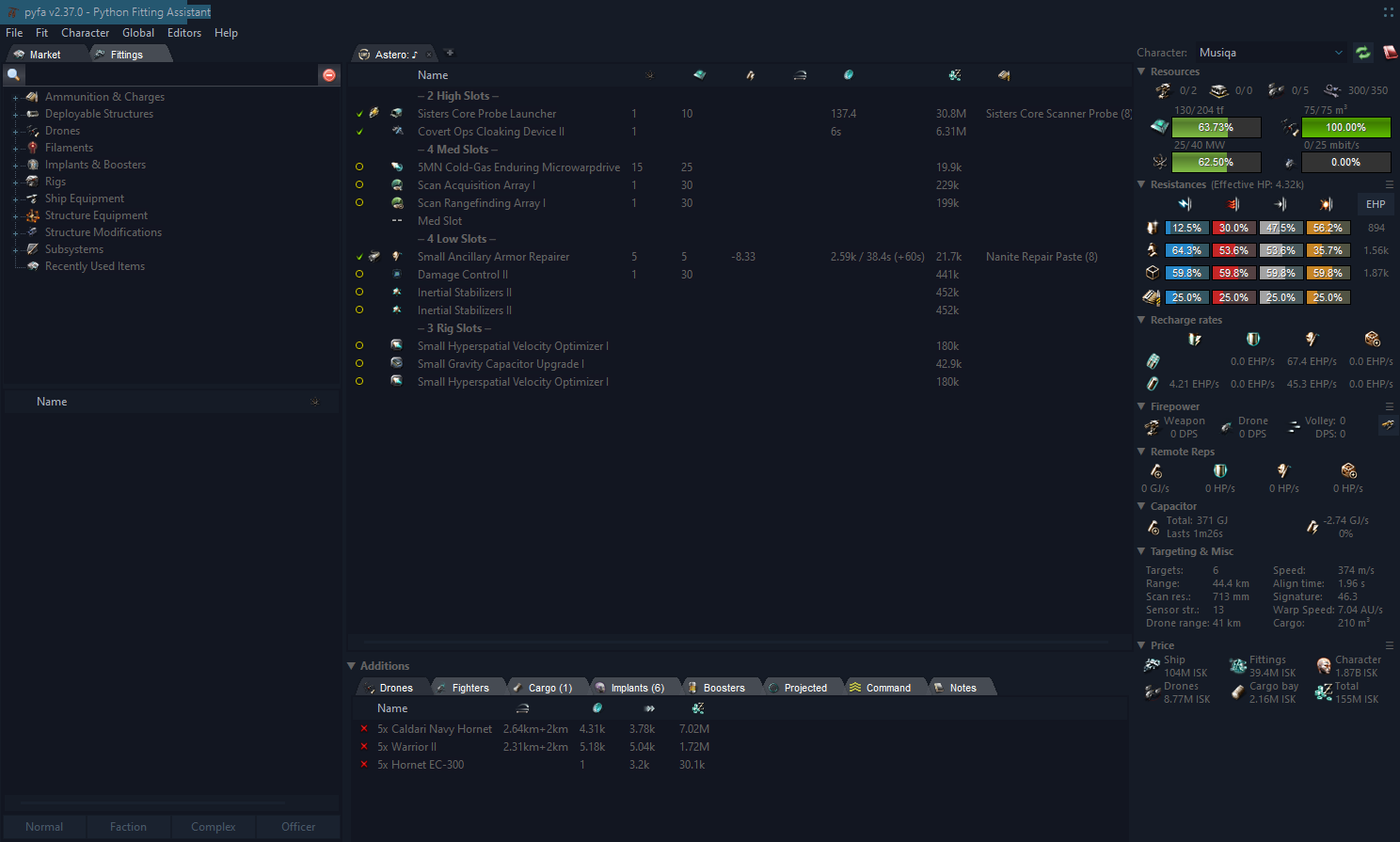 in win 10, it also looks good =)
@Musiqav1 that doesn't look like a windows 10 title bar. Are you using any software for theming?
A quick google, I think Musi is using something like this: https://www.deviantart.com/djabytown/art/Dark-Agility-Visual-Style-148691785

A less straining viewmode for the window release of Pyfa, has for a long time been a sought after feature in the Eve communities i frequent. So I decided to sit down and come up with a solution, and this is the result:
https://github.com/Eivonz/Pyfa-Mod
This is not an ideal solution, but it could be delivered fairly fast and is currently being used by a few players.
Note: I did write an email to blitzmann & kadesh before opening it up to people, as I didnt want to step on anyones toes, but I never heard back.
Cheers

I am just super overloaded with everything (work, family, eve), which doesn't leave much time to maintain pyfa or even read email.
I am unsure what to do with the dark mode under windows. I thought merging your code would be the way, but...
I just made a preview release with new wx, which should make dark mode work on macos (one of mac users already confirmed that it does), also it should theoretically work on linux, but it doesn't for some reason on my laptop. I am trying to figure out why.
Regarding windows - found this issue in wxpython issue tracker: https://github.com/wxWidgets/Phoenix/issues/2413 It contains reference to this wxwidgets method: https://docs.wxwidgets.org/latest/classwx_app.html#af8c93d7e3345e62a58325f3ab1d158d6
So, after support for it is added to wxpython, it might be a relatively painless way to add it to pyfa w/o hacks (with some limitations, though).
Never used wxwidgets but customtkinter has native support for dark mode and themes with customized color profiles. Not sure how much it would take to swap over but I do know it follows the same class structure as tkinter just with different naming conventions. Just a passing thought as I happen to get an email about this while browsing my phone.
On Mon, Dec 4, 2023, 10:36 AM Anton Vorobyov @.***> wrote:
I am just super overloaded with everything (work, family, eve), which doesn't leave much time to maintain pyfa or even read email.
I am unsure what to do with the dark mode under windows. I just made a preview release with new wx, which should make dark mode work on macos (one of mac users already confirmed that it does), also it should theoretically work on linux, but it doesn't for some reason on my laptop. I am trying to figure out why.
Regarding windows - found this issue in wxpython issue tracker: wxWidgets/Phoenix#2413 https://github.com/wxWidgets/Phoenix/issues/2413 It contains reference to this wxwidgets method: https://docs.wxwidgets.org/latest/classwx_app.html#af8c93d7e3345e62a58325f3ab1d158d6
So, after support for it is added to wxpython, it might be a relatively painless way to add it to pyfa w/o hacks (with some limitations, though).
— Reply to this email directly, view it on GitHub https://github.com/pyfa-org/Pyfa/issues/1206#issuecomment-1838901797, or unsubscribe https://github.com/notifications/unsubscribe-auth/ABP2MSL2O3RJYAA6WLP2JPTYHXUYNAVCNFSM4DNWOKOKU5DIOJSWCZC7NNSXTN2JONZXKZKDN5WW2ZLOOQ5TCOBTHA4TAMJXHE3Q . You are receiving this because you commented.Message ID: @.***>