

 pullup
Breaks the extension?


First of all, the extension is now v1.34, so the easy install zip obviously won't extract into the correct folder. Second, putting it in the correct folder and reloading the extension page will immediately disable the extension and mark it as broken, and if you do the Chrome "repair", IT WILL REINSTALL THE EXTENSION AND DELETE EVERYTHING YOU HAVE IN ONETAB! I had about 160 pages in there (master procrastinator here), and I have inadvertently lost all of them, because the extension saves its data in its installation folder, which Chrome deletes. Fucked up if you ask me, that's not a repair, that's just delete + install.
I was hoping the tabs were stored in a file in its install directory, because then I could have used file recovery to simply recover the file, but alas, the OneTab extension stores everything in Chrome's local storage (you can open Chrome Dev Tools while on the extension page, go to Application > Storage > Local Storage, and you'll see the currently stored pages there). That is technically just a file, but there is some magic Chrome does with it, meaning it changes something and doesn't accept the old storage file in case something happens to the extension. Presumably to prevent tampering by third parties or something like that. Even worse, Chrome does not name the local storage files by extension ID, so there is no easy way to understand which storage file is attached to OneTab, and the content is mostly not human-readable either.

Should have read this thread (especially @jurchiks message) prior to attempting to install 😅 Nearly lost 1100+ tabs.
But luckily found a solution listed here that allows you to enable the extension without losing data. https://support.google.com/chrome/thread/9968694?hl=en&msgid=11363304
Note: you need to have the original onetab.css instead of the custom one offered by this repository prior to re-enabling, otherwise it would break the extension again.
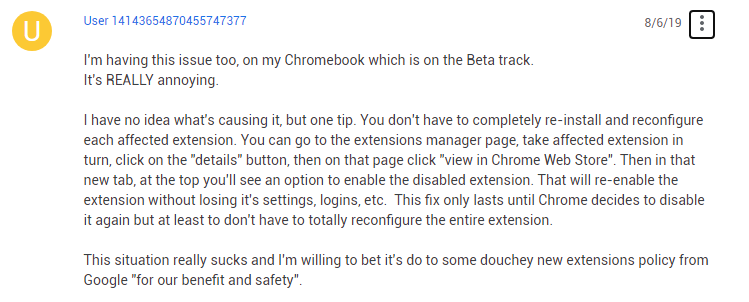

Oh man, I WISH I knew this beforehand, but I never imagined that repair would actually do what it did, so I just clicked it immediately without thinking...

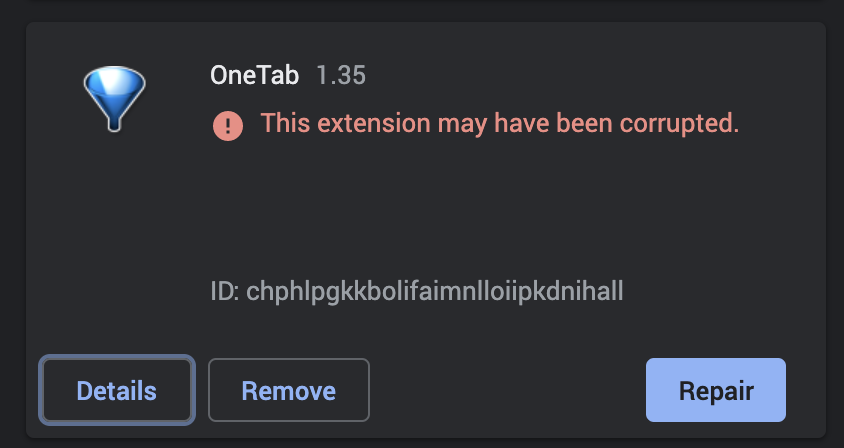
DO NOT CLICK "Repair" !!!!!
should open https://chrome.google.com/webstore/detail/onetab/chphlpgkkbolifaimnlloiipkdnihall , click 'enable item' button. in the way, your data can survive.
thanks Clipy! I just retrieved my data! Fortunately, I copied a copy of my pages before I repaired the OneTab and found these pages in Clipy’s clipboard. Clipy saved my 1127 tabs and my life! 🥲
