

 publiclab
Part of the text deleted while editing
I was working on my proposal https://publiclab.org/notes/gauravano/02-18-2018/gsoc-proposal-email-integration-project few hours back, I was doing some edits in Rich text mode, I used ctrl+B to un-bold some text, 2 lines after that bold line were gone. As missing lines are <img > tags so I ignored it and typed it again but after doing some edits in somewhere in the middle of my research note, I hit publish button and when I scrolled down to take a view at the whole research note, I found that bottom part (2-3 paragraphs) of research note was gone :scream: .
I think there should be an option to see the revisions of research note like we have for the wiki, this option would be visible only to the author of note. What do you think about this @jywarren @ebarry ?

hi! I like the idea of database-stored revisions on nodes in plots2 --
it'd be great. We do have a history module in the editor -- under the ...
button on lower right. It's not well advertised, though, so +1 to any UI
work to make this more obvious. It's client side, so it's not for all
purposes, but we could do better to make it easy to find. Maybe we could
show a brief highlight or tip when people press "undo"?
I'm also not very satisfied with the undo-ability of Woofmark, our WYSIWYG library -- it is a bit unstable. I think updating to the latest version may help, but I'm especially interested in adding more thorough tests to woofmark, and have made some attempts to do so... it's tough!
On Fri, Mar 16, 2018 at 4:29 AM, Gaurav Sachdeva [email protected] wrote:
I was working on my proposal https://publiclab.org/notes/ gauravano/02-18-2018/gsoc-proposal-email-integration-project few hours back, I was doing some edits in Rich text mode, I used ctrl+B to un-bold some text, 2 lines after that bold line were gone. As missing lines are <img
tags so I ignored it and typed it again but after doing some edits in somewhere in the middle of my research note, I hit publish button and when I scrolled down to take a view at the whole research note, I found that bottom part (2-3 paragraphs) of research note was gone.
I think there should be an option to see the revisions of research note like we have for the wiki, this option would be visible only to the author of note. What do you think about this @jywarren https://github.com/jywarren ?
— You are receiving this because you were mentioned. Reply to this email directly, view it on GitHub https://github.com/publiclab/PublicLab.Editor/issues/131, or mute the thread https://github.com/notifications/unsubscribe-auth/AABfJ206hSSn-DxvPs2Obbmxs0wsgFr5ks5te3figaJpZM4StaPa .

We do have a history module in the editor -- under the
...button on lower right.
hi @jywarren , actually, I have tried to revert back to the last possible change but, that history tab records did not come out to any help to me as when changes are made fastly like when the user is constantly typing then at that time it saves the revision faster too as you can see from this screenshot
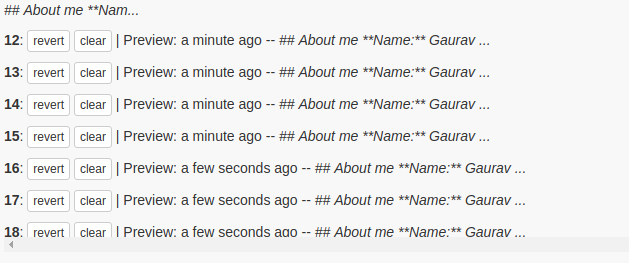
On the other hand, by showing revision like we do for the wiki pages, the user can revert back to his last saved version, I believe it would be really beneficial to regular users of our website which use Rich Text mode for writing.(P.S: I shifted to markdown after the problem :wink:)
It's not well advertised, though, so +1 to any UI work to make this more obvious. It's client side, so it's not for all purposes, but we could do better to make it easy to find. Maybe we could show a brief highlight or tip when people press "undo"?
I would do the changes in UI for more clarity on the history tab feature.
I'm also not very satisfied with the undo-ability of Woofmark, our WYSIWYG library -- it is a bit unstable. I think updating to the latest version may help, but I'm especially interested in adding more thorough tests to woofmark, and have made some attempts to do so... it's tough!
Yup, text editor requires lot of work !!! I would see if I could help in this after submitting the proposal.Thanks.
For solving this issue, I think we could add a preview button which on click will open a div and all the data filled on the editor can be uploaded to a database like mongoDB or firebase and from there data can be fetched to show on the newly open div also a post at https://publiclab.org/notes/recent.. I would like to work on this issue and am open to any and all suggestions. Thankyou @jywarren @gauravano

@niravasher You're suggesting (almost) simultaneous upload (when the preview is pressed and div opens) and download here, right? Wouldn't that add to our online dependency, increase traffic and hits to the PL server (we saw how that ~~affected~~ affects our api), and also may not prove to be a good strategy after all among our low-speed users. My suggestion here is that maybe we can achieve the same by using cookies (with a month of expiry time maybe?), with the user's consent, obviously, that offer us a safe 80KB of storage on the user's machine hence taking the load off the backend and shifting it to the client's side.
How does that sound?

Hmm, regarding this I could add two more buttons
- Save 2) Preview (This will avoid any real time connections) At first save, preview and publish buttons will be disabled. As the user enters the title, only save button will be enabled. On hitting save, a cookie will be generated which will store the title inside it (if user enters more than title, then all of that) and preview and publish will enable. On pressing preview, a div will open as an overlay which will include the data that a user has entered. This can be further published. Is this ok? @rexagod
Hmm. What if the user wants to make a slight change to the content and not record that as a revision? He will, in any case, have to save the content as a revision even though it may be very alike to the previous one. Better yet, to avoid this, we can,
- Monitor for changes, and only allow the content to be saved as a revision if the diff seems pretty much different than the one that's currently under editing.
- Always implement this revision "save" concept whenever the user is at the initial case, that is, when the user first starts to write an article.
Edit: We can show the diff and leave it to the user whether he wants to save it as a revision or not, in the cookie. You may refer this to get a better idea of what I'm talking about.
Ok! So at first all the three buttons will be disabled. Once the user starts writing the title, the save button will be enabled. Once the user hits "save" preview and publish buttons will be enabled. Next when the user tries to edit the information, the changes will be shown in red color as per the documentation of jsdiff. The save button won't be disabled and it is upto the user to save it in a cookie or no. The user when satisfied with the changes can just hit the publish button. Does this sound good? @rexagod I will try to implement this.
@niravasher I think this would work under the given constraints. Let me know if you run into any problems whatsoever.
I can't store images in a cookie since images are of larger sizes, hence I am using local storage instead of cookies @rexagod
Just saying, you can store the URLs in the cookies @niravasher, instead of the whole image. But you're always welcome to implement your own ideas if you think it will have a overall better performance/design impact on the Editor. Also, please don't hesitate to ask any other doubts that may come to your mind, we're here to help. Thanks!!
How do I save the data entered inside the code block of the editor in the local storage? Javascript converts that data into HTML elements and the local Storage is not able to detect it. I tried to use childNodes property but this is giving me an object with many un-necessary properties.....
Hi Nirav! There is no harm in storing them in html in the ls although I'd recommend if you sticked with innerText here to do the same. Also, what exactly do you mean by ls it is not able to detect it?
So whenever browser interprets localStorage.set("code base", doument.getElementsByTagName("pre").innerHTML) ,it returns a javascript object inplace of text that is inside the code block. This is because there is a feature to convert each line of text inside code base into HTML elements. So I tried using document.getElementsByTagName("pre").childNodes, but I don't know why am I still getting a javascript object @rexagod