

 proplot-dev
Manually specify `title` and `abc` coordinate positions
Description
Hi, is it possible to make the abc labels slightly offset to the left from the axis? This would probably be a negative position.
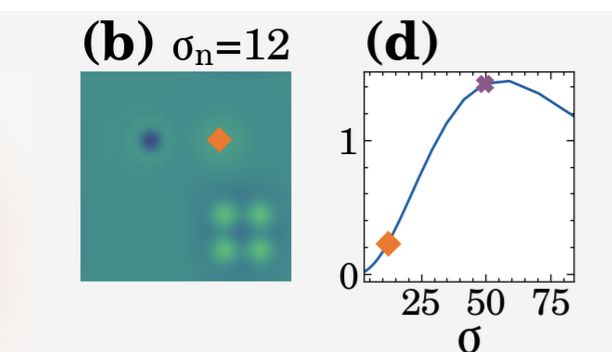
I was hoping to have the (b) moved slightly left so that I can center the title without the two texts crashing into each other.
I tried the following after having all of my "imshow" and other formatting code run:
ax = axes[2]
aobj = ax._title_dict['abc']
print(aobj.get_position()) # prints (0, 1.0)

# no effect
aobj.set_x(-.25)

# no effect
abc = ax.get_children()[1]
abc.set_position((-.25, 1.0))
I couldn't figure out what was running to overwrite these positions, but I assume it's something internal to proplot to make the layout nice and orderly.
Proplot version
>>> import matplotlib; print(matplotlib.__version__); import proplot; print(proplot.version)
3.3.0
0.9.1

This is definitely a fair request. I can support more label position customization by:
- Not auto-adjusting the x-location for "outer" labels (which would fix your example).
- Allow passing 2-tuples to
abclocandtitlelocto specify the coordinate position of an "inner" label.
For now, in your example, you should be able to use ax.format(titleloc='center', abcloc='center') and the a-b-c label will be automatically offset away from the title (i.e., same effect as giving a "left" label a negative x position). You can increase/decrease this offset by changing pplt.rc['abc.titlepad'] or using ax.format(abctitlepad=padding).

Thanks for the suggestion, though when I have seems to move the title off to the right before it moves the (b) off to the left:
ax.format(title=f"$\sigma_n$=12", abcloc='center', titleloc='center', abctitlepad=12)

I tried a few other combos of "left" (makes it worse)
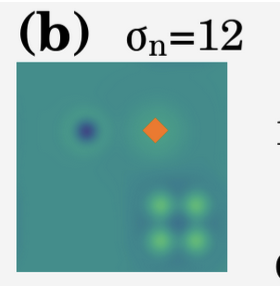
But it gets closer with "right":
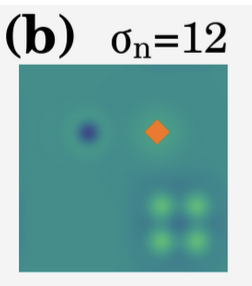
Sorry for the delay. I see now, you want a "centered" title but want the a-b-c label offset toward the left (rather than centering the entire a-b-c label/title ensemble as in your first example).
Will look into this when I get the chance, but for now your best bet is probably this "hacky" solution: 1) set both titleloc='center' and abcloc='center' and play with abctitlepad, as you've done above, then 2) append spaces to the right of the title to prevent the title from getting pushed too far to the right (e.g. title=r'$\sigma_n = 12$' + 5 * ' ').
Alright I'll give it a shot! No worries on quickly implementing this, seems like it might be a rather unique request
On Tue, Oct 5, 2021, 12:42 AM Luke Davis @.***> wrote:
Sorry for the delay. I see now, you want a "centered" title but want the a-b-c label offset toward the left (rather than centering the entire a-b-c label/title ensemble as in your first example).
Will look into this when I get the chance, but for now your best bet is this "hacky" solution: 1) set both titleloc='center' and abcloc='center' and play with abctitlepad, as you've done above, then 2) append spaces to the right of the title to prevent the label from getting pushed too far to the right (e.g. title=r'$\sigma_n = 12$' + 5 * ' ').
— You are receiving this because you authored the thread. Reply to this email directly, view it on GitHub https://github.com/lukelbd/proplot/issues/288#issuecomment-934084751, or unsubscribe https://github.com/notifications/unsubscribe-auth/AB7ILWABBGUXKCYDIUK3ZSDUFKF5FANCNFSM5E3SUSNQ .
No worries on quickly implementing this, seems like it might be a rather unique request
Thanks! I think I'll keep this as an open issue though for the specific feature: specifying titleloc and abcloc with an (x, y) coordinate position rather than preset position.
