

 project64
[Bug]: Screen Image deformed in Glide64 for PJ64.
Expected behavior?
The emulator supposed to have the the normal image.
Like Glide64
Actual behavior?
Actual behavor :
Screen Image deformed :

Steps to reproduce the problem
- Goto Settings>Plugins
- Change video Plugin to
Glide64 For PJ64 - Click Apply Then OK.
- Start a game.
Error messages?
No response
What game were you playing?
Title: Super Mario 64 Maker
Nintendo 64 game or Nintendo 64 Disk Drive: Z64 Cartridge (N64)
ROM information: (File > ROM info, or context menu > ROM information in the ROM list)
Save type: (no save)
Original or modified ROM?: Super Mario 64 Maker (
Specifications and build details
Project64: 3.0.0.5632-f83bee9 OS: Windows 10 21H2 Build 19044.1526
CPU: Intel 6th gen core (Intel I7)
RAM: 16 GB
Graphics: Nvidia GTX 1060
Using included plugins
- [X] I can confirm I am using the included RSP, audio, input, and graphics plugins
Plugins used while the issue occurred
Graphics plugin (and HLE or LLE): Glide 64 for PJ64 Audio plugin: PJ64 Audio Plugin Input plugin: N-Rage for PJ64 RSP plugin: RSP Plugin
Copyright Compliance
- [x] There are no infringing files attached to this bug report.

And if i enable HLE i got the error message :
uCode INI not found then Unknown Memory action and PJ64 frezzes.
Hacked roms don't have existing compatibility settings applied, enable
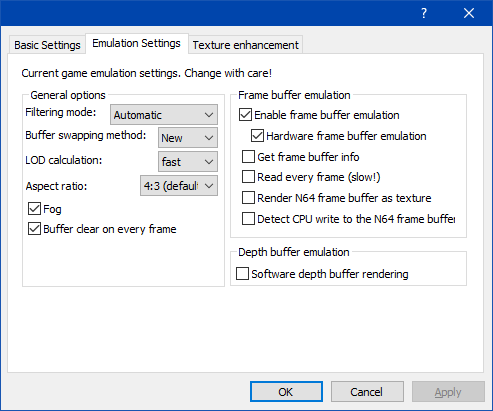

I enabled the same settings and the problem still ocurs. If i change the plugin i got a black screen.
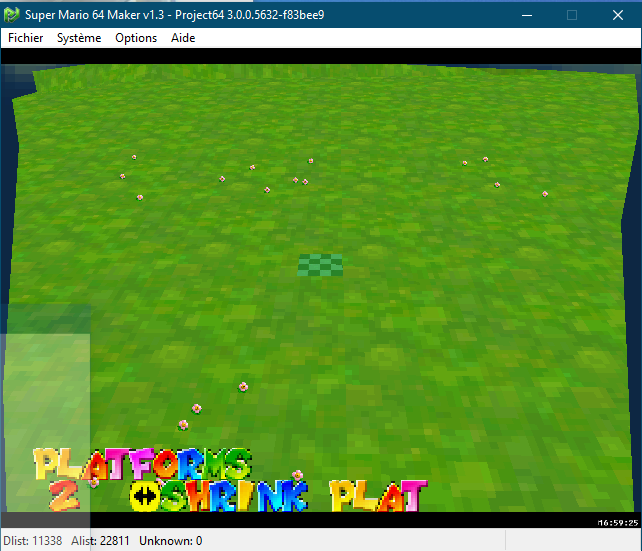
@unutilisateurdegoogle When you say an "original ROM" do you mean the unmodified Super Mario 64?

It seems to be working but the cpu get 99,99% when title screen.
It seems to be working but the cpu get 99,99% when title screen.
Can you try with GLideN64 and the latest development build of Project64 and see if the issue persists?