
one-core
 one-core copied to clipboard
 procivis
Issue, hold and verify digital identities and credentials on any device with eIDAS 2.0 compliancy, ISO 18013-5 mdocs, IETF SD-JWT VC, OID4VC, and W3C VCs.

Table of Contents
- Getting started
- Background
- eIDAS 2.0
- Interoperability and conformance
- Supported standards
- Support
- License
The Procivis One Core is a robust solution capable of powering every element of the digital identity credential lifecycle, flexibly handling a broad array of different protocols and trust models, ensuring compatibility with different digital identity regulations, and can be installed and operated almost anywhere, ensuring seamless integration through a powerful API.
Procivis One is built to connect your organization to the SSI ecosystem, become compatible with regulations such as eIDAS 2.0, and be extensible as new regulations and requirements emerge.
See the key features and complete solution architecture.
Get started
Prerequisites
- Rust 1.88+ - Install via rustup.rs
- Docker with Docker Compose - Docker Desktop recommended for easiest setup
- Install cargo-make:
cargo install cargo-make
Quick start
-
Verify Docker is running:
docker compose version -
Compile the project:
makers build -
Start the database:
makers dbstart -
Start the server:
makers run -
Open http://localhost:3000/swagger-ui/index.html
You should see the Swagger UI interface -
Click the green "Authorize" button and set the authorization bearer token:
test
→ You can now make API calls directly to the server using the Swagger UI interface
What's running:
- Database: running in Docker
- API server: http://localhost:3000
- Swagger UI: http://localhost:3000/swagger-ui/index.html
If you want some guidance on where to go from here, see Issue your first credential on the docs.
Troubleshooting
- Issues compiling - check
rustc --versionand runrustup updateif your version is <1.88. - Issues starting the database - make sure Docker is running.
- Mac: you should see the whale icon in your menu bar.
- Windows: you should see the whale icon in your system tray.
- Issues making API calls - make sure you have added the authorization
bearer token
testto the swagger.- If you still have issues with calls, check the value of
app.authTokeninconfig/config-local.ymlas this determines your authorization token.
- If you still have issues with calls, check the value of
Advanced configurations
Values set in dev.env will override the configuration files found
in /config.
- Set a new server authorization token:
ONE_app__authToken=yourTokenHere - Provide new encryption tokens for OpenID4VCI and private keys (default
configuration has placeholder values allowing the server to start):
ONE_issuanceProtocol__OPENID4VCI_DRAFT13__params__private__encryption=yourTokenHereONE_issuanceProtocol__OPENID4VCI_DRAFT13_SWIYU__params__private__encryption=yourTokenHereONE_keyStorage__INTERNAL__params__private__encryption=yourTokenHere
Encryption keys must be a 32 byte hex-encoded value. Use
openssl rand -hex 32 or another qualified tool to generate a
cryptographically-secure key.
For more, see the configuration guide.
Trial
You can use the full enterprise stack when you join our Trial Environment. Here you are given control of an organization in the Procivis One Desk UI.
Tests
To run only the unit tests
cargo test --lib
# or
makers unit-tests
To run integration-tests
cargo test --test integration_tests
# or
makers integration-tests
To run integration-tests with MariaDB
makers dbstart
ONE_app__databaseUrl="mysql://root:Qpq5nDb5MKD6v9bt8dPD@localhost/core" makers integration-tests
Run Wallet
You can start a separate instance of a service that will play wallet role. This instance is accessible on port 3001.
makers runwallet
Live Reload
Using cargo-watch, the code can be automatically recompiled when changes are made.
Setup
cargo install cargo-watch
Run the REST server
makers runw
Run compiled application (Local env)
./target/debug/core-server --config config/config-procivis-base.yml --config config/config-local.yml
Docker
- Run MariaDB for local developing
docker compose -f docker/db.yml up -d
or
makers dbstart
- Stop MariaDB for local developing
docker compose -f docker/db.yml down
or
makers dbstop
- Drop MariaDB for local developing - removes everything
makers dbdrop
- Print MariaDB logs
docker compose -f docker/db.yml logs -f
- Build project
docker build -t one-core -f docker/Dockerfile .
- Run project on Windows or Mac
docker run --init -p 3000:3000 -it --rm \
  -e RUST_BACKTRACE=full \
  -e ONE_app__databaseUrl=mysql://core:[email protected]/core \
  one-core --config config/config-procivis-base.yml --config config/config-local.yml
- Run project on Linux
docker run --init -p 3000:3000 -it --rm \
  -e RUST_BACKTRACE=full \
  -e ONE_app__databaseUrl=mysql://core:[email protected]/core \
  one-core --config config/config-procivis-base.yml --config config/config-local.yml
- Run shell in the container
docker run -it --rm --entrypoint="" one-core bash
SBOM
Source:
-
Install cyclonedx-cli
sudo curl -L https://github.com/CycloneDX/cyclonedx-cli/releases/download/v0.25.0/cyclonedx-linux-x64 -o /usr/local/bin/cyclonedx-cli
sudo chmod +x /usr/local/bin/cyclonedx-cli
- Install cyclonedx
cargo install cargo-cyclonedx
- Generate JSON format
cargo cyclonedx -f json
- Prepare env
export DEPENDENCY_TRACK_BASE_URL=https://dtrack.dev.one-trust-solution.com
export DEPENDENCY_TRACK_API_KEY="<api_key>"
export DEPENDENCY_TRACK_PROJECT_NAME="ONE-Core"

export D_TRACK_PATH=${DEPENDENCY_TRACK_BASE_URL}/api/v1/bom
export SBOM_FILE_PATH="apps/core-server/bom.json"
export APP_VERSION="local-test-1"
- Upload JSON BOM file
file_content=$(base64 -i merged_sbom.json)

curl -v -X PUT \
  -H "Content-Type: application/json" \
  -H "X-API-Key: ${DEPENDENCY_TRACK_API_KEY}" \
  --data @- ${D_TRACK_PATH} <<EOF
{
  "projectName": "${DEPENDENCY_TRACK_PROJECT_NAME}",
  "projectVersion": "${APP_VERSION}",
  "autoCreate": true,
  "bom": "${file_content}"
}
EOF
- Merge all SBOM files to one
FILES="apps/core-server/bom.json lib/migration/bom.json lib/one-core/bom.json lib/shared-types/bom.json lib/sql-data-provider/bom.json platforms/uniffi/bom.json platforms/uniffi-bindgen/bom.json"
cyclonedx-cli merge --input-files ${FILES} --input-format=json --output-format=json > merged_sbom.json
Testing
Run tests
cargo llvm-cov --no-clean --workspace --release --ignore-filename-regex=".*test.*\.rs$|tests/.*\.rs$"
Generate report
- Cobertura
cargo llvm-cov report --release --cobertura --output-path cobertura.xml
- Lcov
cargo llvm-cov report --release --lcov --output-path lcov.info
Migration
Generate new migration
- Using Sea-ORM CLI
makers generate_migration description_of_new_migration
Background
Decentralized digital identities and credentials is an approach to identity that relocates digital credentials from the possession and control of centralized authorities to the digital wallet of the credentials holder. This architecture eliminates the need for the user to "phone home" to use their credentials as well as the verifier to communicate to the issuer via back-channels, keeping the wallet holder's interactions private between only those parties directly involved in each interaction. This model of digital identity is often referred to as Self-Sovereign Identity, or SSI.
eIDAS 2.0
Whether you want to:
- issue into an EUDI Wallet
- provide an EUDI Wallet
- offer services to an EUDI Wallet holder
Procivis One provides production grade open source components to get certified and connect your organization to the eIDAS 2.0 ecosystem.
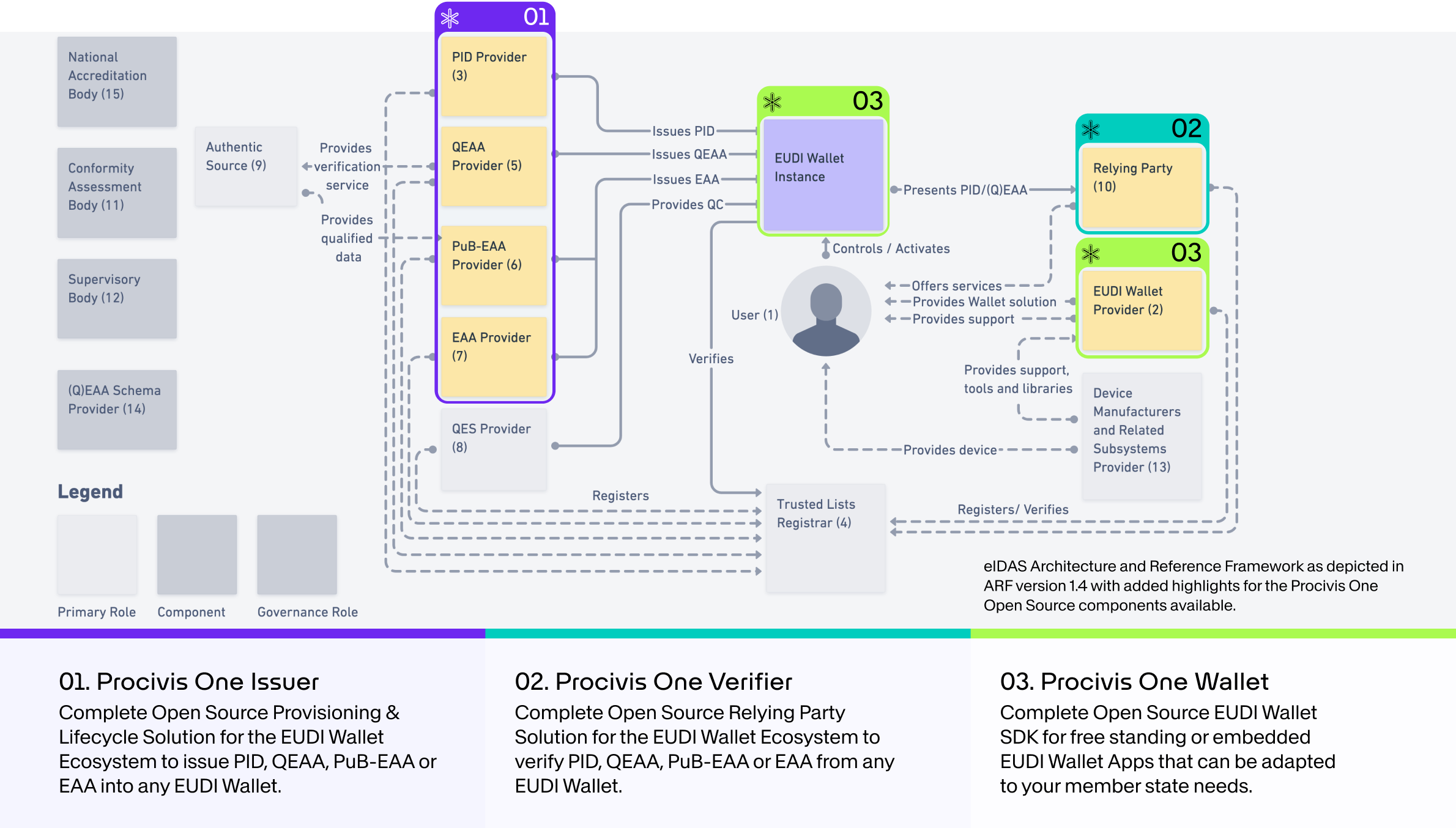
Use the Procivis One Core for Issuer or Verifier solutions. For an EUDI Wallet, use the One Core React Native SDK for embedding into an existing app, or use the Procivis One Wallet with adaptations to fit your needs.
Interoperability and conformance
Procivis One is built using open standards and tested to ensure interoperability with different software vendors and across different international regulatory ecosystems.
- W3C standards
- The W3C offers several test suites for standards conformance. See the latest test results for Procivis One at canivc.com.
- ISO/IEC 18013-5 mDL
- Procivis One's implementation of the ISO mDL standard is compatible with the OpenWallet Foundation's verifier: Procivis One can successfully issue mDL credentials to a Procivis One Wallet, and these credentials can successfully be verified by the OpenWallet Foundation's verifier. See the OpenWallet Foundation libraries.
- eIDAS 2.0; EUDI Wallet
We continue to look for more opportunities for interoperability testing as the standards and regulations mature and harden.
Supported standards
Credential models
W3C VC
- W3C Verifiable Credentials Data Model 2.0 in the following variations:
| Securing mechanism | Supported representations | Supported proof/signature types |
|---|---|---|
| W3C Data Integrity Proofs (embedded) | JSON-LD in Compacted Document Form | |
| W3C VC-JOSE-COSE (enveloping) |
* CRYSTALS-DILITHIUM is a post-quantum resistant signature scheme, selected by NIST for Post-Quantum Cryptography Standardization. Support for the recently published FIPS-204 is planned for the near future.
-
Backwards compatibility: Procivis One supports verification of proofs which use VCDM 1.1.
-
Additional VC formats: Procivis One supports verification of VCs embedded in optical barcodes. See Verifiable Credentials Barcode v0.7.
ISO mdoc
- ISO/IEC 18013-5:2021 standard for mdoc credentials.
IETF SD-JWT VC
| Standard | Supported representations | Supported proof/signature types |
|---|---|---|
| IETF SD-JWT VC | SD-JWT |
* CRYSTALS-DILITHIUM is a post-quantum resistant signature scheme, selected by NIST for Post-Quantum Cryptography Standardization. Support for the recently published FIPS-204 is planned for the near future.
Exchange and transport
- OpenID4VCI (Issuance)
- OpenID4VP (Verification)
- v1.0
- Draft 25
- Draft 20
- OID4VP over BLE; optimized version of Draft 00
- OID4VP over MQTT; proprietary adaptation of "OID4VP over BLE" via MQTT channel
- ISO/IEC 18013
Key storage
- Secure Enclave (iOS) and Android Keystore (TEE or Strongbox)
- Azure Key Vault (HSM)
- Internal encrypted database
Revocation methods
- Bitstring Status List v1.0
- Linked Validity Verifiable Credentials (LVVC)
- Token Status List - Draft 03
DID methods
See our supported technology page for more details.
Support
Need support or have feedback? Contact us.
License
Some rights reserved. This library is published under the Apache License Version 2.0.

© Procivis AG, https://www.procivis.ch.
 procivis