

 processing
Chrome issue: TypeError: Cannot read property 'addModule' of undefined
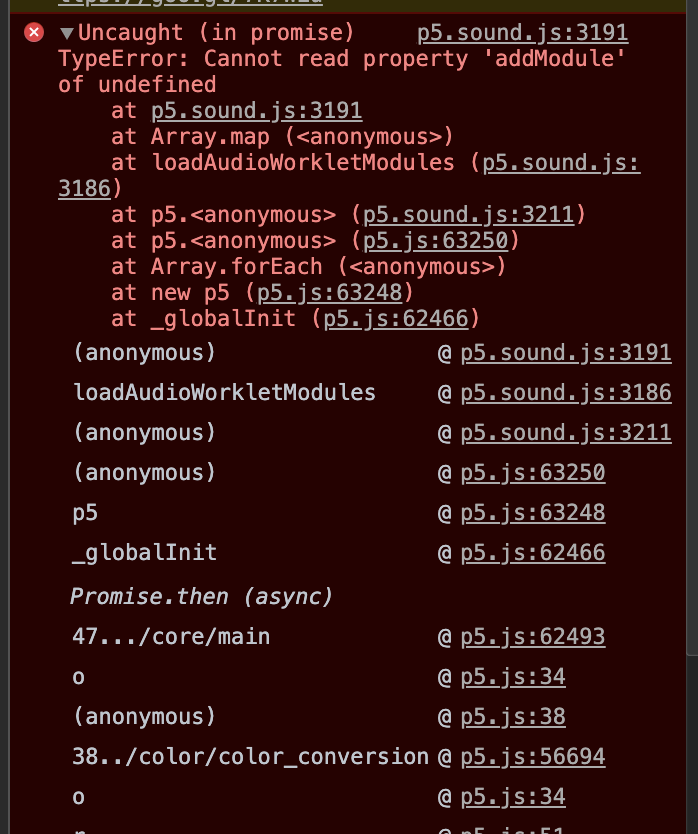

same issue here...it is weird, because I had the same code 2 days ago and the error was not there. It just appeared when I ran it today. I wonder if it has to do with some Chrome update/changes?

Hi again @xuan-91 , I found this was solved already here. The problem is when using HTTP protocol instead of HTTPS. I did it and it worked out. I hope it works for you too.
Hi again @xuan-91 , I found this was solved already here. The problem is when using HTTP protocol instead of HTTPS. I did it and it worked out. I hope it works for you too.
Hi teo523, thank you for mentioning this, mine is working now!

How do I solve it If for some reasons I can't use HTTPS?
You can use a tunnel to your localhost. For instance, ngrok creates a HTTPS URL that refers to your localhost, and it's for free!
@teo523 Thanks for the tip! The latest version of p5.sound 3.1.2 had broken the ability to locally network a sketch (on macos machines, using http://name.local:xxxx ) – since it's technically not 'localhost' anymore. Previously it failed quietly, obviously not able to use the mic, but now it returned this 'addModule' bug preventing whole sketch from loading – this ngrok totally solves the issue for linking machines via an https tunnel.


You can work around this using the GoogleChromeLabs audioworklet-polyfill. However, I found it irksome that the GoogleChromeLabs pollyfill hasn't had a release published since it was updated to fix this issue, so I forked it and published an updated npm package. You can workaround this issue by adding this to your HTML:
<script src="https://unpkg.com/@free-side/audioworklet-polyfill/dist/audioworklet-polyfill.js"></script>

@sflanker 's solution works perfectly for those looking for a quick fix even a year+ later.

@MatterL Where in your React app did you add this line of HTML? I tried adding it in the <body>, but it didn't work for me.

@MatterL Where in your React app did you add this line of HTML? I tried adding it in the
<body>, but it didn't work for me.
You're going to want it up in the HEAD, I put it directly under where I imported the p5.js library. So my script imports look like this:
<html>
<head>
<script src="https://cdn.jsdelivr.net/npm/[email protected]/lib/p5.js"></script>
<script src="https://cdn.jsdelivr.net/npm/[email protected]/lib/addons/p5.sound.js"></script>
<script src="https://unpkg.com/@free-side/audioworklet-polyfill/dist/audioworklet-polyfill.js"></script>
</head>
<body>
 Body here-
</body>
</html>
Hope this helps.