
plugins-extra
 plugins-extra copied to clipboard
 processhacker
These are highly unstable, buggy, incomplete plugins that are not included with Process Hacker by default.
processhacker/plugins-extra
These are small plugins that are not included with Process Hacker by default.
Compilation
- Checkout the main repository into a folder somewhere (For example:
C:\ProcessHacker\) - Run
C:\ProcessHacker\build\debug_debug.cmd - Download the plugins-extra repository.
- Copy into the folder you created earlier (
C:\ProcessHacker\)
Your folder should look like this:
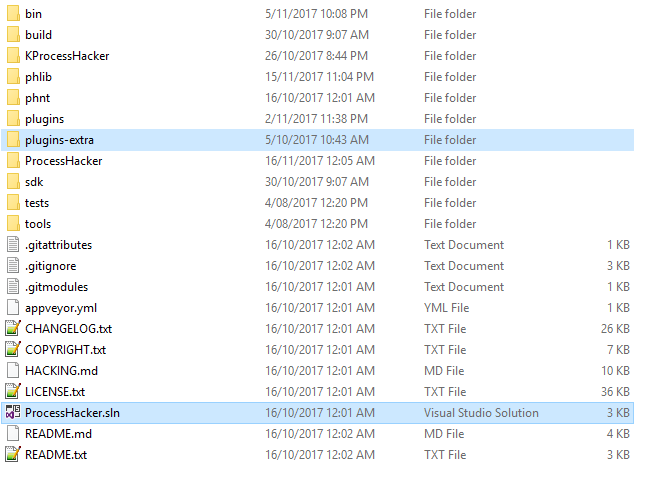
You can now just open the plugins-extra\ExtraPlugins.sln solution just like the plugins\Plugins.sln solution. You can also set the default startup project inside Visual Studio and press F5 to run/debug that specific plugin with breakpoints or use the build menu to build all plugins.
What about a simple possibility to install any of them without installing several gigabytes of Visual Studio?
Install the "Build Tools for Visual Studio 2017" (170mb) and run build\build_release.cmd
Metadata
Owner
 processhacker
Metadata
These are highly unstable, buggy, incomplete plugins that are not included with Process Hacker by default.